5
6
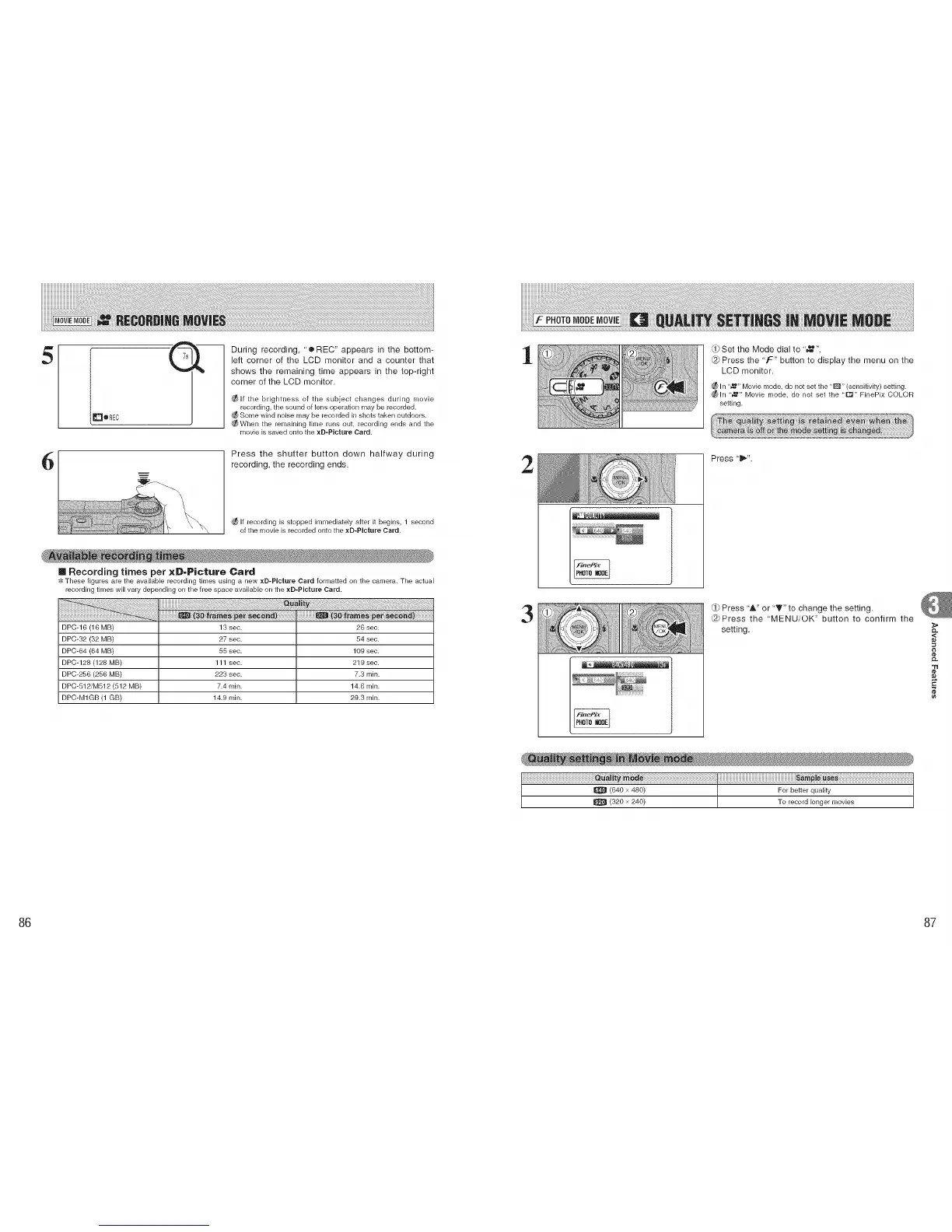
During recording, "e RED" appears in the bottom-
left corner of the LCD monitor and a counter that
shows the remaining time appears in the top-right
corner of the LCD monitor.
_lf the brightness of the subject changes during movie
recording, the sound of lens operation may be recorded•
Some wind noise may be recorded in shots taken outdoors•
_When the remaining time runs out, recording ends and the
movie is saved onto the xD-PIcture Card.
Press the shutter button down halfway during
recording, the recording ends.
If recording is stopped immediately after it begins, 1 second
of the movie is recorded onto the xD-Plcture Card.
[] Recording times per xD-Picture Card
These figures are the available recording tir'_les using a new xD-PIcture Card formatted on the camera. The actual
recording times will vary depending on the free space available on the xD-PIcture Card•
DPC-16 (16 MB)
DPC-32 (32 MB)
DPC-64 (64 MB)
DPC-128 (128 MB)
DPC=256 (256 MB)
DPC=812/M812 (812 MB)
DPC-M1GB (1 GB)
13 sec.
27 sec.
55 sec.
111 sec.
223 sec.
7.4 min.
14•9 min.
26 sec.
84 sec.
109 sec.
219 sec.
7.3 min.
14.8 min.
29.3 min.
1
2
3
t 2:i;_i_i ¸ij_i_
rd}Set the Mode dial to ',,_".
@ Press the 'F" button to display the menu on the
LCD monitor.
¢_ln %1_" Movie mode, do not set the "1_" (sensitivity) setting.
;_ln "_" Movie mode, do not set the ',r'_" FinePix COLOR
setting•
Press "11_".
Press "&" or "T" to change the setting.
@Press the "MENU/OK" button to confirm the
setting.
,<
"tl
¢e
86 87











 To Next Page