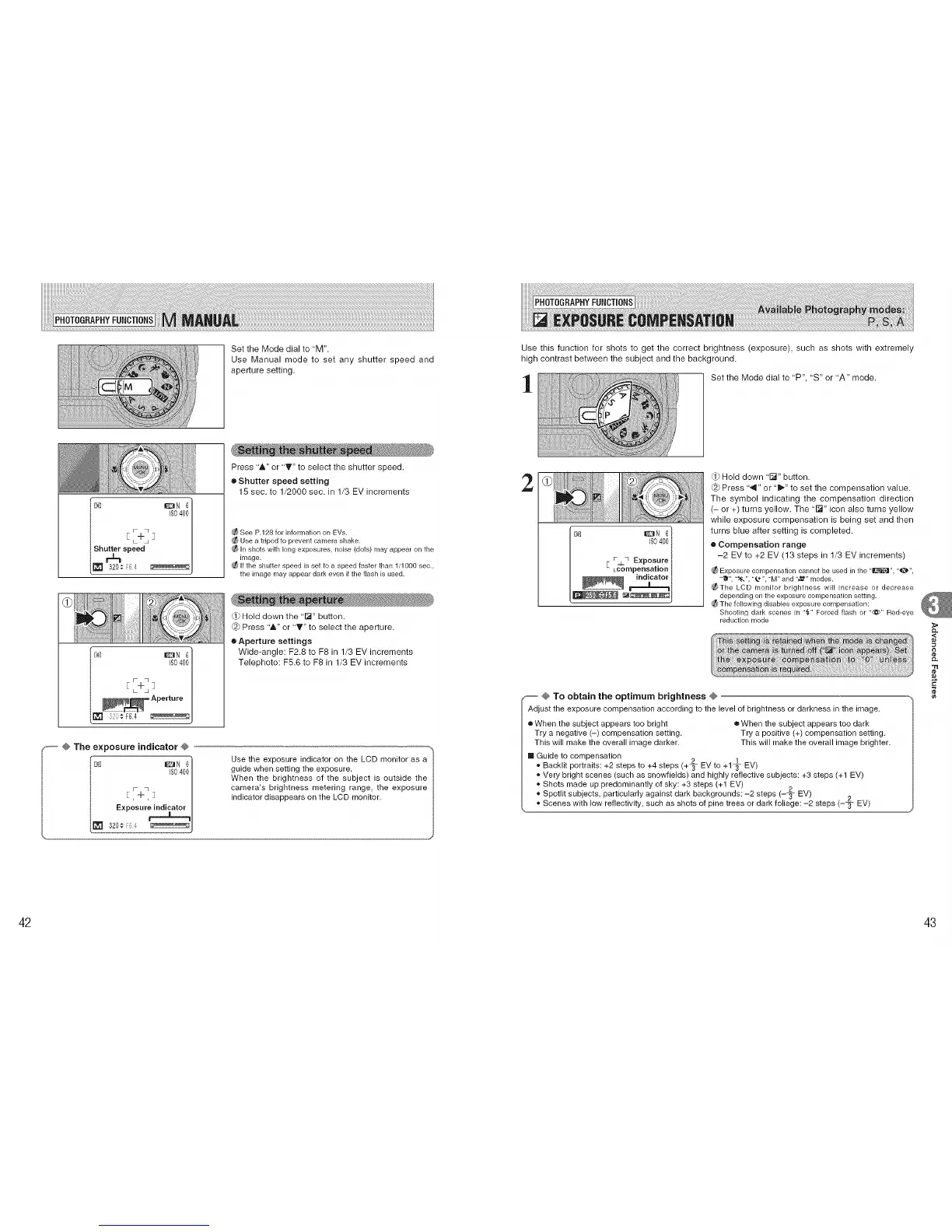
Set the Mode dial to "M".
Use Manual mode to set any shutter speed and
aperture setting.
ISO400/
Shutter speed /
r-%
l=320;_' _!
Press "A" or "T" to select the shutter speed.
• Shutter speed setting
15 sec. to 1/2000 sec. in 1/3 EV increments
See P.128 for information on EVs.
Use a tripod to prevent camera shake.
In shots with long exposures, noise (dots) may appear on the
image.
If the shutter speed is set to a speed faster than 1/1000 sec.,
the image may appear dark even if the flash is used.
Q} Hold down the "l_" button.
@) Press 'A" or '_" to select the aperture.
e Aperture settings
Wide-angle: F2.8 to F8 in 1/3 EV increments
Telephoto: F5.6 to F8 in 1/3 EV increments
........ @ The exposure indicator @
IS04001
Exposure_
320¢ ;:
Use the exposure indicator on the LCD monitor as a
guide when setting the exposure.
When the brightness of the subject is outside the
camera's brightness metering range, the exposure
indicator disappears on the LCD monitor.
Use this function for shots to get the correct brightness (exposure), such as shots with extremely
high contrast between the subject and the background.
1
Set the Mode dial to 'P", "S" or "A" mode.
2
Ee_ I_N 6
ISO400
rj_q Exposure
Lcomperlsation
indicator
Hold down "1_" button.
dS}Press "4" or "i_" to set the compensation value.
The symbol indicating the compensation direction
(- or +) turns yellow. The "l_" icon also turns yellow
while exposure compensation is being set and then
turns blue after setting is completed.
• Compensation range
-2 EV to +2 EV (13 steps in 1/3 EV increments)
_ Exposure compensation cannot be used in the "_". "_'",
-_", '.t&", "@", "M" and "_" modes.
Y_The LCD monitor brightness will increase or decrease
dependingon the exposure compensation setting.
_ The following disables exposure compensation:
Shooting dark scenes in "_" Forced flash or "@" Red-eye
reduction mode
@ To obtain the optimum brightness @
Adjust the exposure compensation according to the level of brightness or darkness in the image,
e When the subject appears too bright • When the subject appears too dark
Try a negative (-) compensation setting. Try a positive (+) compensation setting.
This will make the overall image darker. This will make the overall image brighter.
[] Guide to compensation
t3 3
" Backlit portraits: +2 steps to +4 steps (+t EV to +1_- EV)
,*Very bright scenes (such as snowfields) and highly reflective subjects: +3 steps (+1 EV)
,* Shots made up predominantly of sky: +3 steps (+1 EV)
2
,* Spotlit subjects, particularly against dark backgrounds: -2 steps (-T EV)
o
,, Scenes with low reflectivity, such as shots of pine trees or dark foliage: -2 steps (-_- EV)
_L
,<
"tl
¢e
42 43











 To Next Page