2O
2
3
4
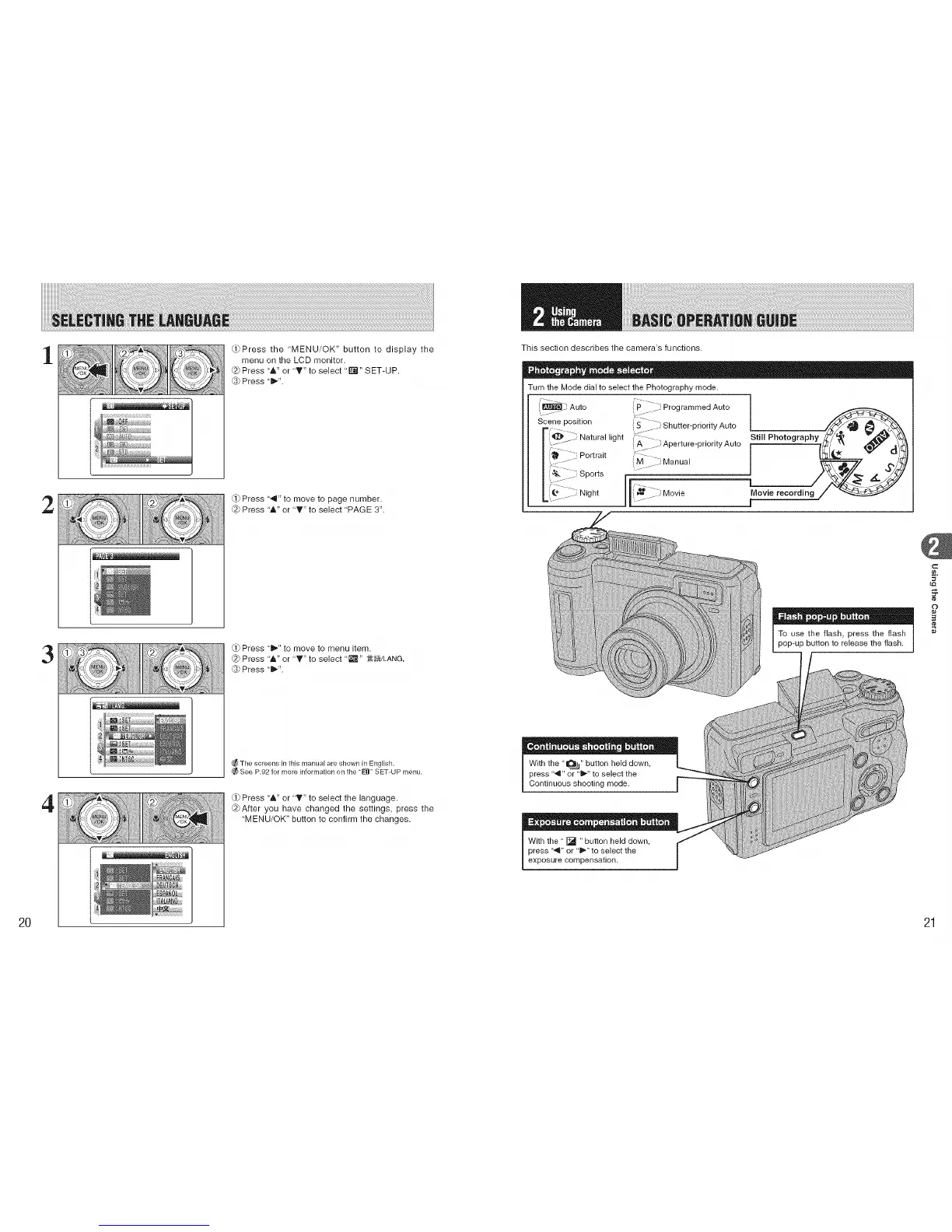
_Press the "MENU/OK" button to display the
menu on the LCD monitor.
@ Press "&" or "T" to select "_" SET-UP.
_3_Press "1_".
(.1)Press ',,t" to move to page number.
@ Press "&" or "T" to select 'PAGE 3".
(.1)Press ' i1_."to move to menu item.
@ Press '&" or "T" to select '_" _E:_/LANG,
_3_Press "1_".
_The screens in this ['_lanual are shown in English.
See P.92 for more information on the "E_" SET-U P menu.
Press '&" or 'T" to select the language.
@After you have changed the settings, press the
'MENU/OK" button to confirm the changes.
This section describes the camera's functions.
Turn the Mode dial to select the Photography mode.
"_ Auto /I _P i Programmed Auto _it]llvi:ill i_
Sl_,ene position S _ Shutter-priority Auto
1[_]_/ Natura ght ,:
1_ { A Aperture-priority Auto
Portra t i_
| _:::::::: .................: M anual
:::Sperta
L t_ :i Night /1(_ _:Move 1
With the " [] "button held down,
press "_1" or "1_" to select the
exposure compensation.
c
¢e,
£
21











 To Next Page