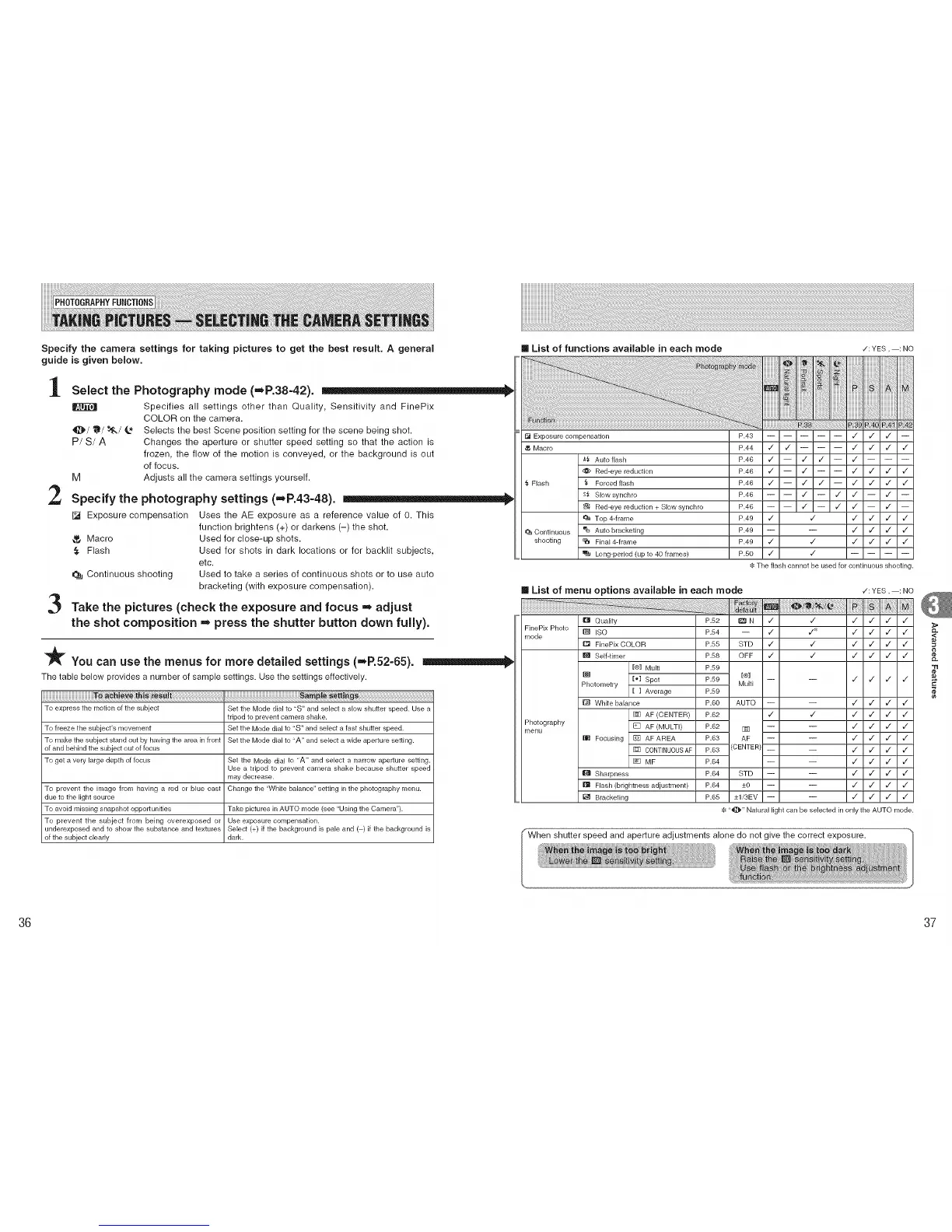
Specify the camera settings for taking pictures to get the best result. A general [] List of functions available in each mode ¢:YES, : NO
guide is given below.
1
2
3
Select the Photography mode (=P.38-42).
Specifies all settings other than Quality, Sensitivity and FinePix
COLOR on the camera.
_]_/11_/_/_ Selects the best Scene position setting for the scene being shot.
P! S/A Changes the aperture or shutter speed setting so that the action is
frozen, the flow of the motion is conveyed, or the background is out
of focus.
M Adjusts all the camera settings yourself.
Specify the photography settings (,,,_R43=48).
[] Exposure compensation Uses the AE exposure as a reference value of 0. This
function brightens (+) or darkens (-) the shot.
Macro Used for close-up shots.
,_ Flash Used for shots in dark locations or for backlit subjects,
etc.
Continuous shooting Used to take a series of continuous shots or to use auto
bracketing (with exposure compensation).
Take the pictures (check the exposure and focus = adjust
the shot composition = press the shutter button down fully).
_You can use the menus for more detailed settings (=,P.52-65).
The table below provides a number of sample settings. Use the settings effectively.
To express the motion of the subject Set the Mode dial to "S" and select a slow shutter speed. Use a
tripod to prevent camera shake.
To freeze the subject's movement Set the Mode dial to "S" and select a fast shutter speed.
To make the subject stand out by having the area in front Set the Mode dial to "A" and select a wide aperLure setting.
of and behind the subject out of focus
To get a very large depth of focus Set the Mode dial to "A" and select a narrow aperture setting.
Use a tripod to prevent camera shake because shutter speed
may decrease.
To prevent the image from having a red or blue cast Change the "White balance" setting in the photography menu.
due to the light source
To avoid missing snapshot opportunities Take pictures in AUTO mode (see "Using the Camera").
To prevent the subject from being overexposed or Use exposure compensation.
underexposed and to show the substance and textures Select (+) if the background is pale and ( ) if the background is
of the subject clearly dark.
Exposure compensation
,_ Macro
_, Flash
Continuous
shooting
_,f_ Auto flash
d_ Red-eye reduction
_, Forced flash
s_ Slow synchro
Red-eye reduction + Slow synchro
Top 4-frame
Auto bracketing
_ Final 4-frame
Long-period (up to 40 frames)
P,39 P,4E.PA1 .PA_
P.43 ,/ / / --
P.44 ,/ / ,/ / / ,/
P.46 ,/ -- / / -- ,/
P.46 ,/ m / ,/ / / ,/
P.46 v" -- / / -- v" / / v"
P.46 / -- v" v" -- / --
P.46 / m ,/ ,/ m / m
P.49 ,/ ,/ ,/ / / ,/
P.49 -- -- v" / / v"
P.49 v" v" v" / / v"
P.50 v" v"
The flash cannot be used for continuous shooting.
[] List of menu options available in each mode
[] Quality P.52 (_1 N
FinePix Photo
mode
Photography
menu
_] ISO
D FinePix COLOR
Self4imer
[®] Multi
[_] Spot
Photometry
[ ] Average
m White balance
AF (CENTER)
[] AF (MULTI)
W Focusing [] AF AREA
CONTINUOUS AF
[] MF
Sharpness
IE_ Flash (brightness adjustment)
I_ Bracketing
•/: YES, : NO
,/ ,/ ,/ / / ,/
P154 -- ,/ v_ ,/ _/ v_ ,/
P.55 STD ,/ ,/ ,/ / / ,/
P.58 OFF ,/ ,/ ,/ v_ _/ ,/
P.59
[®1
P.59 -- -- ,/ ,/ v_ ,/
Multi
P.59
P.6O AUTO -- -- ¢" / / ¢"
P.62 ,/ ,/ ,/ / / ¢"
P.62 _ -- -- ,/ / / ¢"
P.63 AF -- -- ,/ / / ,/
P.63 (CENTER) _ _ ,/ / / ¢
P164 -- -- ,/ / / ¢"
P.64 STD -- -- ,/ / / ¢"
P.64 _+o -- -- ,/ / / ¢
P.65 -+1i3EV -- -- ,/ ,/ v" ,/
"*_[_" Natural light can be selected in only the AUTO mode.
,<
'TI
¢e
36 37











 To Next Page