1
2
3
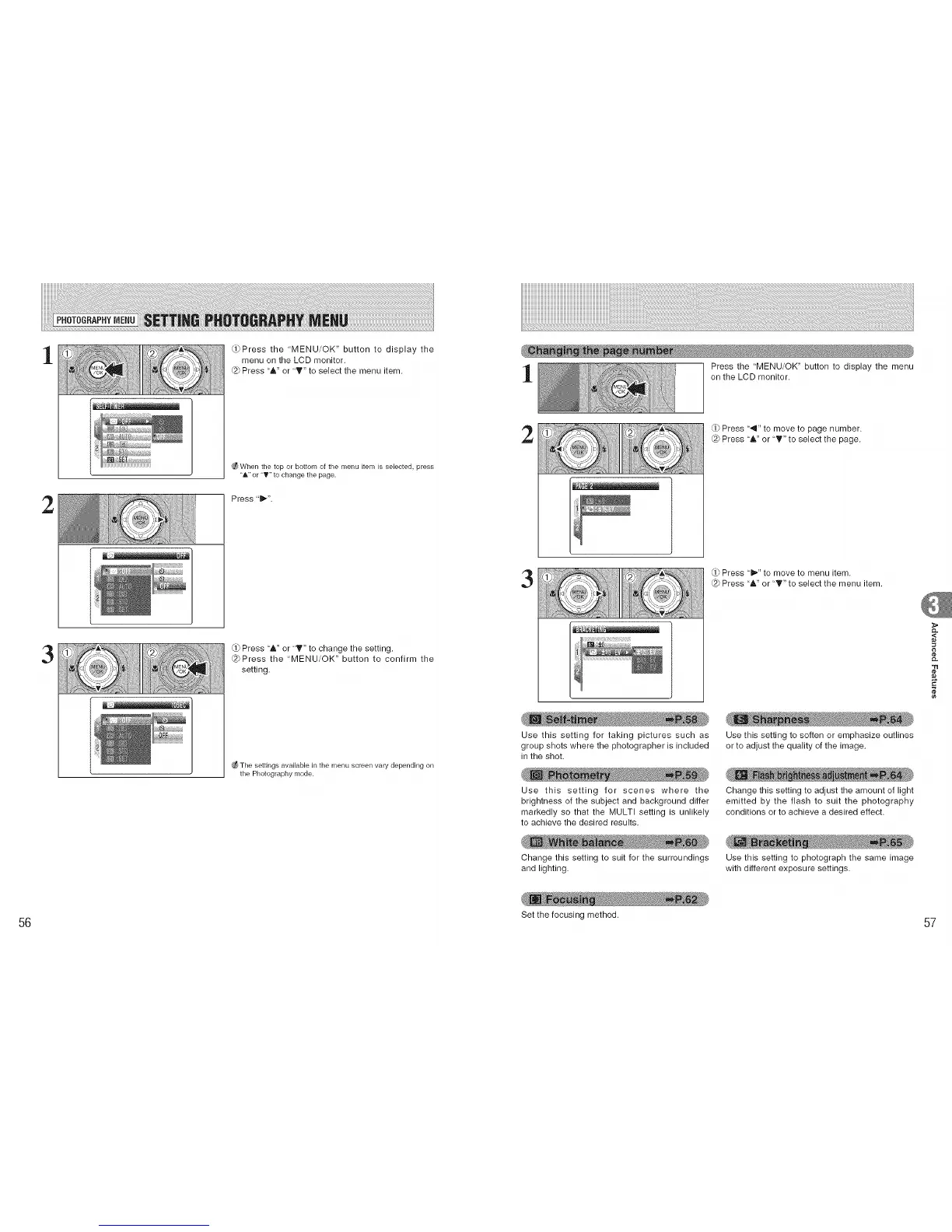
_Press the "MENU/OK" button to display the
menu on the LCD monitor.
@ Press "A" or "T" to select the menu item.
_When the top or bottom of the menu item is selected, press
"A" or "V" to change the page.
Press 't_".
(.1)Press 'A" or 'T" to change the setting.
@Press the "MENU/OK" button to confirm the
setting.
The settings available in the menu screen vary depending on
the Photography ['_lode.
Press the "MENU/OK" button to display the menu
on the LCD monitor.
2
Press '_1" to move to page number.
@ Press "A" or "_'" to select the page.
3
(,ji'
Press '_'" to move to menu item.
@ Press "&" or "T" to select the menu item.
Use this setting for taking pictures such as Use this setting to soften or emphasize outlines
group shots where the photographer is included or to adjust the quality of the image.
in the shot.
Use this setting for scenes where the
brightness of the subject and background differ
markedly so that the MULTI setting is unlikely
to achieve the desired results.
Change this setting to adjust the amount of light
emitted by the flash to suit the photography
conditions or to achieve a desired effect.
Change this setting to suit for the surroundings Use this setting to photograph the same image
and lighting, with different exposure settings.
,<
¢e
56 Set the focusing method. 57











 To Next Page