92
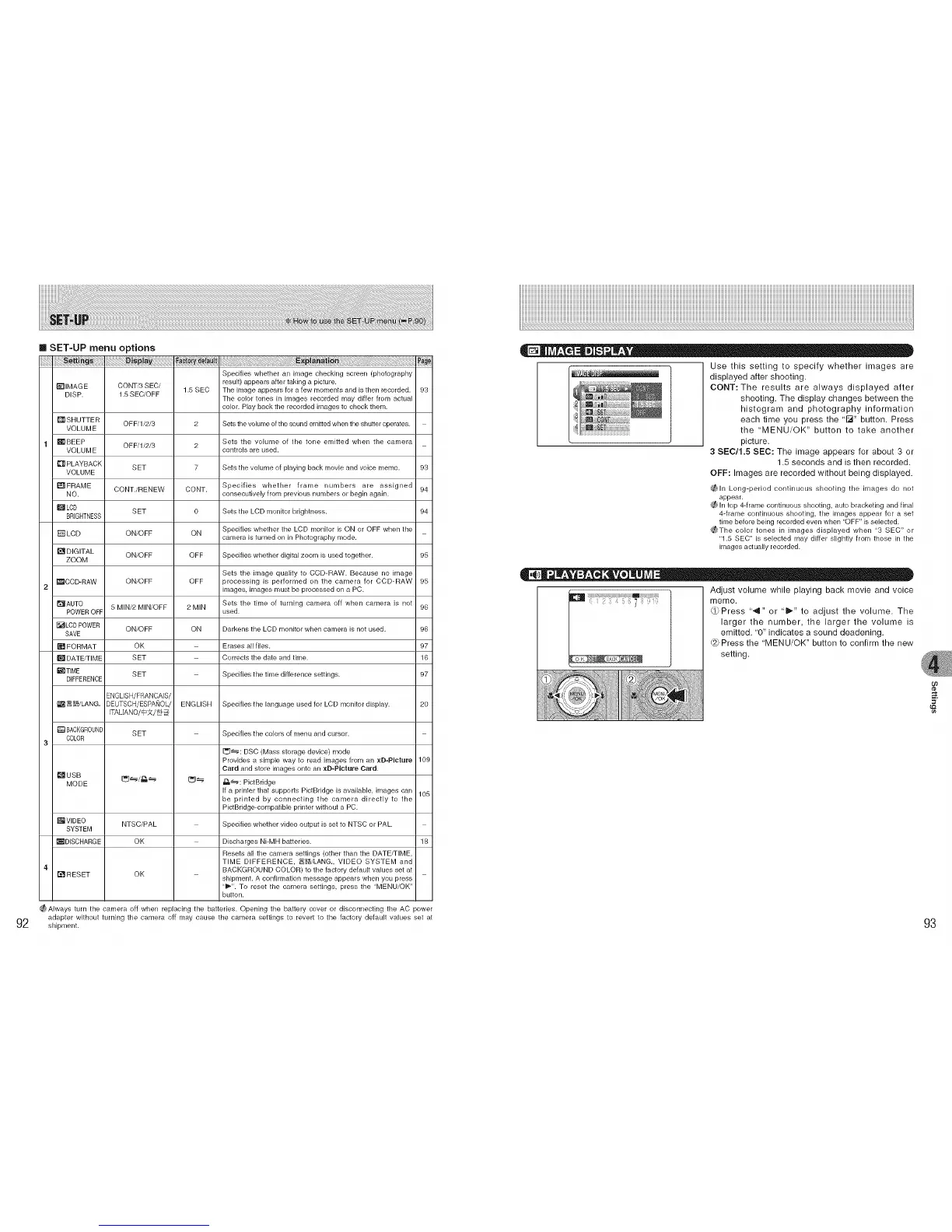
SET-UP menu options
_]IMAG E CONT/3 SEC/
DISP. 1.5 SEC/OFF
SHUTTER 0FF/1/2/3
VOLUME
1 _11BEEP 0FF/1/2/3
VOLUME
_[_ PLAYBACK SET
VOLUME
[] FRAME CONT./RENEW
NO.
DLCD SET
BRIGHTNESS
LCD ON/OFF
[]DIGITAL ON/OFF
ZOOM
_CCD-RAW ON/OFF
2
[]AUTO 5 MINi2 MIN/OFF
POWER OFF
_LCD POWER ON/OFF
SAVE
[] FORMAT OK
[] DATE/TIME SET
_TIME SET
DIFFERENCE
ENGUSH/FRANCAIS/
_ _/LANG. DEUTSCH/ESPA_OL/
[TALANO/_/_
[] BACKGROUND SET
COLOR
3
MODE
_VlDEO NTSC/PAL
SYSTEM
•DISCHARGE OK
4
[] RESET OK
ENGLISH
_i_i_iiiiii!!!_ij_i_!_!iii!i_!_!_!_!_!_!_i_iiiii_iiiiiiiiii!!jiii!ji_iii_iiiiiillIIi__ _i _ii_ll!l!l!l!l!l_l_lliiIiiiiIill_iIIliiiiiiiiiiiil!IllilililililililililililiiIlil!IiiIlliiii_iiiiiiiiiiiiiiiiiiiill
Specifies whether an image checking screen (photography
result) appears after taking a picture.
1.5 SEC The image appears for a few moments and is then recorded.
The color tones in images recorded may differ from actual
color. Play back the recorded images to check them.
2 Sets the volume of the sound emitted when the shutter operates.
Sets the volume of the tone emitted when the camera
2 controls are used.
7 Sets the volume of playing back movie and voice memo.
CONT. Specifies whether frame numbers are assigned
consecutively from previous numbers or begin again.
o Sets the LCD monitor brightness.
ON Specifies whether the LCD monitor is ON or OFF when the
camera is turned on in Photography mode.
OFF Specifies whether digital zoom is used together.
Sets the image quality to CCD-RAW. Because no image
OFF processing is performed on the camera for CCD-RAW
images, images must be processed on a PC.
2 MIN Sets the time of turning camera off when camera is not
used.
ON Darkens the LCD monitor when camera is not used.
Erases all files.
Corrects the date and time.
Specifies the time difference settings.
Specifies the language used for LCD monitor display.
Specifies the colors of menu and cursor.
[_: DSC (Mass storage device) mode
Provides a simple way to read images from an xD-PIcture
Card and store images onto an xD-PIcture Card.
I_]_ _: PictBridge
If a printer that supporLs PictBridge is available, images can
be printed by connecthlg the camera direcBy to the
PictBfidge-compaRble printer without a PC.
Specifies whether video output is set to NTSC or PAL.
Discharges Ni-MH batteries.
Resets all the camera settings (other than the DATE/TIME
TIME DIFFERENCE, _/LANG., VIDEO SYSTEM and
BACKGROUND COLOR) to the factory default values set at
shipment. A confirmation message appears when you press
"_". To reset the camera settings, press the "MENU/OK"
button.
93
93
94
94
95
95
96
96
97
16
97
2O
109
105
18
_Always turn the camera off when replacing the batteries. Opening the battery cover or disconnecting the AC _ower
adapter without turning the camera off may cause the camera settings to reverL to the factory default values set at
shipment.
Use this setting to specify whether images are
displayed after shooting.
CONT:The results are always displayed after
shooting. The display changes between the
histogram and photography information
each time you press the '[_" button. Press
the 'MENU/OK" button to take another
picture.
3 SEC/1.5 SEC: The image appears for about 3 or
1.5 seconds and is then recorded.
OFF: Images are recorded without being displayed.
_ln Long-period continuous shooting the images do not
appear.
¢_ In top 4-frame continuous shooting, auto bracketing andfinal
4-flame continuous shooting, the images appear for a set
time beforebeing recorded even when "OFF" isselected.
_The color tones in images displayed when "3 SEC" or
"1.5 SEC" is selected may differ slightly from those in the
images actually recorded.
Adjust volume while playing back movie and voice
memo.
(_Press ""9" or "_" to adjust the volume. The
larger the number, the larger the volume is
emitted. '0" indicates a sound deadening.
Press the 'MENU/OK" button to confirm the new
setting.
%
e_
93











 To Next Page