1
2
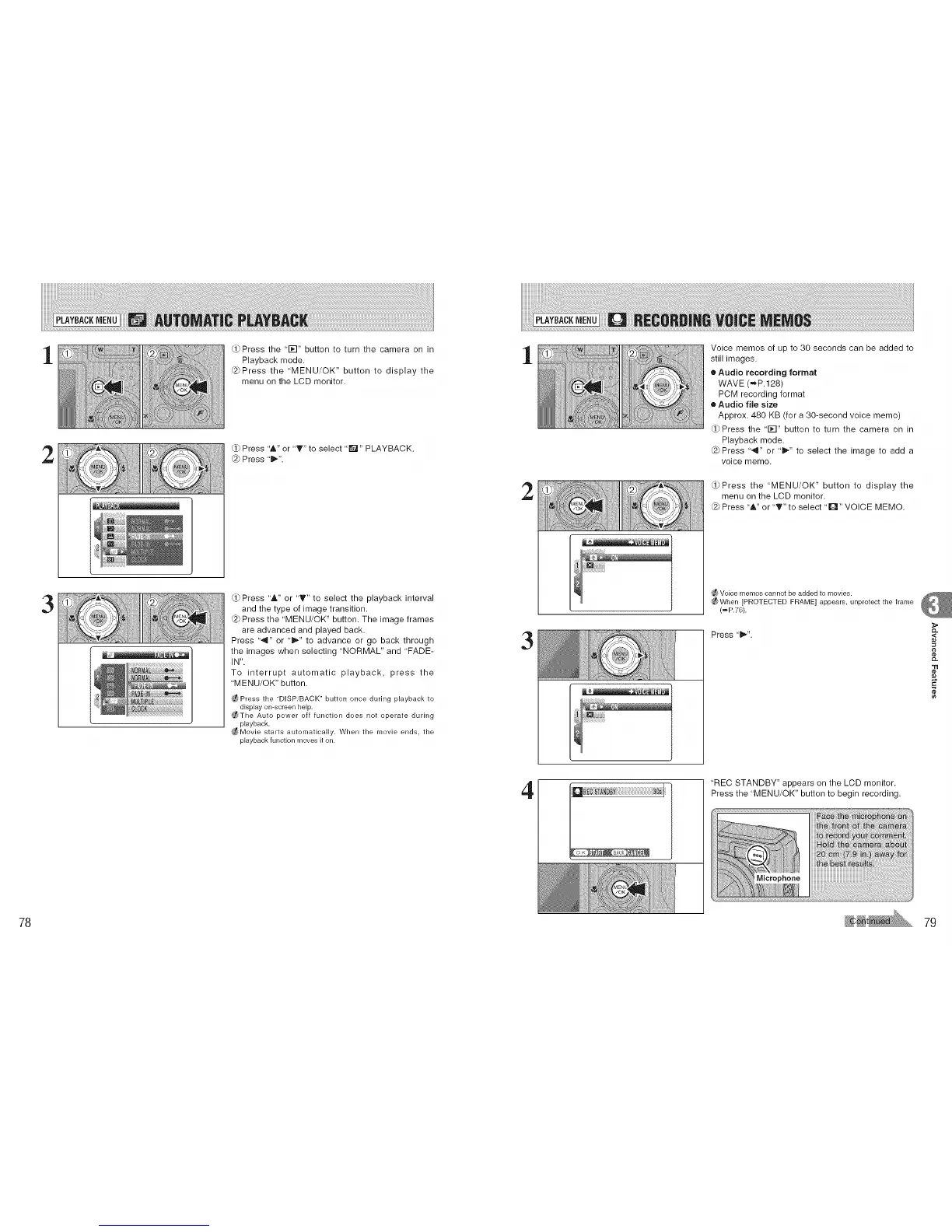
Press the '1_-I" button to turn the camera on in
Playback mode.
@Press the 'MENU/OK" button to display the
menu on the LCD monitor.
Press '&" or "T" to select 'Q" PLAYBACK.
@ Press 't_".
1
2
Voice memos of up to 30 seconds can be added to
still images.
• Audio recording format
WAVE (,mp. 128)
PCM recording format
• Audio file size
Approx. 480 KB (for a 30-second voice memo)
rd_Press the "1_-I" button to turn the camera on in
Playback mode.
(2_Press "4" or "l_" to select the image to add a
voice memo.
Press the "MENU/OK" button to display the
menu on the LCD monitor.
Press "A" or "T" to select "L_" VOICE MEMO.
3
Press 'A" or "T" to select the playback interval
and the type of image transition.
@ Press the 'MENU/OK" button. The image frames
are advanced and played back.
Press '-9" or '_" to advance or go back through
the images when selecting "NORMAL" and "FADE-
IN".
To interrupt automatic playback, press the
"MENU/OK" button.
_Press the "DISPiBACK" button once during playback to
display on-screen help.
_The Auto power off function does not operate during
playback.
_Movie starts automatically. When the movie ends, the
playback function moves it on.
3
_ Voice ['_ler'_loscannot be added to movies.
_When [PROTECTED FRAME] appears, unprotect the frame
(_P.76).
Press"l_". ,<
"tl
¢e
4
'REC STANDBY" appears on the LCD monitor.
Press the "MENU/OK" button to begin recording.
78 79











 To Next Page