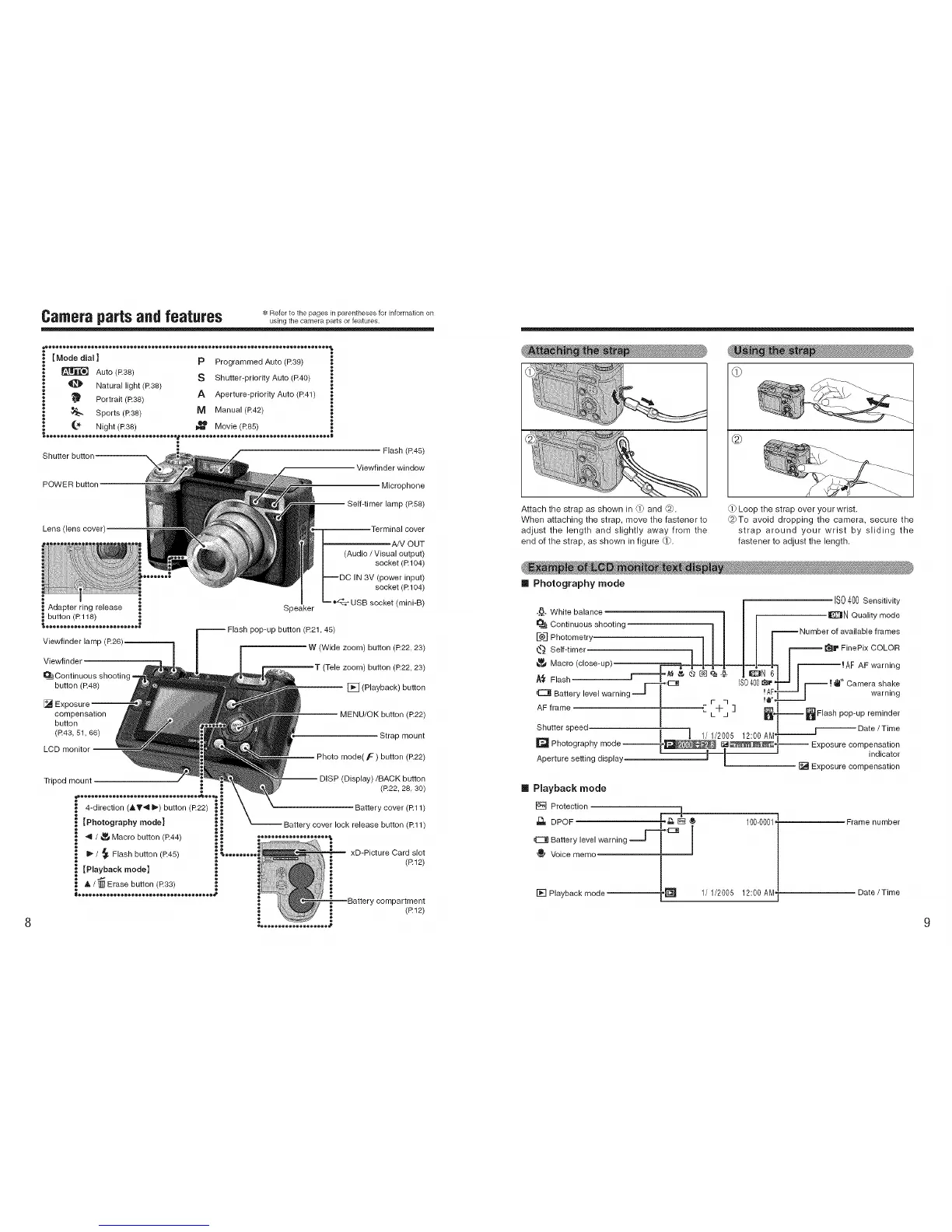
Camerapartsandfeatures Roto.o,.opagos,, pa onrhos,nOrhoco.,,orapo s ......
Flash (R45)
Viewfinder window
POWER button
Microphone
Self-timer lamp (R58)
Lens (lens cover)
Viewfinder lamp (R26)
Viewfinder
g=
button (R48)
[] E>
compensation
button
(R43, 51, 66)
LCD monitor
Speaker
Terminal cover
'A/V OUT
(Audio / Visual output)
socket (R 104)
--DC IN 3V (power input)
socket (R 104)
--"_ USB socket (mini-B)
pop-up button (R21,45)
W (Wide zoom) button (R22, 23)
[ (Tele zoom) button (R22, 23)
[] (Playback) button
MENU/OK button (R22)
Strap mount
Photo mode( F ) button (R22)
Tripod mount
4-direction (AV'q I_) button (R22)
]Photography mode]
/ _ Macro button (R44)
/ _ Flash button (R45)
[Playback mode]
& / _ Erase button (R33)
h®oeoo®oeoe®o®oeoo®oeoe®o®oeoo®oeoe®o®_
(Display)/BACK button
(R22, 28, 30)
Battery cover (R11)
Battery cover lock release button (Rll)
®®®e®o®e®eo®®®oo®o®e_
xD-Picture Card slot
(R12)
"ycompartment
(R12)
@
Attach the strap as shown in _ and C_).
When attaching the strap, move the fastener to
adjust the length and slightly away from the
end of the strap, as shown in figure Q).
Loop the strap over your wrist.
@To avoid dropping the camera, secure the
strap around your wrist by sliding the
fastener to adjust the length.
[] Photography mode
IS0400sensitivity
..8...White balance 1 I r IE_N Quality mode
_Jj Continuous shooting ! /
_ I l | ! _Number of available frames
L®J Photometry I _ _ _ |
_ Self-timer I I I I | _ _ 1'_1_FinePix COLOR
Masro c,oseup I AFwarn,ng
_ Flash ' r-_C]8 IS0400_rl--_ I r _ -I_l" Camera shake
Battery level warning --J _ !AF1---_ I warning
AF frame i _ L-it-j ] _ _,_ _ Flash pop-up reminder
S_hutter speed_ 1/ 1/2005 12:00 AMI_ _Date/time
I1_ Photography mode Exposure compensation
• . _--_ indicator
Aperture setting display _ [] Exposure compensation
[] Playback mode
[] Protection
r-z:_) i
J_- DPOF ,_ [] _ 100-0001 Frame number
_E_ Battery level warning _j---_l_l I
Voice memc
[] Playback mode h_"_ 1/1/2005 12:00 AM_ Date/Time











 To Next Page