Always use the FUJIFILM AC Power Adapter AC-3VX (sold separately) (,_P.116).
Use the AC power adapter to prevent losing power at inconvenient times, such as when
downloading photographed images to your PC. You can take pictures and play back images without
worrying about depleting the batteries.
Only connect or disconnect the AC power adapter when the camera is off.
Connecting or disconnecting the AC power adapter while the camera is on temporarily interrupts the power supply to the
camera, so that images or movies being shot are not recorded. Failing to turn the camera off first can also result in
damage to the xD-PIcture Card or malfunctions during PC connection.
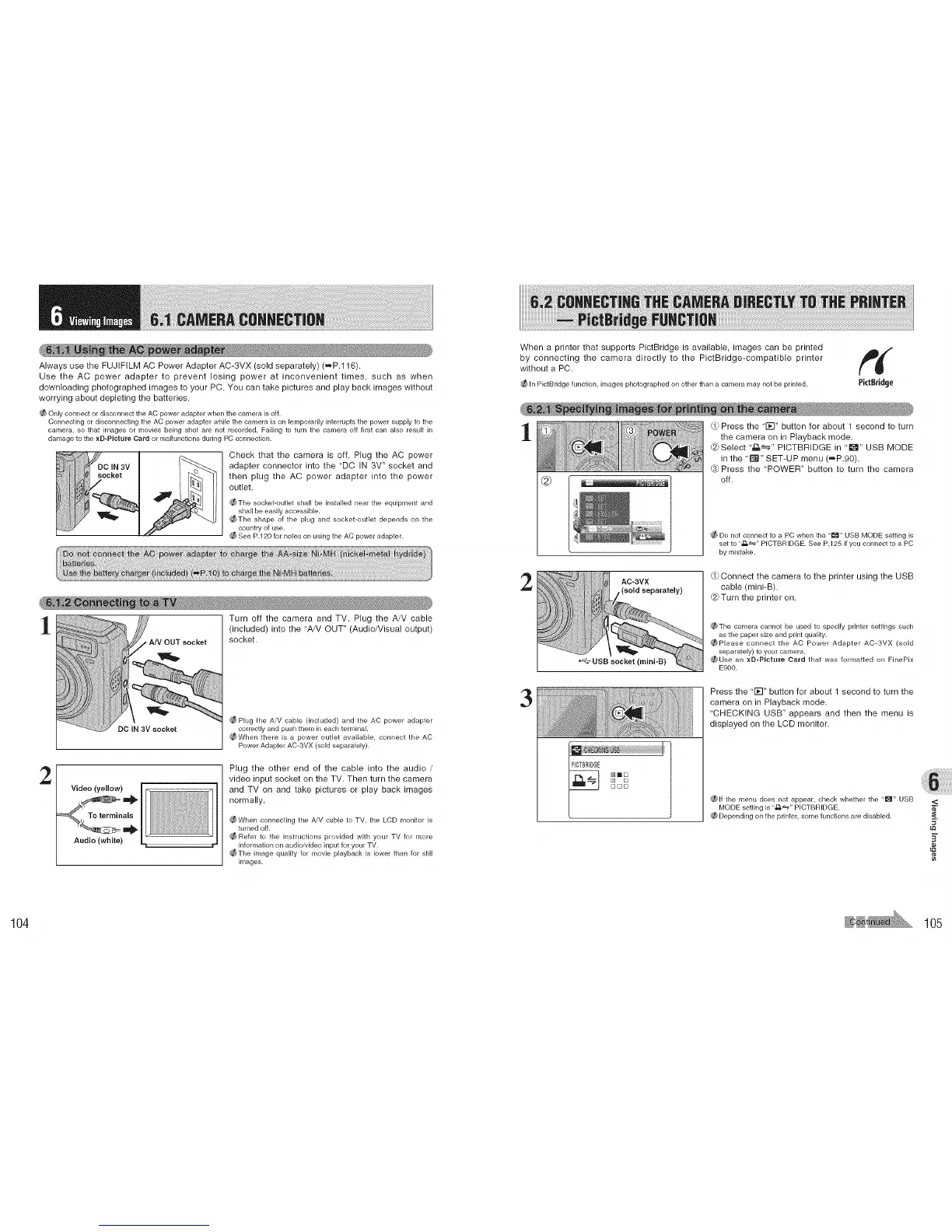
Check that the camera is off. Plug the AC power
adapter connector into the "DC IN 3V" socket and
then plug the AC power adapter into the power
outlet.
_The socket-outlet shall be installed near the equipment and
shall be easily accessible.
_The shape of the plug and socket-outlet depends on the
country of use.
See P.120 for notes on using the AC power adapter.
Turn off the camera and TV. Plug the A/V cable
(included) into the "A/V OUT" (Audio/Visual output)
socket.
_Plug the A/V cable (included) and the AC power adapter
DO IN 3V socket correctly and push them in each terminal
_When there is a power outlet available, connect the AC
Power Adapter AC-3VX (sold separately).
2
Plug the other end of the cable into the audio /
video input socket on the TV. Then turn the camera
and TV on and take pictures or play back images
normally.
_When connecting the AiV cable to TV. the LCD monitor is
turned off.
_Refer to the instructions provided with your TV for more
information on audioivideo input for your TV.
_The image quality for movie playback is lower than for still
i['_lages.
When a printer that supports PictBridge is available, images can be printed
by connecting the camera directly to the PictBridge-compatible printer
without a PC.
_ In PictBridge function, images photographed on other than a camera may not be printed. PictBridge
1
2
3
AC-3VX
(sold separately)
,_}Press the "1;1" button for about 1 second to turn
the camera on in Playback mode.
(8}Select '_" PICTBRIDGE in ' I_" USB MODE
in the '_" SET-UP menu (-JP.90).
Press the "POWER" button to turn the camera
off.
_f_ Do not connect to a PC when the "_" USB MODE setting is
set to ..£L_,, PICTBRIDGE. See P.125 if you connect to a PC
by mistake.
,_}Connect the camera to the printer using the USB
cable (mini-B).
(8}Turn the printer on.
_,_The camera cannot be used to specify printer settings such
as the paper size and print quality.
(_Please connect the AC Power Adapter AC-3VX (sold
separately) to your camera.
_Use an xD-PIcture Card that was formatted on FinePix
E900.
Press the '1;1" button for about 1 second to turn the
camera on in Playback mode.
'CHECKING USB" appears and then the menu is
displayed on the LCD monitor.
(_lf the menu does not appear, check whether the "1_" USB
MODE setting is ,,zs_,, PICTBRIDGE.
_1_Depending on the printer, some functions are disabled.
<
_2
¢e
104 105











 To Next Page