1
2
3
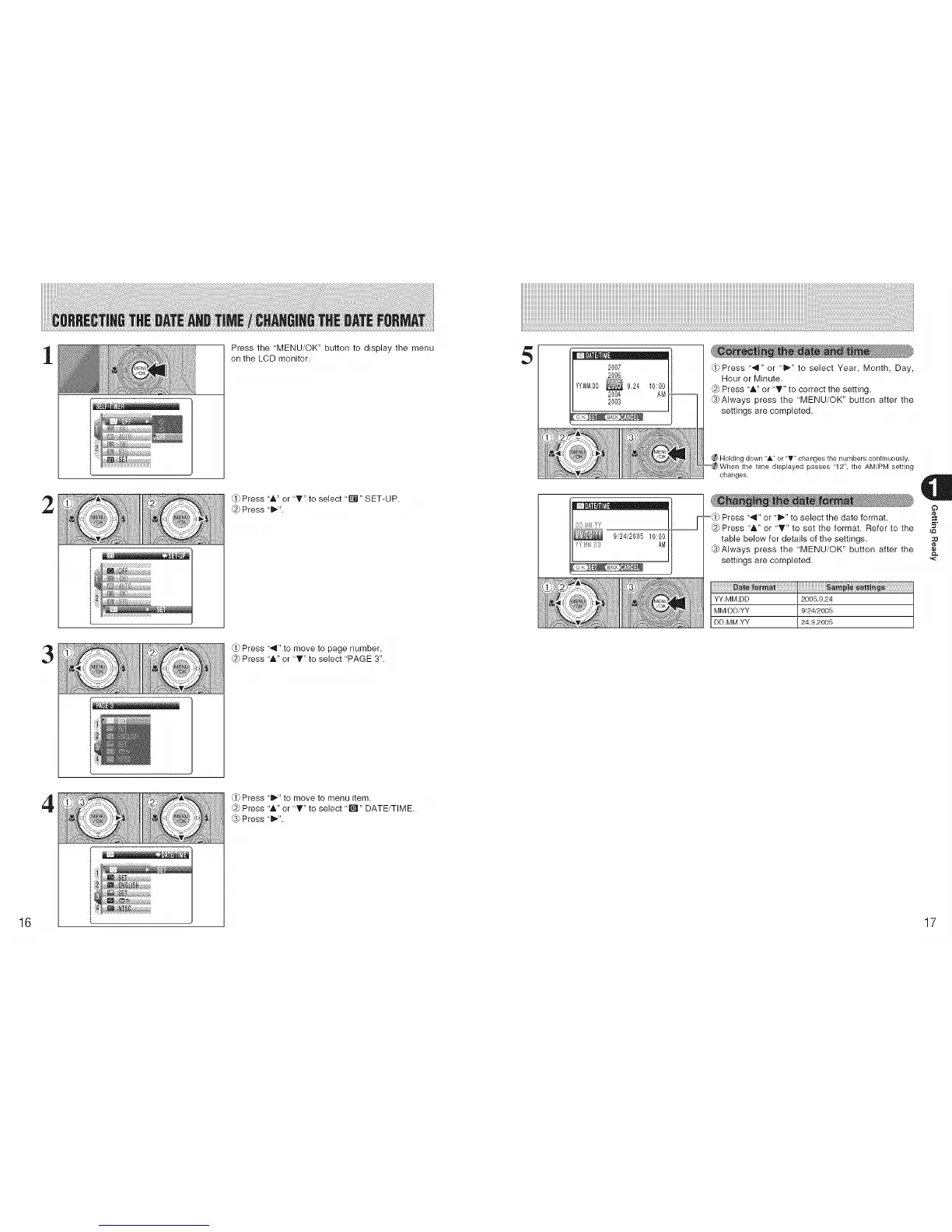
Press the 'MENU/OK" button to display the menu
on the LCD monitor.
Press '&" or "T" to select "_'t" SET-UP.
@ Press "ill"'.
Press '.111"to move to page number.
@ Press "&" or "_" to select 'PAGE 3".
5
2007
2006
YYMMDD_ 9,24 10:00
2004 AM. --
2003
1
AM
iiiiil_iiI iI_iiil/iilliiliiiililii! iiiiiil/il
(_Press "4" or "_" to select Year, Month, Day,
Hour or Minute.
@ Press "A" or I'" to correct the setting.
_Always press the "MENU/OK" button after the
settings are completed.
Holding down "&" or "T" changes the numbers continuously.
When the time displayed passes "12", the AM/PM setting
changes.
-,.,/Press "4" or "_" to select the date format.
Press "A" or 'T" to set the format. Refer to the 5"
table below for details of the settings. :_
_Always press the "MENU/OK" button after the
settings are completed.
iiiiiiiiiiiiiiiiiii
YY.MM.DD
MM/DD/YY
DD.MM.YY
2005.9.24
9/24/2005
24.9.2005
4
Press "_" to move to menu item.
Press -A" or "T" to select "E_'J"DATE/TIME.
_3)Press "ill"'.
16 17











 To Next Page