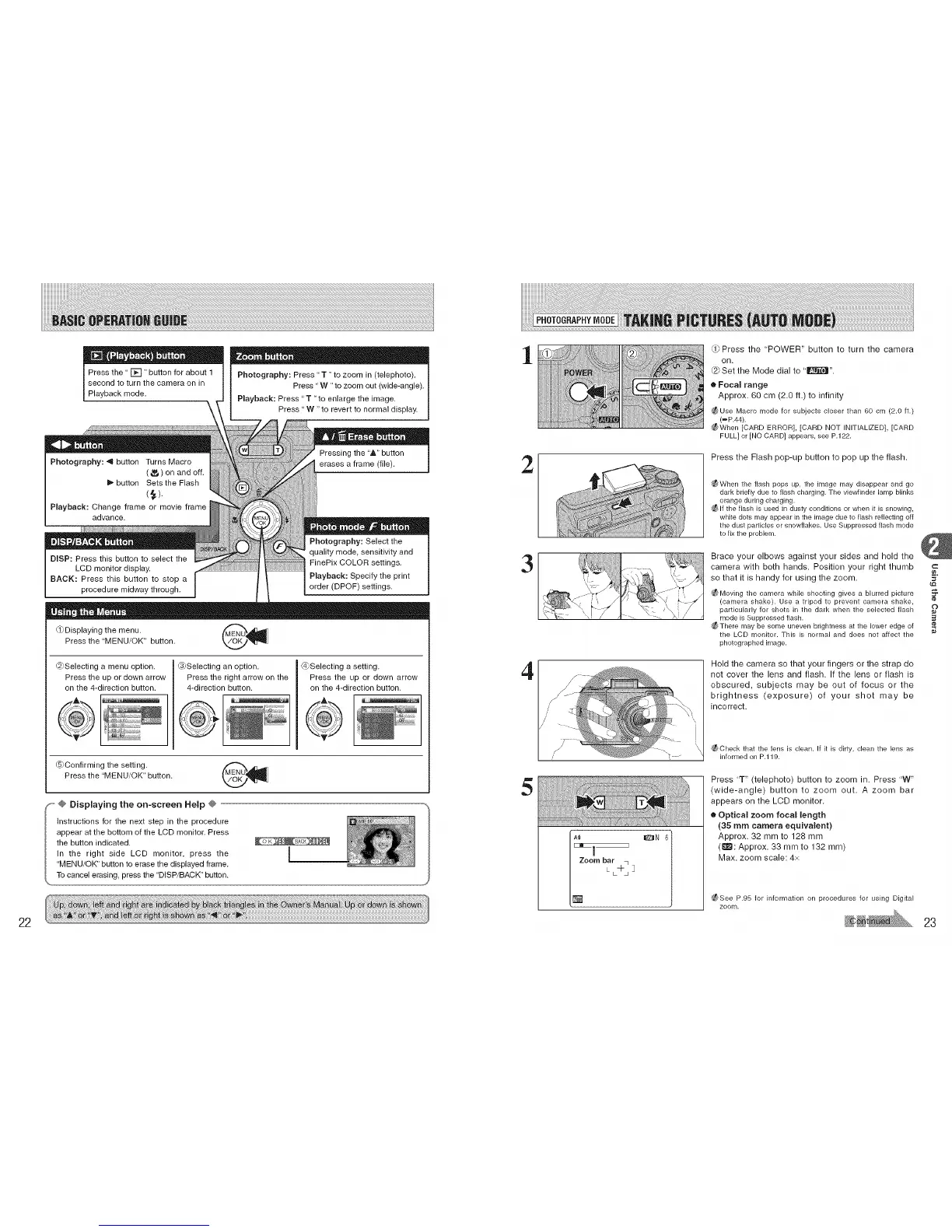
Press the" []" button for about 1
second to turn the camera on in
Playback mode.
Q_ J •
Photography: Press "T "to zoom in (telephoto).
Press "W "to zoom out (wide-angle).
Playback: Press "T "to enlarge the image,
Press "W "to revert to normal display.
(_Displaying the menu.
Press the "MENU/OK" button.
@Selecting a menu option.
Press the up or down arrow
on the 4-direction button.
_)Selecting an option.
Press the right arrow on the
4-direction button.
@Selecting a setting.
Press the up or down arrow
on the 4-direction button.
LS)Confirming the setting. _ ._l&_n
Press the "MENU/OK" button.
1
2
3
4
5
L -I- ]
(])Press the "POWER" button to turn the camera
on.
Set the Mode dial to ' E_[]_".
• Focal range
Approx. 60 cm (2.0 ft.) to infinity
_Use Macro mode for subjects closer than 60 cm (2.0 ft.)
(=P.44).
_f_ When [CARD ERROR], [CARD NOT INITIALIZED], [CARD
FULL] or [NO CARD] appears, see P.122.
Press the Flash pop-up button to pop up the flash.
_ When the flash pops up, the image may disappear and go
dark briefly due to flash charging. The viewfinder lamp blinks
orange during charging.
_ If the flash is used in dusty conditions or when it is snowing,
white dots may appear in the image due to flash reflecting off
the dust particles or snow[lakes. Use Suppressed flash mode
to fix the problem.
Brace your elbows against your sides and hold the
camera with both hands. Position your right thumb
so that it is handy for using the zoom. =
_ Moving the camera while shooting gives a blurred picture ._
(carqera shake). Use a tripod to prevent camera shake,
particularly for shots in the dark when the selected flash O
rqode is Suppressedflash.
_ There may be some uneven brightness at the lower edge of
the LCD monitor. This is normal and does not affect the
photographed image.
Hold the camera so that your fingers or the strap do
not cover the lens and flash. If the lens or flash is
obscured, subjects may be out of focus or the
brightness (exposure) of your shot may be
incorrect.
_Check that the lens is clean. If it is dirty, clean the lens as
informed on P.119.
Press 'T" (telephoto) button to zoom in. Press "W"
(wide-angle) button to zoom out. A zoom bar
appears on the LCD monitor.
• Optical zoom focal length
(35 mm camera equivalent)
Approx. 32 mm to 128 mm
(_:Approx. 33 mm to 132 mm)
Max. zoom scale: 4x
¢_See P.95 for information on procedures for using Digital
zoom.
22 23











 To Next Page