118
Overviewofthe conversionJens/adapterring
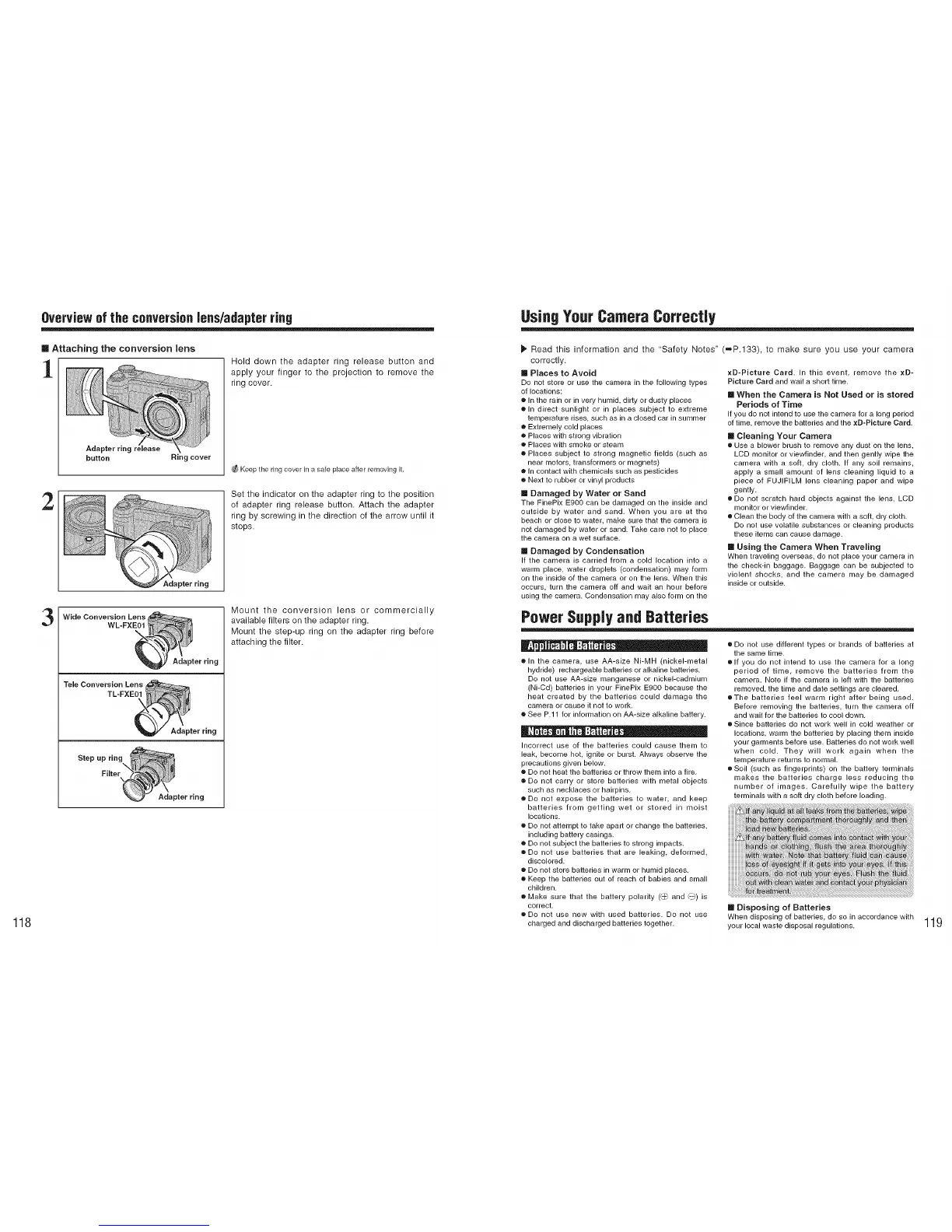
m Attaching the conversion lens
1
Adapter ring
button Ring cover
Hold down the adapter ring release button and
apply your finger to the projection to remove the
ring cover.
Keep the ring cover in a sate place after removing it.
2
Set the indicator on the adapter ring to the position
of adapter ring release button. Attach the adapter
ring by screwing in the direction of the arrow until it
stops.
Adapter ring
3
Wide Conversion Lens .....
WL-FXE01
Adapter ring
Tele Conversion Lens
TL-FXE
Adapter ring
Mount the conversion lens or commercially
available filters on the adapter ring.
Mount the step-up ring on the adapter ring before
attaching the filter.
UsingYour Camera CorrecUy
Read this information and the "Safety Notes"
correctly.
[] Places to Avoid
Do not store or use the camera in the following types
of locations:
e In the rain or in very humid dirty or dusty places
e In direct sunlight or in places subject to extreme
temperature rises such as ill a closed car in summer
e Extremely cold places
e Places with strong vibration
e Places with smoke or steam
e Places subject to strong magnetic fields (such as
near motors transformers or magnets)
e In contact with chemicals such as pesticides
e Next to rubber or vinyl products
[] Damaged by Water or Sand
The FinePix E900 can be damaged on the inside and
outside by water and sand, When you are at the
beach or close to water, make sure that the camera is
not damaged by water or sand. Take care not to place
the camera on a wet surface,
[] Damaged by Condensation
If the camera is carried from a cold location into a
warm place, water droplets (condensation) may form
on the inside of the camera or on the lens. When this
occurs, turn the camera off and wait an hour before
using the camera. Condensation may also form on the
(=P.133), to make sure you use your camera
xD-Picture Card. In this event, remove the xD-
Picture Card and wait a short time,
[] When the Camera is Not Used or is stored
Periods of Time
If you do not intend to use the camera for a long period
of time, remove the batteries and the xD-Picture Card,
[] Cleaning Your Camera
• Use a blower brush to remove any dust on the lens,
LCD monitor or viewfinder, and then gently wipe the
camera with a soft dry cloth. If any soil remains,
apply a small amount of lens cleaning liquid to a
piece of FUJIFILM lens cleaning paper and wipe
gently.
• Do not scratch hard objects against the lens, LCD
monitor or viewfinder.
• Clean the body of the camera with a soft dry cloth.
Do not use volatile substances or cleaning products
these items can cause damage.
[] Using the Camera When Traveling
When traveling overseas, do not place your camera in
the check-in baggage. Baggage can be subjected to
violent shocks and the camera may be damaged
inside or outside.
Power Supply and Batteries
e In the camera, use AA-size Ni-MH (nickel-metal
hydride) rechargeable batteries or alkaline batteries.
Do not use AA-size manganese or nickel-cadmium
(Ni-Cd) batteries in your FinePix E900 because the
heat created by the batteries could damage the
camera or cause it not to work.
e See P.11 for information on AA-size alkaline battery.
Incorrect use of the batteries could cause them to
leak, become hot, ignite or burst. Always observe the
precautions given below.
e Do not heat the batteries or throw them into a fire.
e Do not carry or store batteries with metal objects
such as necklaces or hairpins.
e Do not expose the batteries to water, and keep
batteries from getting wet or stored in moist
locations.
e Do not attempt to take apalt or change the batteries,
including battery casings.
e Do not subject the batteries to strong impacts.
eDo not use batteries that are leaking, deformed,
discolored.
e Do not store batteries in warm or humid places.
e Keep the batteries out of reach of babies and small
children.
e Make sure that the battery polarity ('_ and _) is
correct,
e Do not use new with used batteries. Do not use
charged and discharged batteries together,
• Do not use different types or brands of batteries at
the same time.
• If you do not intend to use the camera for a long
period of time, remove the batteries from the
camera. Note if the camera is left with the batteries
removed, the time and date settings are cleared.
oThe batteries feel warm right after being used.
Before removing the batteries, turn the camera off
and wait for the batteries to cool down.
• Since batteries do not work well in cold weather or
locations, warm the batteries by placing them inside
your garments before use. Batteries do not work well
when cold. They will work again when the
temperature returns to normal.
• Soil (such as fingerprints) on the battery terminals
makes the batteries charge less reducing the
number of images. Carefully wipe the battery
terminals with a soft dry cloth before loading.
[] Disposing of Batteries
When disposing of batteries, do so in accordance with
your local waste disposal regulations,
119











 To Next Page