Controls the adjustment of the [Main Fader] for all channels.
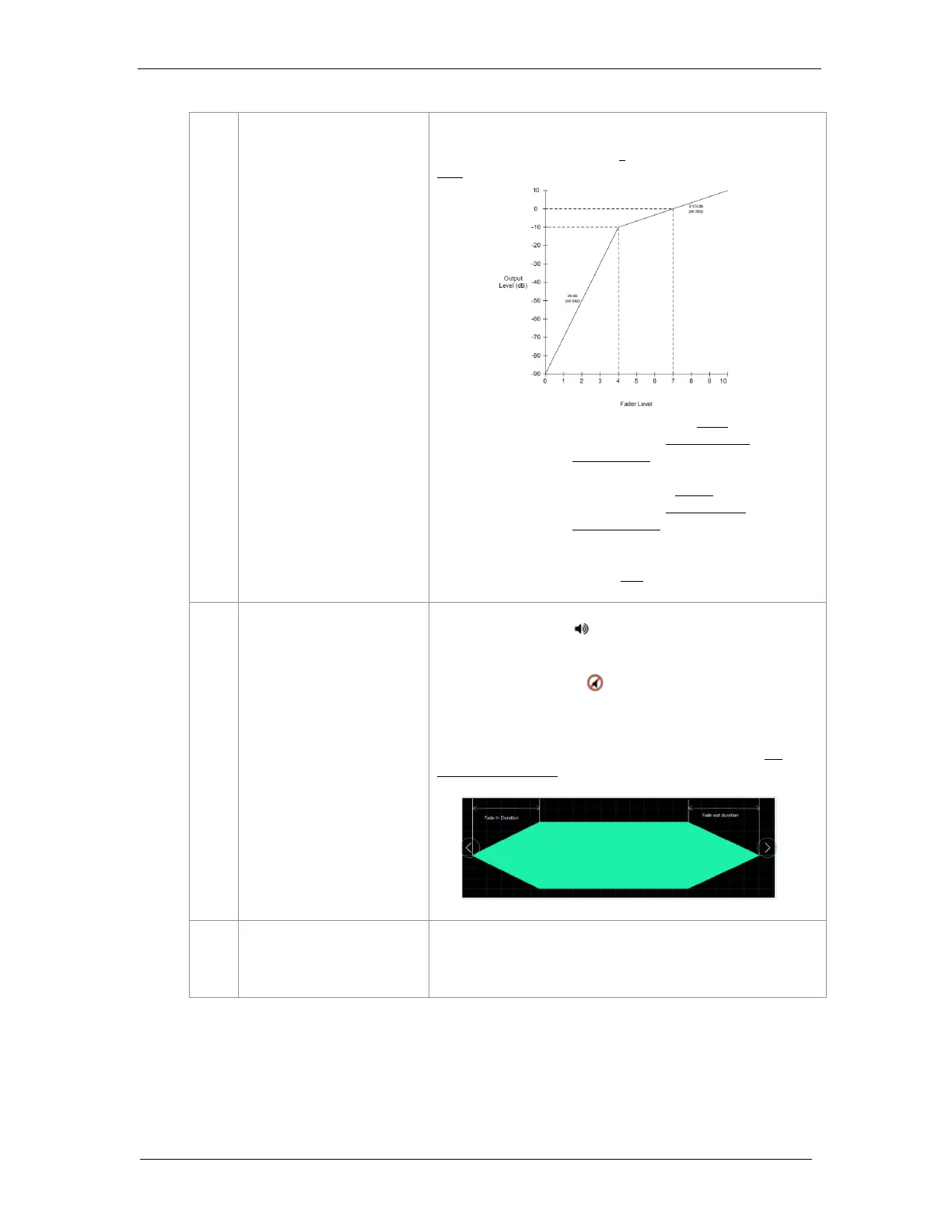
The default Fader value is set at 7, representing gain output at
0dB.
When the Fader level is set within the range of 0 to 4; the
corresponding gain setting changes from -90dB to -10dB with a
variation in amplitude of 20dB per step.
When the Fader level is set in the range of 4 to 10, the
corresponding gain setting changes from -10dB to 10dB with a
variation in amplitude of 3.33dB per step.
In this way, the Main volume can have a large dynamic range and
can be fine-tuned when it is near 0dB.
Press the [Mute Button] to “fade out” all channel outputs until
they are muted. At this time, the Fader volume setting will not be
changed.
Press the [Unmute Button] again to “fade in” all channel
outputs until their original set volumes are restored.
“Fade out” and “fade in” speeds can be set respectively under the
Configuration sub-tab (refer to Section 8.4), ranging from 0.2
seconds to 5 seconds.



 To Next Page