USER MANUAL FOR SR-1000 STANDALONE INTEGRATED MEDIA BLOCK™
4. PLAYBACK
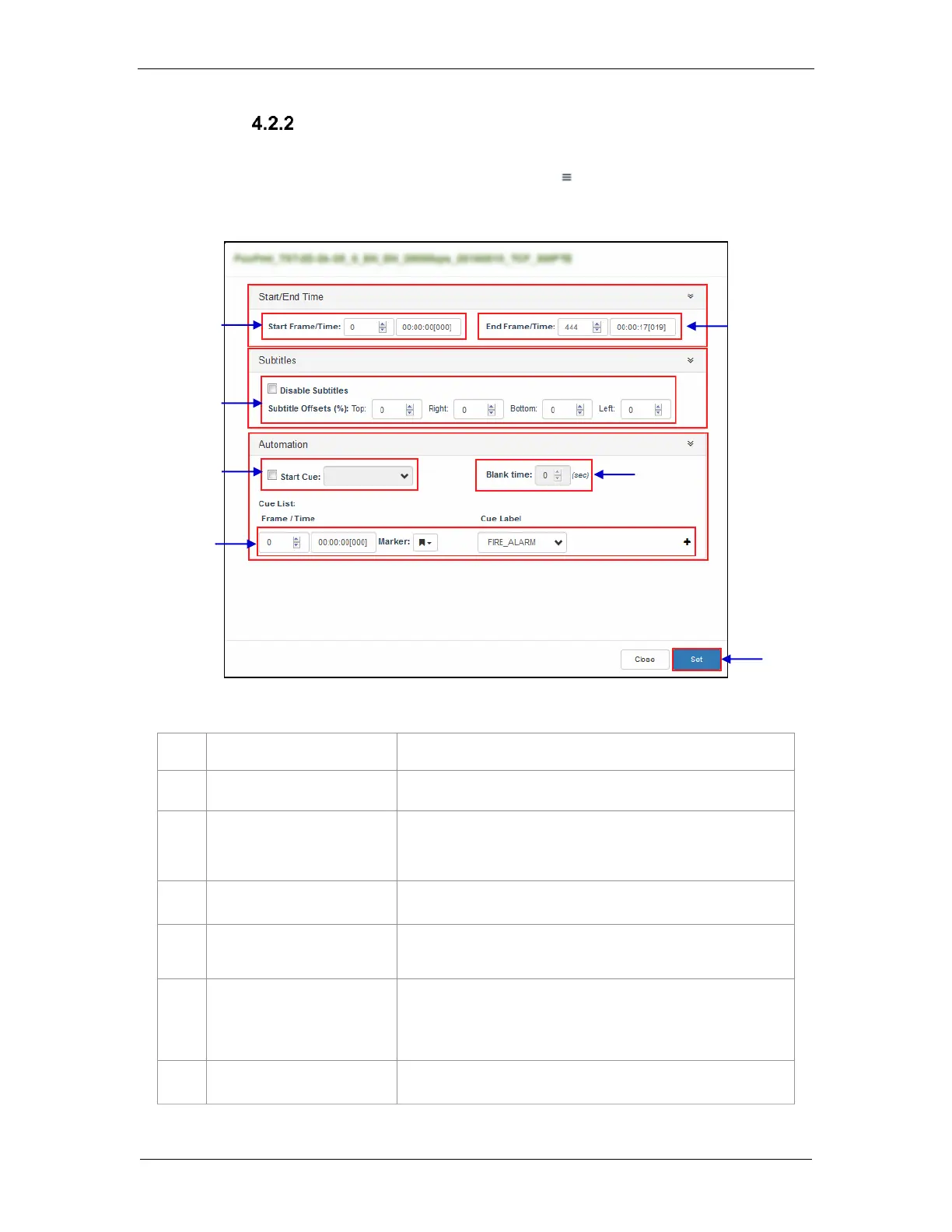
Edit CPL Properties
Additional functions can be applied to each composition by editing the CPL properties.
The "Edit CPL Properties" popup will open up by clicking button (Edit Props) button on
a particular clip in the Playlist Editor.
Note: The Edit Props button will be hidden if the selected playlist is locked.
Figure 9: Edit CPL Properties
Set the time code/frame number where playback of the clip starts.
Set the time code/frame number where playback of the clip ends.
Set the Top, Right, Bottom and Left values to adjust the position of
the subtitles projected. You can also disable subtitles by selecting
the Disable Subtitles checkbox.
Set an automation cue to execute before the clip begins.
Set the time interval between the end of the start cue and the start of
the clip playback.
Sets automation cues to execute during playback.
Select the cue from the dropdown list, enter the Frame/Time and
click the + Insert button.
Cue list will display the inserted automation cue.
Save the changes to the CPL.



 To Next Page