EasyManua.ls Logo

GDC SR-1000 - 4.2 Playlist Editing

GDC SR-1000
137 pages
Print Icon
To Next Page IconTo Next Page
To Previous Page IconTo Previous Page
Loading...
- 17 -
April 22
nd
, 2021
USER MANUAL FOR SR-1000 STANDALONE INTEGRATED MEDIA BLOCK™
4. PLAYBACK
4.2 Edit
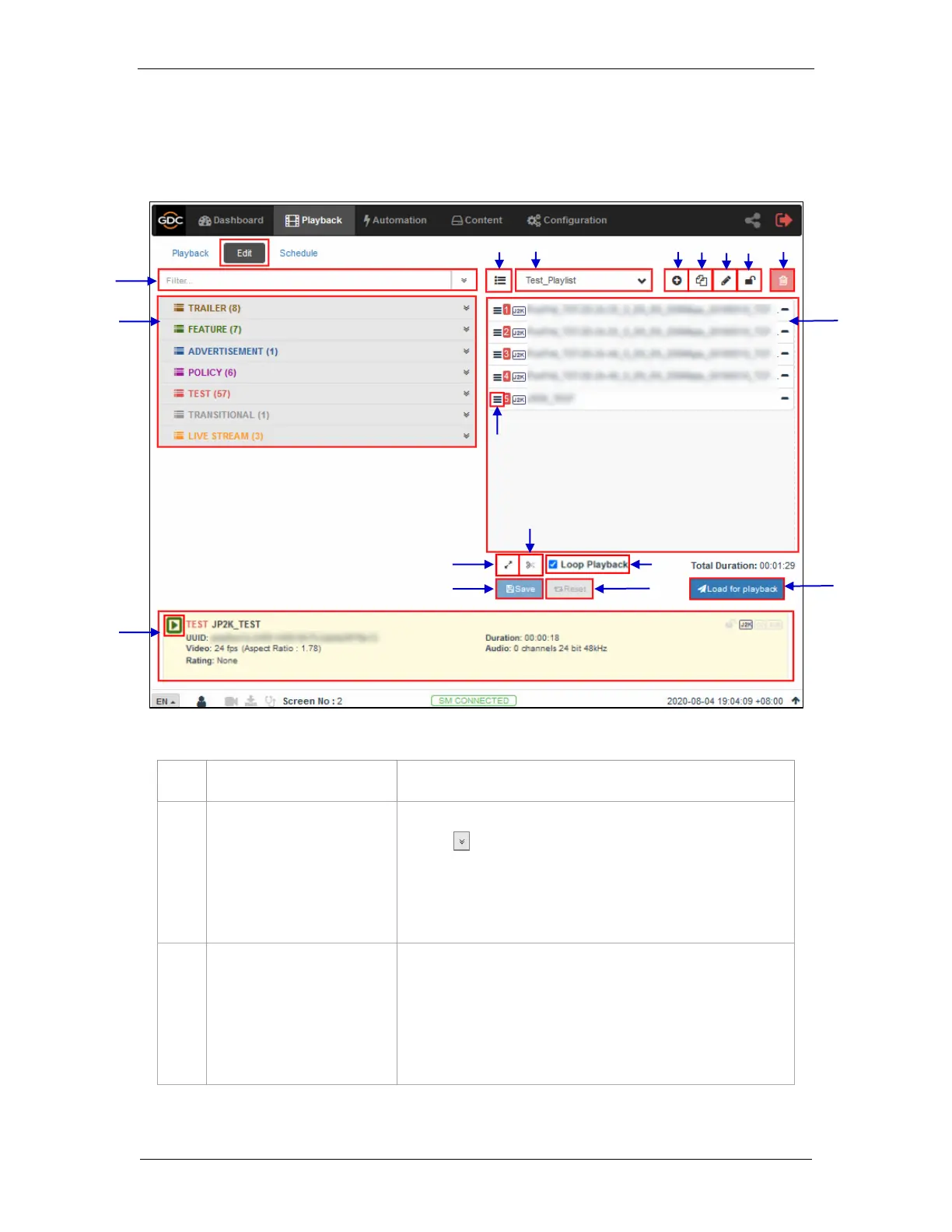
The Edit sub-tab is used to create and edit playlists.
1
[Filter]
Filter the content list based on content name.
2
[Content List]
Available content on the SR-1000 is listed here.
Use the arrow to expand and list all the clips under the
selected category.
Content can be dragged and dropped between [Content List]
and [Playlist Editor].
3
[Playlist Editor]
The contents of the playlist being currently edited are displayed.
Click the ‘-‘ button to remove a clip from the playlist.
Clips can be dragged and dropped within the playlist to change
playback order.
4
2
1
5
16
3
3
8
11
12
13
14
11
11
6
7
15
3
Figure 7: Edit Playlist
18
3
17
3
9
10

Table of Contents

Other manuals for GDC SR-1000

Related product manuals