USER MANUAL FOR SR-1000 STANDALONE INTEGRATED MEDIA BLOCK™
7. CONFIGURATION
SNMP Configuration
The SNMP feature is an option on the SR-1000 that enables the use of SNMP to monitor the
Server. The SNMP interface contains many useful SNMP traps and is easy to configure.
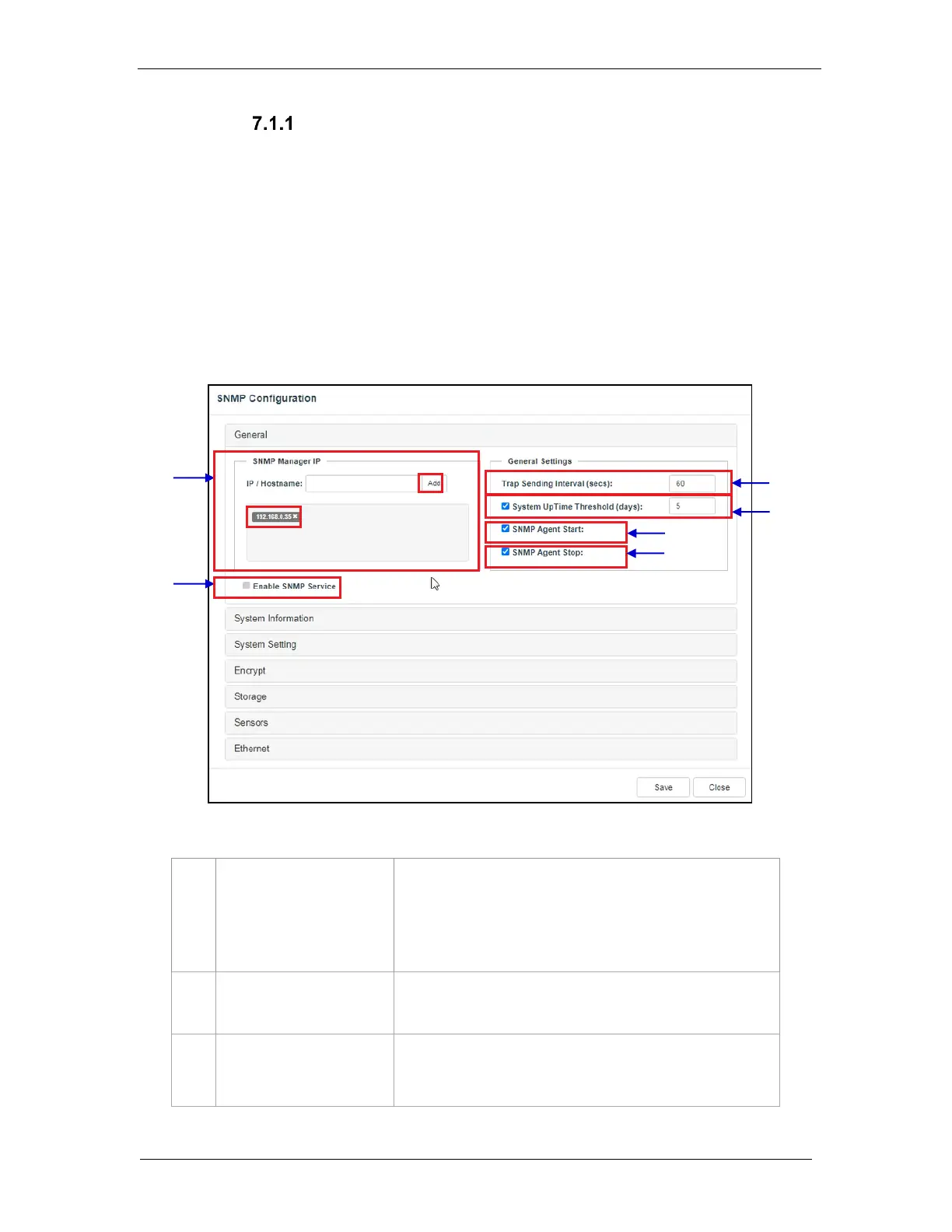
A SNMP configuration pop-up window is shown with the following sections: General, System
Information, System Setting, Encrypt, Storage, Sensors, and Ethernet. Clicking on each
section will expand it.
7.1.1.1 SNMP Configuration → General
Indicate the IP address of the SNMP Manager where traps are
to be sent.
To add an SNMP Manager, Enter the IP Address of the SNMP
Manager and click Add.
Click the X next to the IP address to remove it.
Indicate the time interval in seconds after which a trap should be
resent to the SNMP Manager. The trap will continue to be resent
only as long as the error condition exists.
[System UpTime Threshold]
Indicate the threshold time in days.
Note: When Trap is On, a trap will be sent if the System UpTime
exceeds the threshold value.
Figure 42: SNMP Configuration - General



 To Next Page