EasyManua.ls Logo

GDC SR-1000 - 5.2 Scheduling Automation Cues

GDC SR-1000
137 pages
Print Icon
To Next Page IconTo Next Page
To Previous Page IconTo Previous Page
Loading...
- 28 -
April 22
nd
, 2021
USER MANUAL FOR SR-1000 STANDALONE INTEGRATED MEDIA BLOCK™
5. AUTOMATION
5.2 Schedule
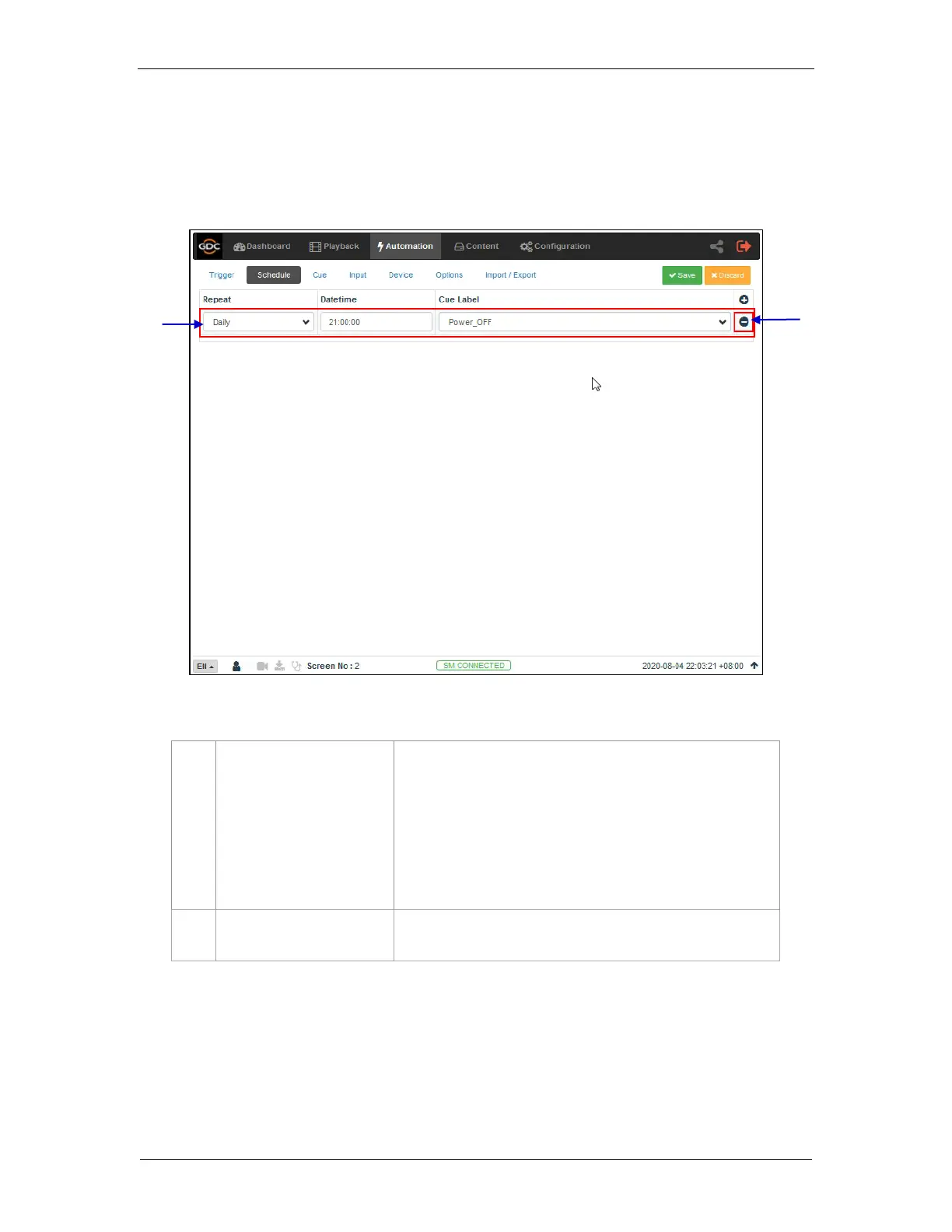
The Schedule sub-tab is used to schedule automation cues to execute at the specified
date and time.
1
[+ New Schedule]
Click + to add a new schedule.
Repeat: Choose between None or Daily
Datetime: Select specific datetime for the automation cue
to be executed.
Cue Label: The first cue in cue list is added by default.
Select from drop down list to change to other cue.
Click Save to save the added schedule or click Discard
to remove.

2
[- Remove Schedule]
Click to remove the selected scheduled automation cue.
1
2
Figure 15: Scheduling Cues

Table of Contents

Other manuals for GDC SR-1000

Related product manuals