USER MANUAL FOR SR-1000 STANDALONE INTEGRATED MEDIA BLOCK™
7. CONFIGURATION
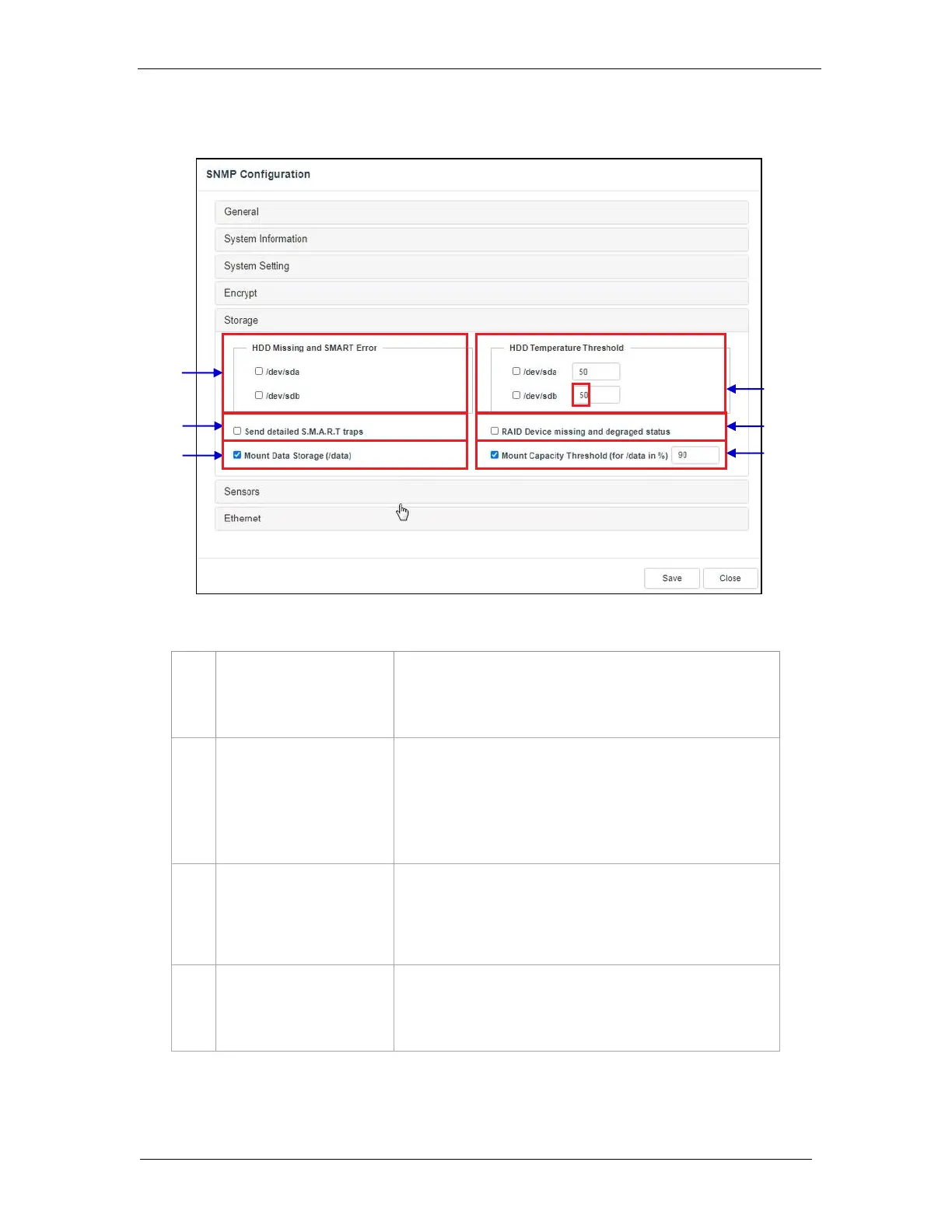
7.1.1.5 SNMP Configuration → Storage
[HDD Missing and SMART
Error]
Check the corresponding storage devices to activate the Trap.
Note: When Trap is On, a trap will be sent to the SNMP
Manager if the system cannot detect the specified device.
[HDD Temperature
Threshold]
Set the desired threshold temperature for respective storage
device by using the [▲] and [▼] buttons.
Check the corresponding storage devices to activate the Trap.
Note: When Trap is On, a trap will be sent to the SNMP
Manager when the threshold temperature is reached.
[RAID Device missing and
degraded status]
Check RAID Device missing and degraded status to activate the
Trap.
Note: When Trap is On, a trap will be sent if the RAID Device is
missing or degraded.
Check Mount Data Storage to activate the Trap.
Note: When Trap is On, a trap will be sent if the data storage is
not mounted on the system.
Figure 46: SNMP Configuration - Storage



 To Next Page