EasyManua.ls Logo

GDC SR-1000 - 6.3 KDM Management

GDC SR-1000
137 pages
Print Icon
To Next Page IconTo Next Page
To Previous Page IconTo Previous Page
Loading...
- 52 -
April 22
nd
, 2021
USER MANUAL FOR SR-1000 STANDALONE INTEGRATED MEDIA BLOCK™
6. CONTENT
6.3 KDM
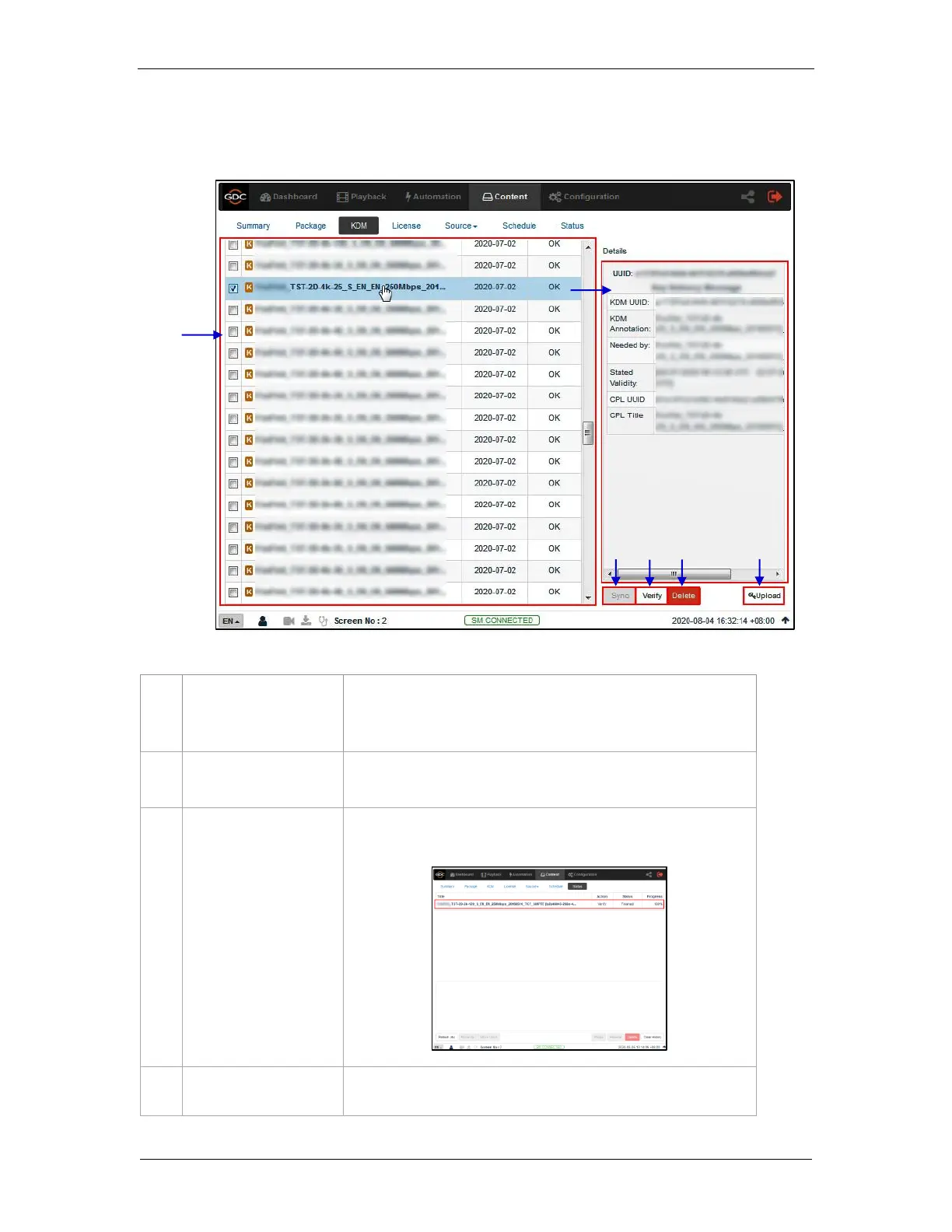
The KDM sub-tab displays all the KDMs present on the SR-1000
Figure 29: List of KDMs
1
[KDM List]
Displays a list of the KDMs on the SR-1000.
When a KDM is selected from the list, KDM details are displayed on
the right panel.
2
[Sync]
When the status displays ‘Not in SM”, click the Sync button to
synchronize the KDM to the SM.
3
[Verify]
Verify the selected KDM. Any errors found will be displayed. The
verification status will be displayed under the Status tab.
4
[Delete]
Delete the selected KDM from the SR-1000.
1
5
4
2
3

Table of Contents

Other manuals for GDC SR-1000

Related product manuals