EasyManua.ls Logo

GDC SR-1000 - 5.5 Device Configuration

GDC SR-1000
137 pages
Print Icon
To Next Page IconTo Next Page
To Previous Page IconTo Previous Page
Loading...
- 36 -
April 22
nd
, 2021
USER MANUAL FOR SR-1000 STANDALONE INTEGRATED MEDIA BLOCK™
5. AUTOMATION
5.5 Device
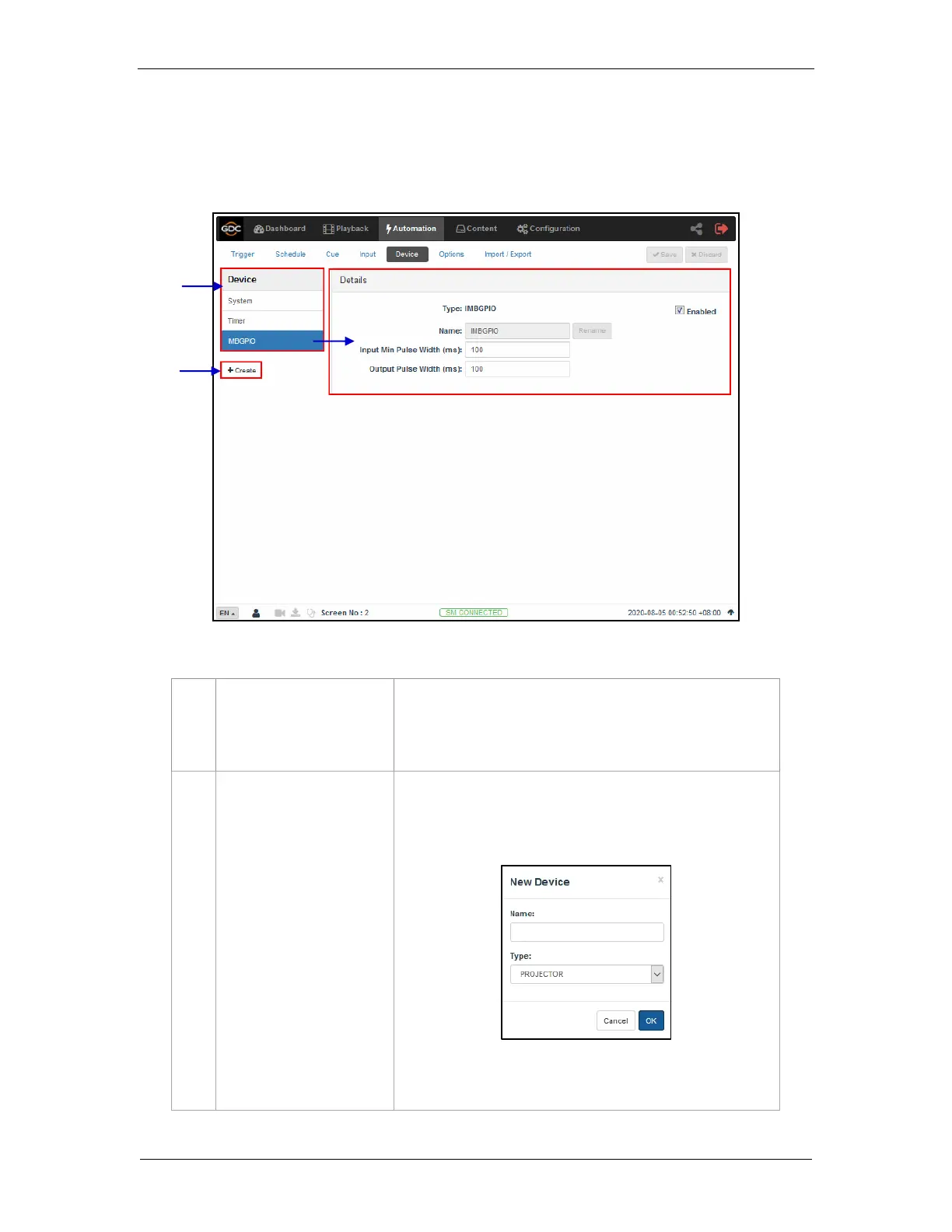
The Device sub-tab is used to configure the SR-1000 to communicate with external
automation devices.
1
[Device]
This is a list of configured automation devices on the SR-1000.
When a device is selected from the list, device details are
displayed under the Details section.
2
[+Create]
Click +Create to create a new device.
Enter Device Name and select the device Type. Click OK to
confirm or click Cancel to cancel adding devices.
Refer to Section 5.5.1 for more details on creating a new
automation device.
2
1
Figure 20: List of configured Automation devices

Table of Contents

Other manuals for GDC SR-1000

Related product manuals