USER MANUAL FOR SR-1000 STANDALONE INTEGRATED MEDIA BLOCK™
6. CONTENT
6 CONTENT
The Content tab is used to manage the content, keys and licenses on the SR-1000. It allows the
user to perform the actions listed below:
1. Ingest content from disk or network source.
2. Ingest Key Delivery Messages (KDMs) required for playing encrypted content.
3. Ingest License Delivery Messages (LDMs).
4. Delete content from Server storage.
5. Verify content on Server storage.
6.1 Summary
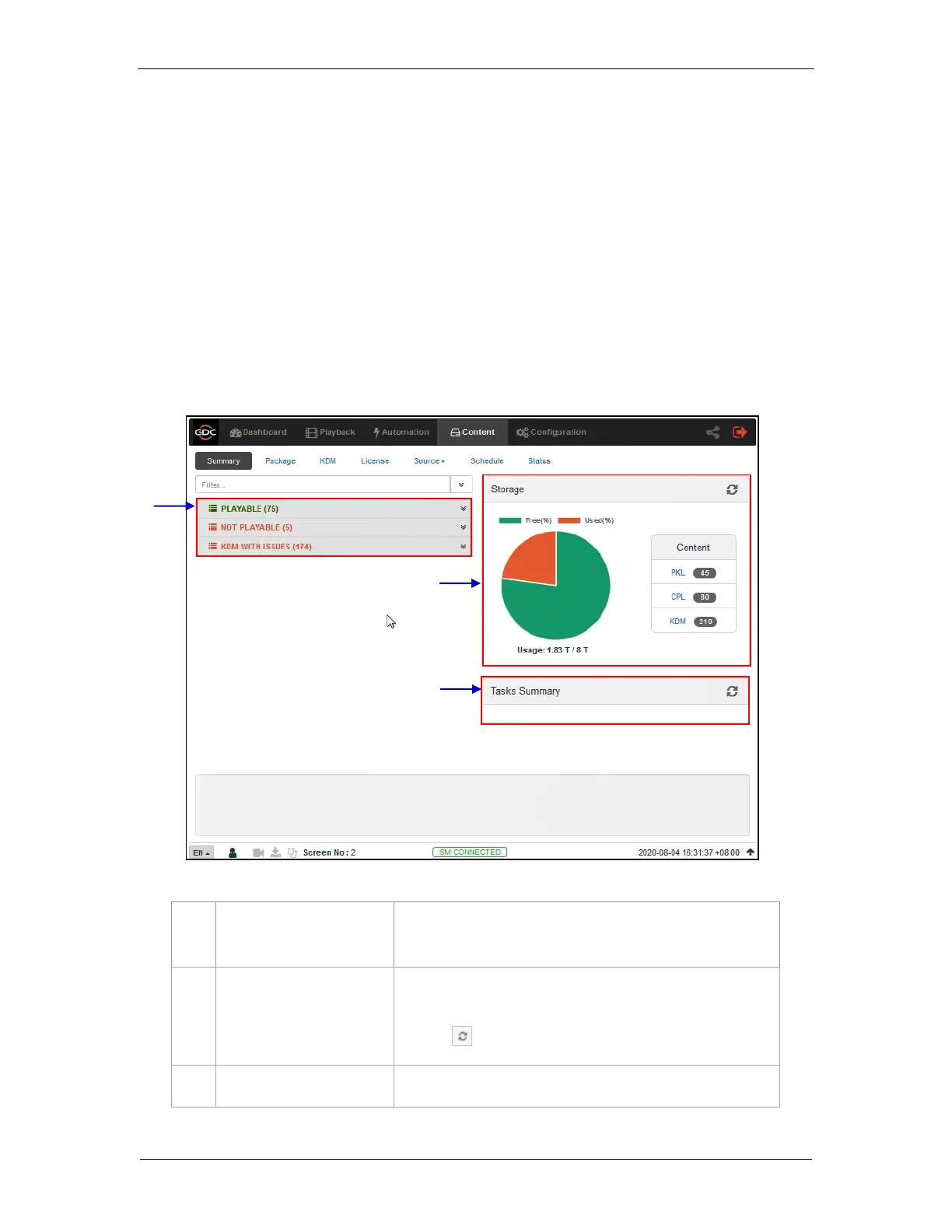
The Summary sub-tab shows a summary of the content and the storage space.
[Playable/Not Playable/KDM
woth Issues List]
Displays a list of playable and non-playable content which are
currently present on the SR-1000, along with the list of KDMs
with issues.
Shows a graphical overview of the number of PKL, CPL, KDM
present on the SR-1000. It also displays Storage Usage and
Capacity.
Click the Refresh button to update the displayed information.
Displays the tasks available on the SR-1000.
Figure 25: Content and Storage summary



 To Next Page