EasyManua.ls Logo

GDC SR-1000 - Page 111

GDC SR-1000
137 pages
Print Icon
To Next Page IconTo Next Page
To Previous Page IconTo Previous Page
Loading...
- 110 -
April 22
nd
, 2021
USER MANUAL FOR SR-1000 STANDALONE INTEGRATED MEDIA BLOCK™
8. AUDIO PROCESSING
Click the Save button and exit the Configure Signal Generator page.
Switch the Signal Generator to the ON position to start playing the test signal.
Switch the Signal Generator to the OFF position to stop playing the test signal.
Note: The Signal Generator operation and playback cannot be done at the same time.
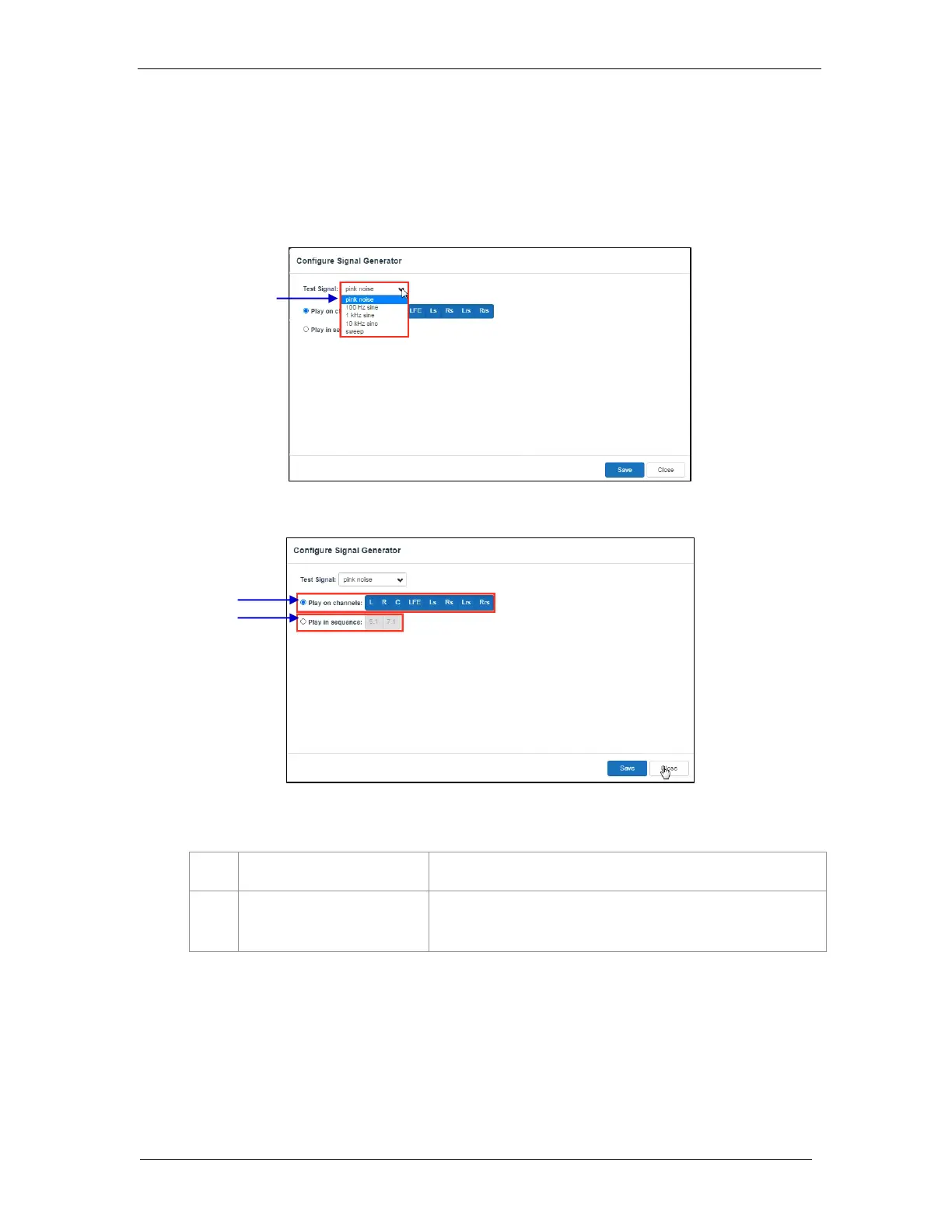
Figure 73: Configure Signal Generator (1)
Figure 74: Configure Signal Generator (2)

1
[Play on channels]
Select one or more channels to output the specified test signal
2
[Play in sequence]
5.1/7.1 channels can be selected to output test signals one-by-
one in sequence
1
2

Table of Contents

Other manuals for GDC SR-1000

Related product manuals