USER MANUAL FOR SR-1000 STANDALONE INTEGRATED MEDIA BLOCK™
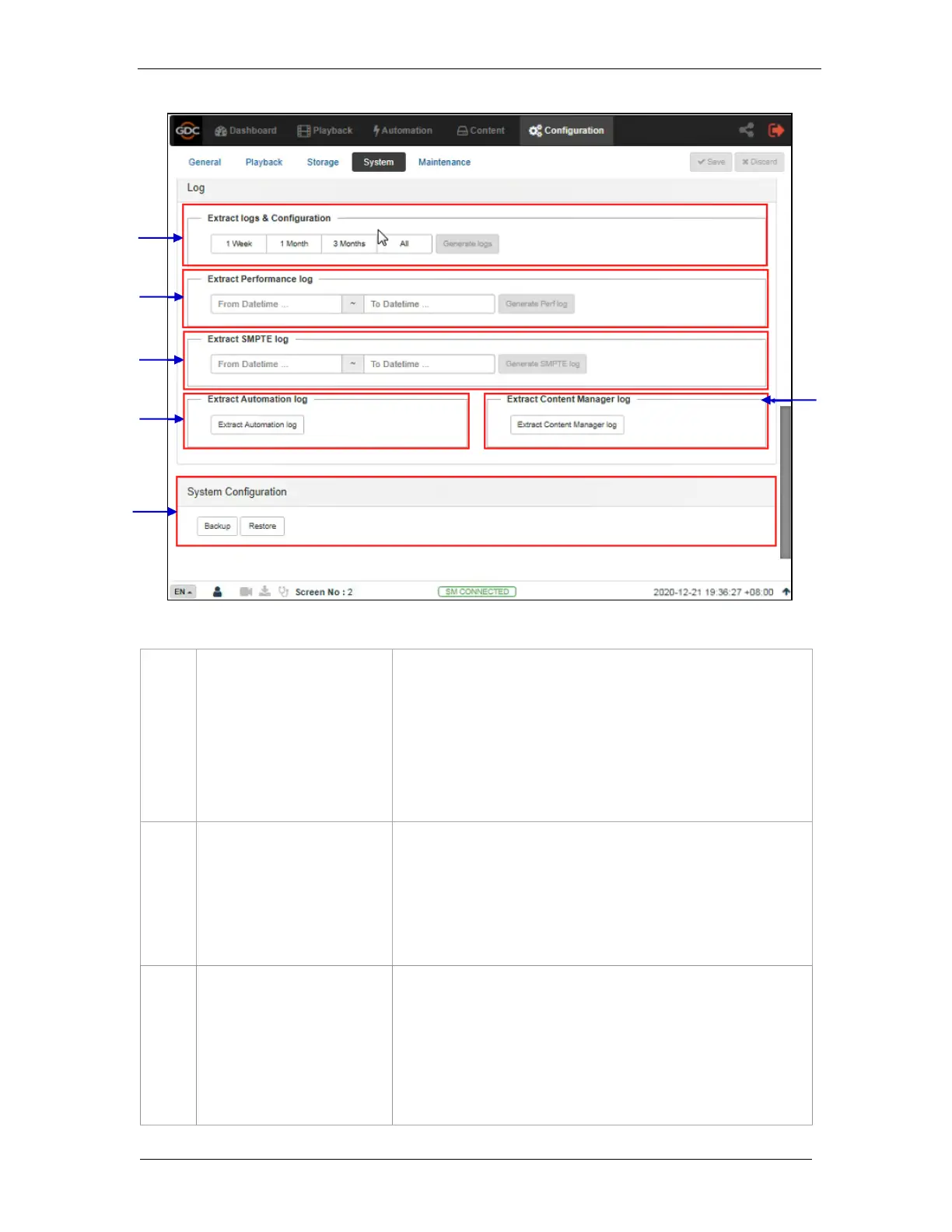
[Extract logs and configuration]
This allows the operator to extract debug logs from the SR-1000 for
analysis by GDC personnel.
Time duration includes 1 Week, 1 Month, 3 Months and All.
After selecting the time duration, Generate logs button will be enabled.
A pop-up window will be shown to display the log extraction progress.
After log generation, a pop-up window will be shown to save or open
the extracted file.
[Extract Performance Log]
This allows the operator to extract performance logs from
the SR-1000.
After selecting the Date/Time, Generate Pref Log button will be enabled.
A pop-up window will be shown to display the log extraction progress.
After log generation, a pop-up window will be shown to save or open
the extracted file.
This allows the operator to extract SMPTE audit logs from
the SR-1000.
After selecting the Date/Time, Generate SMPTE Log button will be
enabled. A pop-up window will be shown to display the log extraction
progress.
After log generation, a pop-up window will be shown to save or open
the extracted file.
Figure 65: System Configuration (3)



 To Next Page