54 GE INFORMATION D20E ETHERNET I/O MODULE INSTRUCTION MANUAL
CHAPTER 3: CONFIGURING THE D20E FIRMWARE
8. Select the User Group which contains the User by either:
– Double-clicking the User Group, or
– Clicking the User Group, right-clicking a blank area of the window, and then
clicking Edit at the bottom of the page.
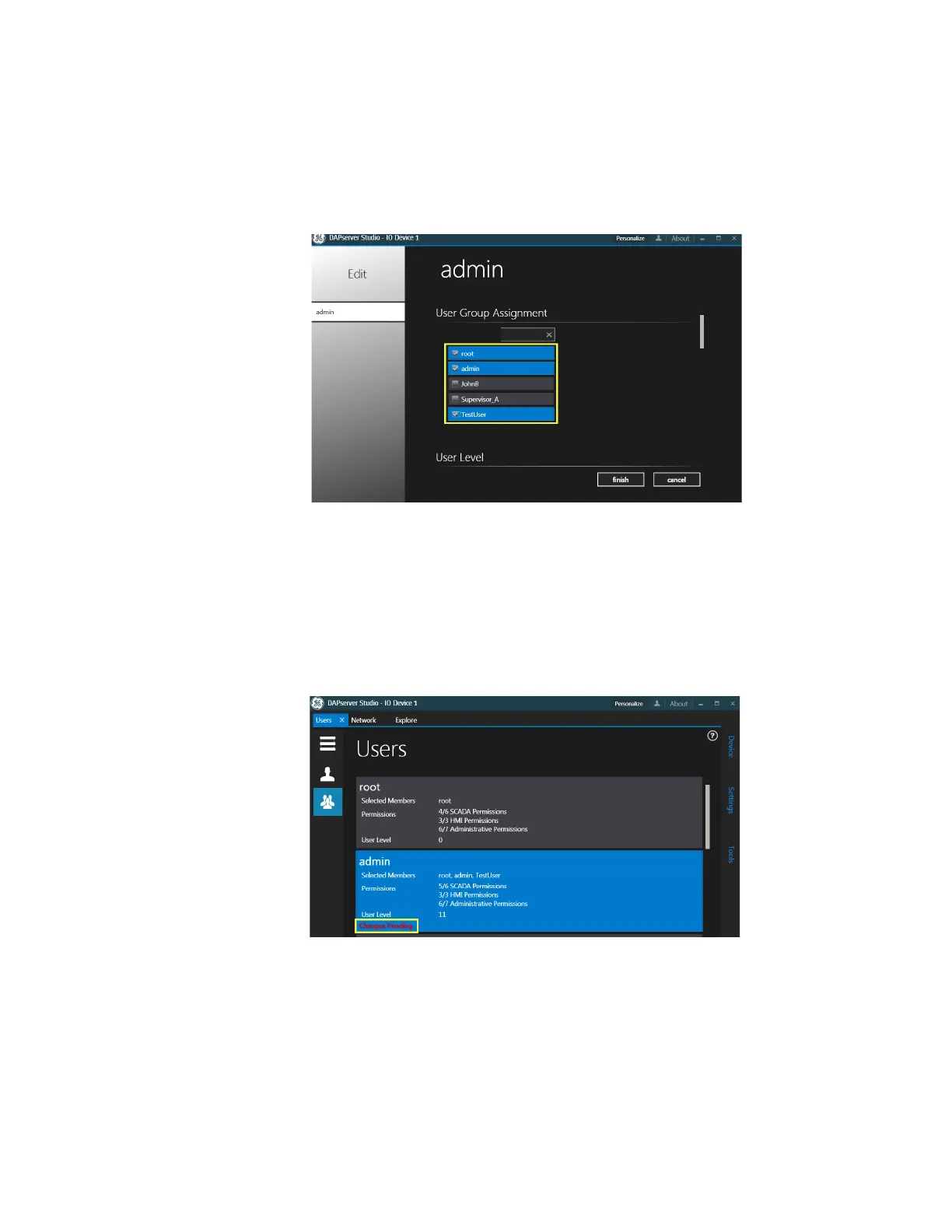
Result: The User Group window appears.
9. Select the check-boxes for the users to be edited.
10. Scroll down and adjust the slider for the desired User Level.
11. Scroll down and select check-boxes for the relevant Permissions associated with the
D20E:
–SCADA Operations
– Administrative Operations
See the DAPserver Studio User Manual, Get Help guide for further descriptions listed
under SCADA Operations and Administrative Operations for user group permissions.
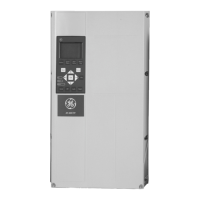
12. Click Finish.
Result: The User Group window appears, indicating: Changes Pending.
13. Right-click a blank area of the screen.
Result: The Task bar appears at the bottom of the screen.
14. Click Sync in the Task bar.
Result: The Change Pending message is cleared.



 To Next Page