28.5 Profile List Selection
Navigation:
AUTO
►MAN
► Menu
► Process monitoring
► Profile
► List
►PLC
► Test
PLC Interface
28.5 Profile List Selection
Preconditions:
● PLC interface connected to GAV.
● Process monitoring and profile list active (see Section 11 "Process Monitoring").
● Profile lists provided for selection (see Section 11 "Process Monitoring").
Inputs:
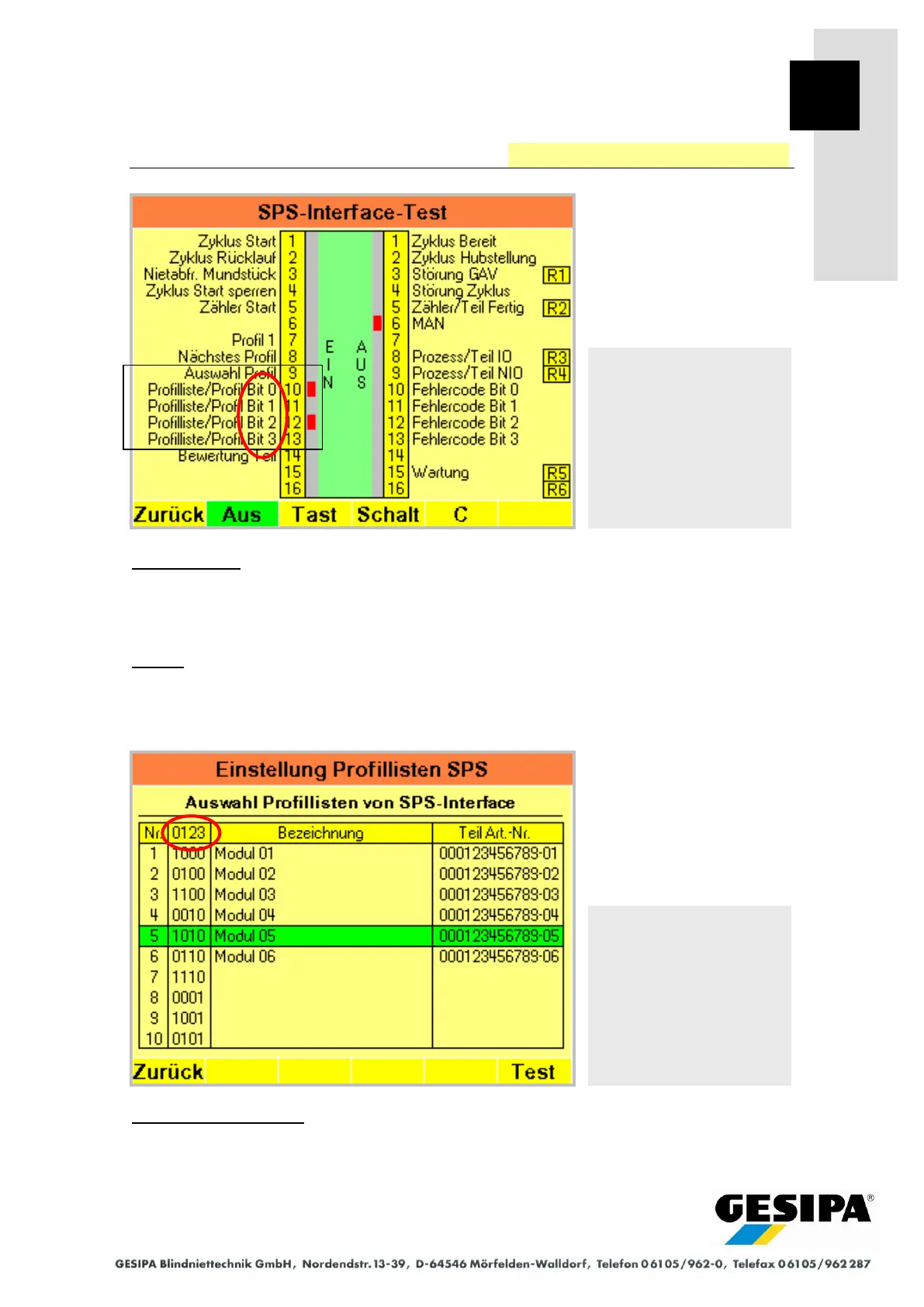
Input 9 "Profile Selection" must be 0 (0 V). One of maximum 10 available profile lists can be se-
lected with the inputs 10 to 13 "Profile List". The profile list last selected remains active when 0
(0000) is selected.
Example (see screens):
Selection 5 (1010) at the inputs 10 to 13 "Profile List" activates the
profile list "Module 05".
Navigation:
AUTO
►MAN
► Menu
► Process monitoring
► Profile
► List
►PLC
Profile lists available for se-
lection



 To Next Page