Operation
8.4 Main Menu
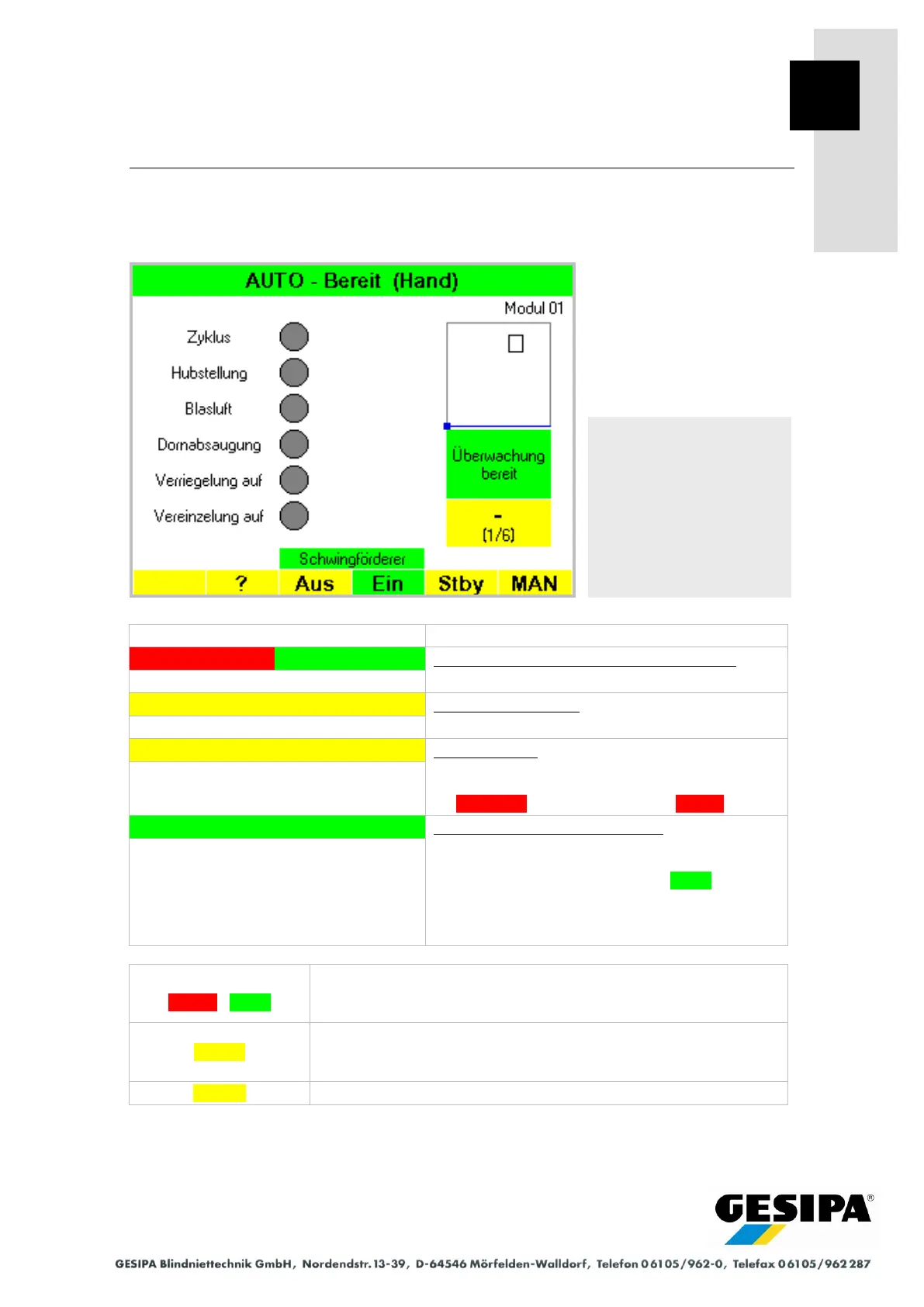
After being switched on and in normal operation mode, the GAV device is set to to the main
menu AUTO.
GAV switched on ("POWER" master switch)
- Valves de-energised.
Set AUTO home position...
"ON" button pressed:
- Setting home position.
Home position:
- Home position was set.
- Start conditions not met:
FAULT or vibration feed unit OFF
GAV ready (start conditions met):
- GAV in home position.
- Start conditions met:
No fault and vibration feed unit ON
- Start options: Hand = hand trigger
Foot = foot trigger
PLC = PLC activation
Vibration feed unit
OFF / ON
Switches the vibration feed unit. By selecting "vibration feed unit" it
is possible to switch directly to the "Vibration Feed Unit Settings"
menu where the feed rate, for example, can be set.
Sets the GAV to Standby mode. The display goes blank and GAV
switched to "OFF". This function is cancelled by pressing any but-
ton.
Opens the MAN menu for manual operation.
The configuration of the main menu may differ from that illustrated when additional functions
such as "Process Counter" are active.
AUTO main menu
Status "Ready"
Start option "Hand" (hand
trigger)



 To Next Page