Operation
8.6 Access Authorisation
Access authorisation ensures that only authorised persons carry out maintenance and setting
work on the GAV. Access authorisations are assigned after entering a four-digit access code. A
distinction is made between two access authorisations:
In most menus an access code is only requested when parameters or settings are to be
changed. Once assigned, an access authorisation is valid for the entire manual area. All access
authorisations are cancelled on return to the AUTO main menu.
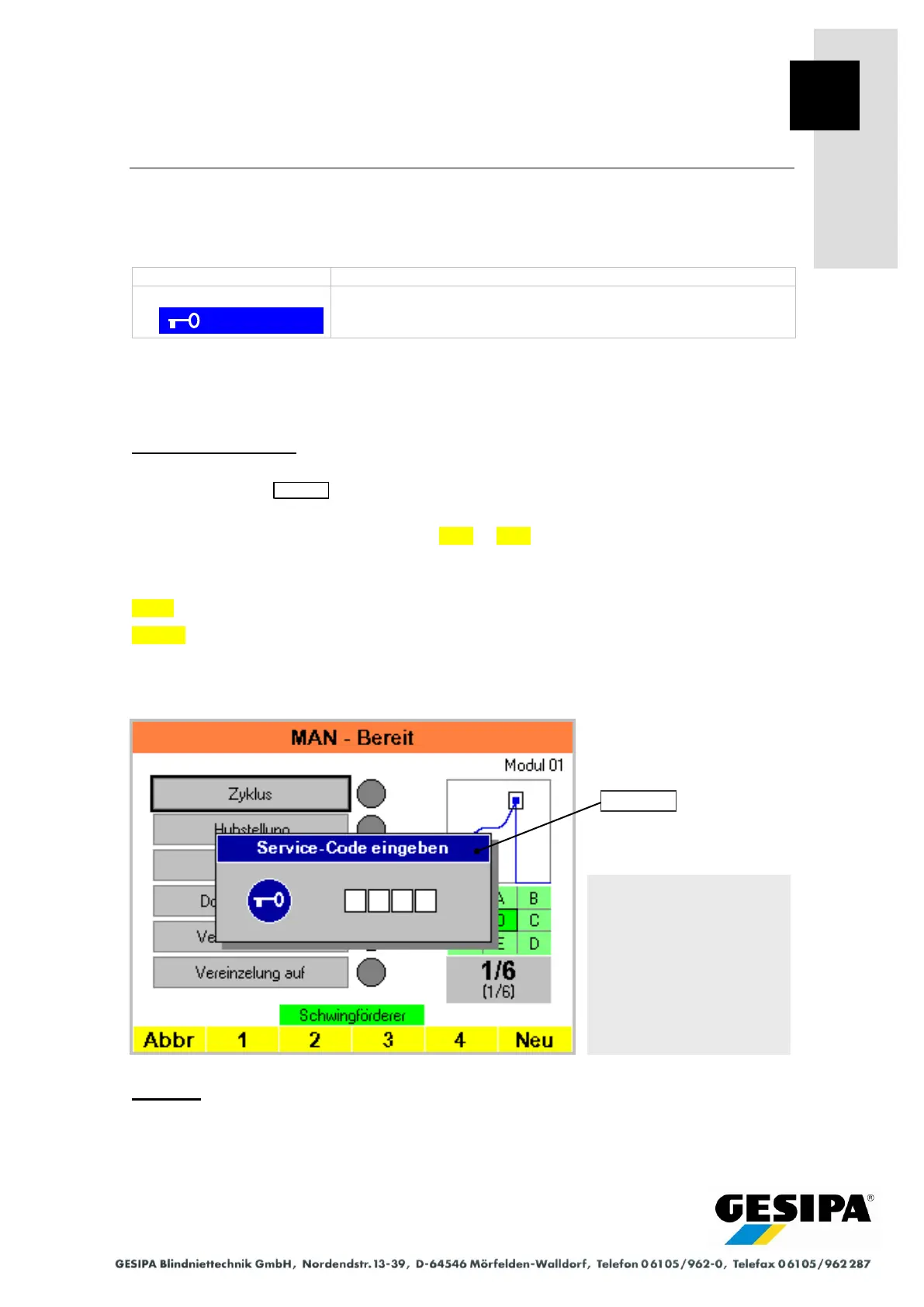
Entering access code:
An additional window appears in the menu to enter the access code, the navigation bar chang-
es accordingly. The title bar of the window shows which access code is to be entered, the Ser-
vice code or the GESIPA code.
The access code is entered using the digits 1 to 4 . The entry starts in the left-hand field
and, with concealed entry (standard), is displayed as an asterisk *.
The Service code default is 1111.
Cncl Cancels the code entry.
New allows you to enter the code again.
The corresponding access authorisation is assigned after correctly entering the code.
The access authorisations are deleted in the main menu.
Example:
In the illustrated example, the "Cycle" function was selected in the "MAN" menu. The access au-
thorisation "Service code" is required to execute this function.
For service and general set-up work.
For entering calibration data. The relevant menus are correspond-
ingly marked in the operating instructions.
Example: Code entry Service
code



 To Next Page