Process Monitoring
11.2 Settings
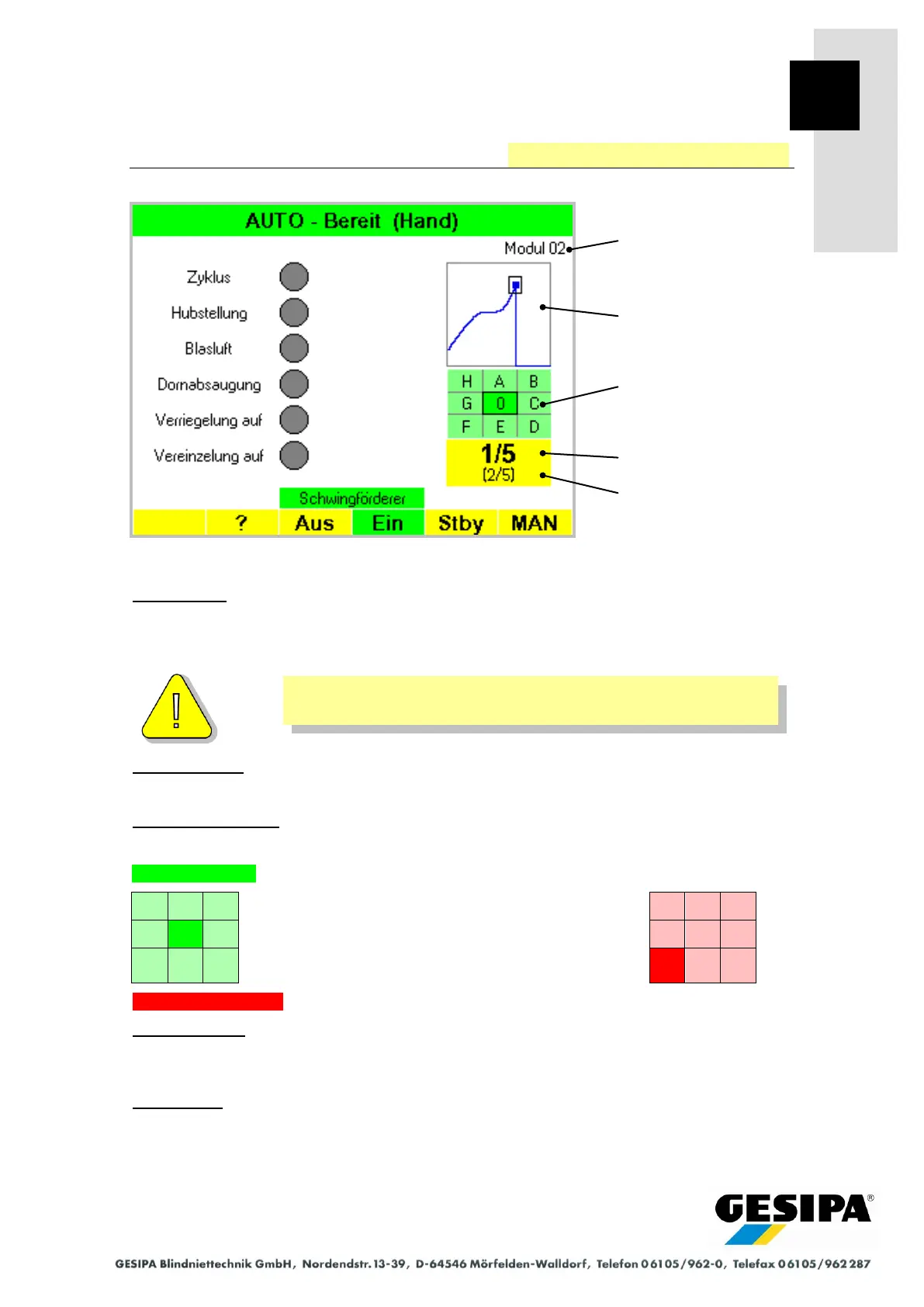
The following information for setting process monitoring is shown in the AUTO main menu:
Designation:
The designation of the current profile list is displayed. The designation of the active profile will
be shown if no profile list is active.
It is necessary to use profile lists for component-related group
evaluations.
Process curve:
The process curve, break-off point and evaluation window are shown after each setting process.
Process evaluation:
The evaluation is output after each setting process:
Monitoring ready text shown after switching on GAV or deleting process curve.
Display of position of break-off point:
Left: Process OK Break-off point in sector 0
Right: Process NOK Break-off point in sector F
(break-off displacement too short, break-off
force too low)
No measured values text, e.g. when a no-load cycle was run.
Current profile:
The position of the current profile in the profile list is shown. In the example this is the first pro-
file of 5 from the "Module 02" profile list.
Next profile:
The position of the profile in the profile list, with which the next setting process is to be evaluat-
ed, is shown. Any profile can be selected from a profile list for manual selection or PLC activa-
tion. In the example this is the second profile of 5 from the "Module 02" profile list.



 To Next Page