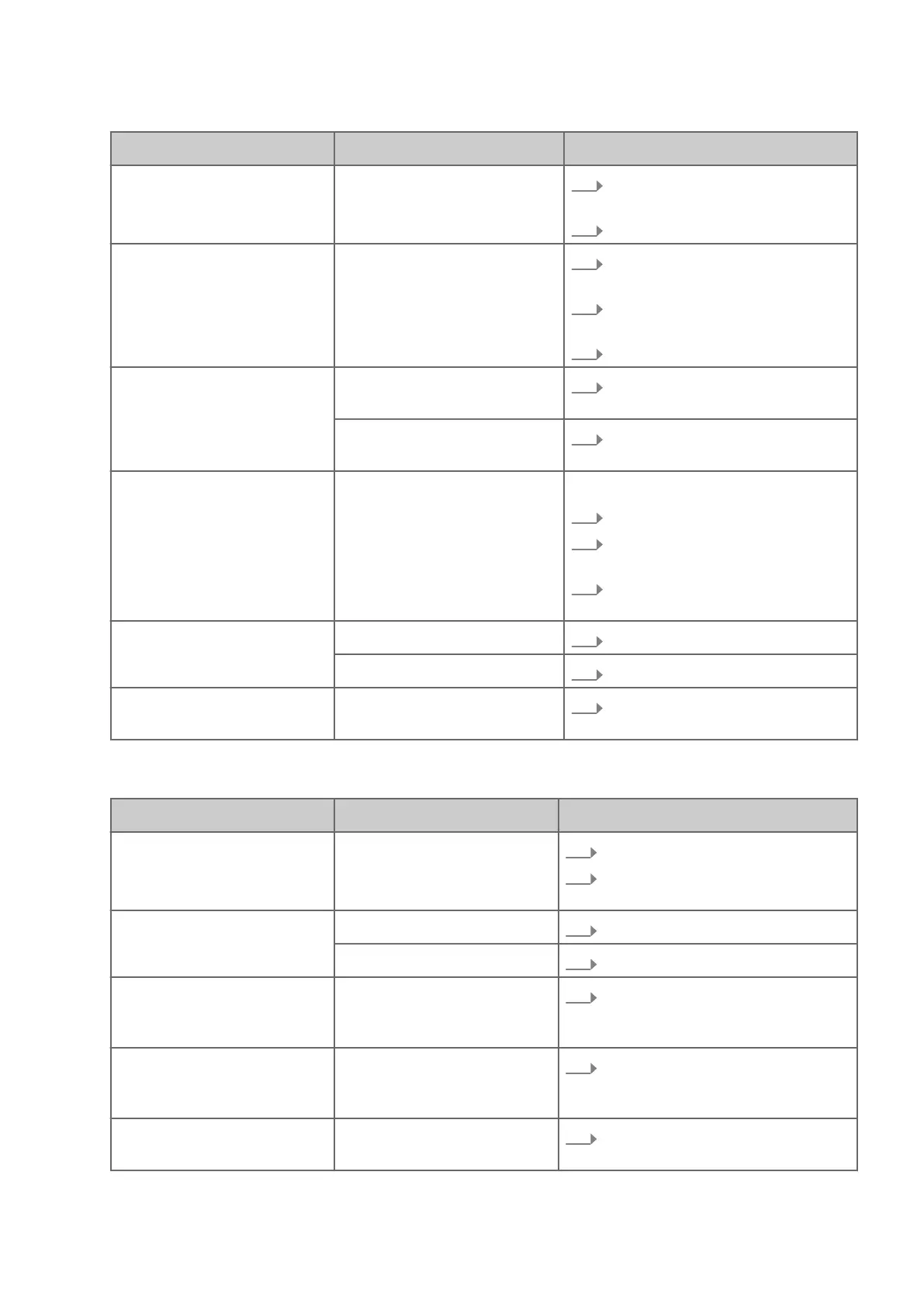
Fault description Cause Remedy
Safety limit switch without func-
t
ion
Fault in the electrical system
2.
Disc
onnect the machine from the
mains supply
3.
Contact Felder Group service
Machine cannot be switched
of
f
Fault in the electrical system
1.
If pr
esent: Switch off [Main switch]
(position "O" / "OFF")
2.
Disconnect the machine from the
mains suppl
y
3.
Contact Felder Group service
Machine is not functioning [Main switch] is of
f (position
"O" / "OFF")
Switch on the main switch (position
"I" / "ON")
Error in the electrical connection Check the electrical connection
(
power cable, fuses)
Cutterblock does not start [Motor safety switch] has been
triggered
depending on the equipment:
1.
Activate [mo
tor protection switch]
2.
Switch off main switch, restart the
mac
hine
3.
Let the engine cool down, restart
the mac
hine
The belts squeal when
s
witched on or started
The belt tension is too slack
Re-tensioning the drive belt
The drive belt is worn out Replacing the drive belt
Cutterblock cannot be brought
t
o a stop within 10 seconds
Fault in the electrical system /
brake
Contact Felder Group service
Disruptions whilst processing the workpiece
Fault description Cause Remedy
Poorly planed surface Planer knives are worn out
1.
R
eplace the planer knives
2.
Depending on the configuration:
ad
just planer knives
The joint is not true (extremely
concave or convex)
Infeed planer table misaligned
Adjusting the joint
Planer knives are heavily worn Replace the planer knives
When surface planing, work-
piec
e stops when it reaches the
planer table outfeed
Outfeed planer table is too
high in relation to the trajec-
tory of the knives
Adjust outfeed planer table
"Straight cut" at the end of
the w
orkpiece when surface
planing
Outfeed planer table is too
low in relation to the trajectory
of the blades
Adjust outfeed planer table
The planer fence angle is not
c
orrect
The angle adjustment is misad-
justed
Correct the planing fence angle



 To Next Page