119
Save the Setup
USB
FLASH DRIVE
INITIALIZE THE USB FLASH DRIVE
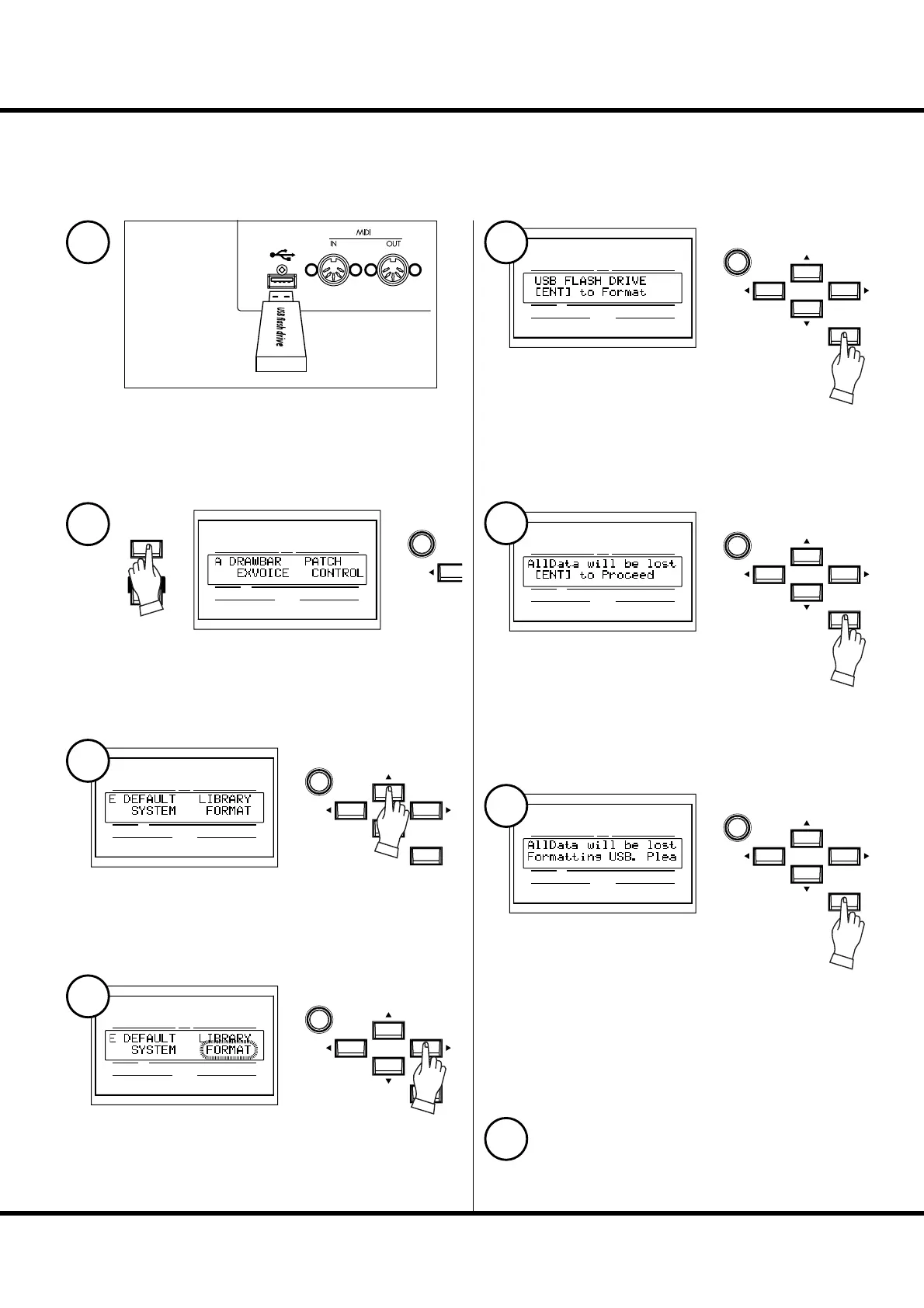
A “fresh” e USB fl ash drive must be “initialized”. e initializing procedure is as
follows:
When initializing is completed, all the contents of the USB ash drive
are erased.
Insert the USB fl ash drive to the USB MEMORY jack.
Wait until the display “Confirming USB. Please
wait...” disappears.
Press the [MENU/EXIT] button to display the Menu.
Select Page E with the [S],[T] buttons.
Press the [ENTER] button.
e FORMAT (=initializing) mode is displayed.
Press the [ENTER] button.
Confi rmation message is displayed.
Press the [ENTER] button.
Initialization starts. It takes about 3 seconds.
NOTE: If you choose to not initialize, just press the [MENU/EXIT] but-
ton.
To return to the play mode, press the [PLAY] button.
Select the “FORMAT” with the [X] button.
UPPER
PEDAL
LOWER
NUMBER NAME
PAT CH
VA L U E
MENU/
EXIT
PLAY
UPPER
PEDAL
LOWER
NUMBER NAME
PAT CH
ENTER
VA L U E
UPPER
PEDAL
LOWER
NUMBER NAME
PAT CH
ENTER
VA L U E
UPPER
PEDAL
LOWER
NUMBER NAME
PAT CH
ENTER
VA L U E
UPPER
PEDAL
LOWER
NUMBER NAME
PAT CH
ENTER
VA L U E
UPPER
PEDAL
LOWER
NUMBER NAME
PAT CH
ENTER
VA L U E
1
2
3
5
6
7
8
4



 To Next Page