-SJ -49
16-1
Selecting letters using the built-in fonts.
You can create monogramming data by using built-in alphabet, numbers and symbols.
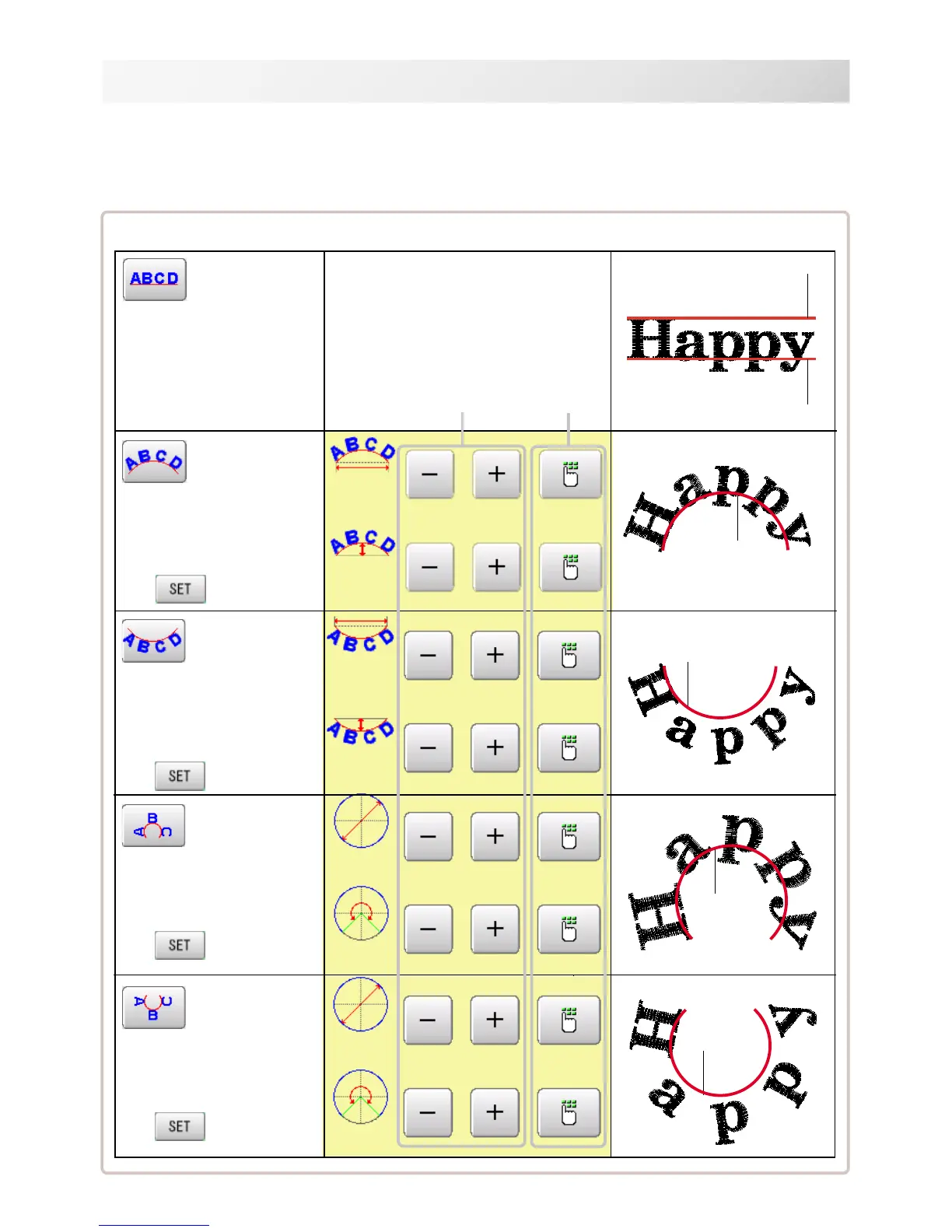
You can choose layout method of monogramming data from horizontal, arch, or circle layout.
Save lettering embroidery data to design memory automatically.
ベースライ
ンの右に寄
せて配置
ベースライ
ンの右に配
置
Layout method
Base line
Horizontal
(straight line)
Base line is horizontally laid
out.
Arch (upward)
Increase or decrease by 5. Set
by entering value.
Baseline is formed a round arch in
an upward direction.
Change settings of baseline's
width and height.
Press after setting is firmed.
Arch (downward)
Cap line is formed a round
arch in a downward direction.
Change settings of capline's
width and depth.
Press after setting is firmed.
Press after setting is firmed.
Circle (upward)
Baseline is formed a circle in
an upward direction.
Change settings of baseline's
diameter and angle.
Press after setting is firmed.
Circle (downward)
Capline is formed a circle in an
downward direction.
Change settings of cap line's
diameter and angle.
Press after setting is firmed.
Width
Increase or decrease
by 5(mm or degrees)
Height
Set by entering
value.
Diameter
Angle
Base line
Base line
Cap line
LETTER
18_1 N401
Cap line
Cap line
Width
Height
Diameter
Angle



 To Next Page