-DA -130
13-J
FRAME CONFIRMATION
20_L O901
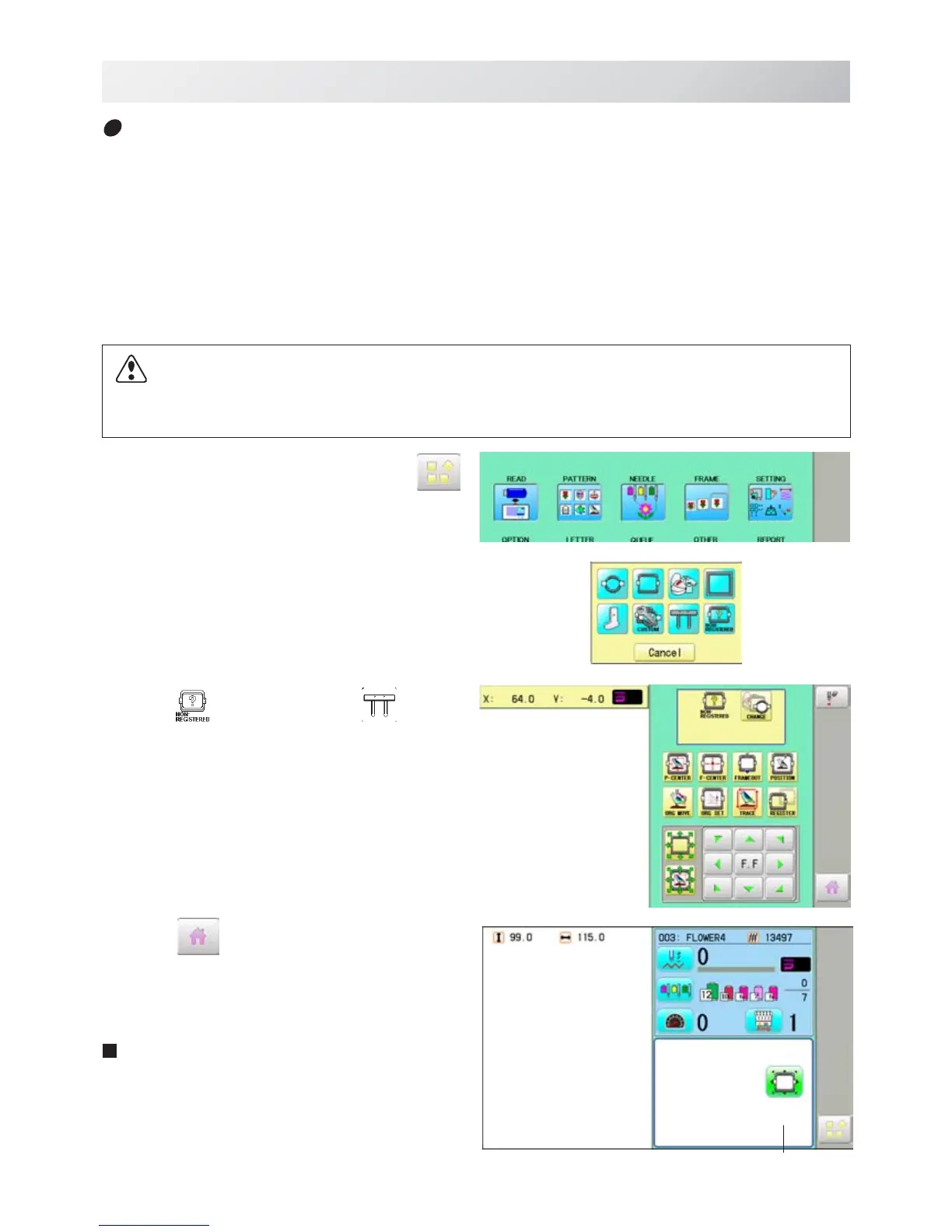
1. When the machine is stopped, press .
2. Select "FRAME".
3. Select
"Non registered" or “Special
frame”.
4. Press
.
Iindication of frame type disappears.
It means that "Non Registered (Special frame) "
is selected.
When you need to change from Non
Registered frame (Special frame) to other
type of frame, please powor machine off
and start again.
Without re-starting machine, machine will
move incorrectly.
Non registered, Special frame ( Except HCR2)
In case Non Registered Frame is selected, carriage does not have movement for creating the
coordinates of frame position at the time of turning machine on.
Please select Non Registered Frame, when you need use special frame which can hit pressure
foot or other machine parts by movement of carriage for creating the coordinates of frame posi-
tion.
The following functions is canceled by selecting Non Registered Frame;
* Frame confirmation
* Restore the position at the time of power failure
* Locate
* Autostop function when movement exceeds the carriage limit.
Frame Iindication disappears
Except using special shape frame, please do not select Non Registered Frame.
In case you have operation mistake, needle and/or pressure foot may hit frame and machine
and/or frame can be damaged.



 To Next Page