-SJ -29
LOCK STITCHES
15-5
5_3b NB01
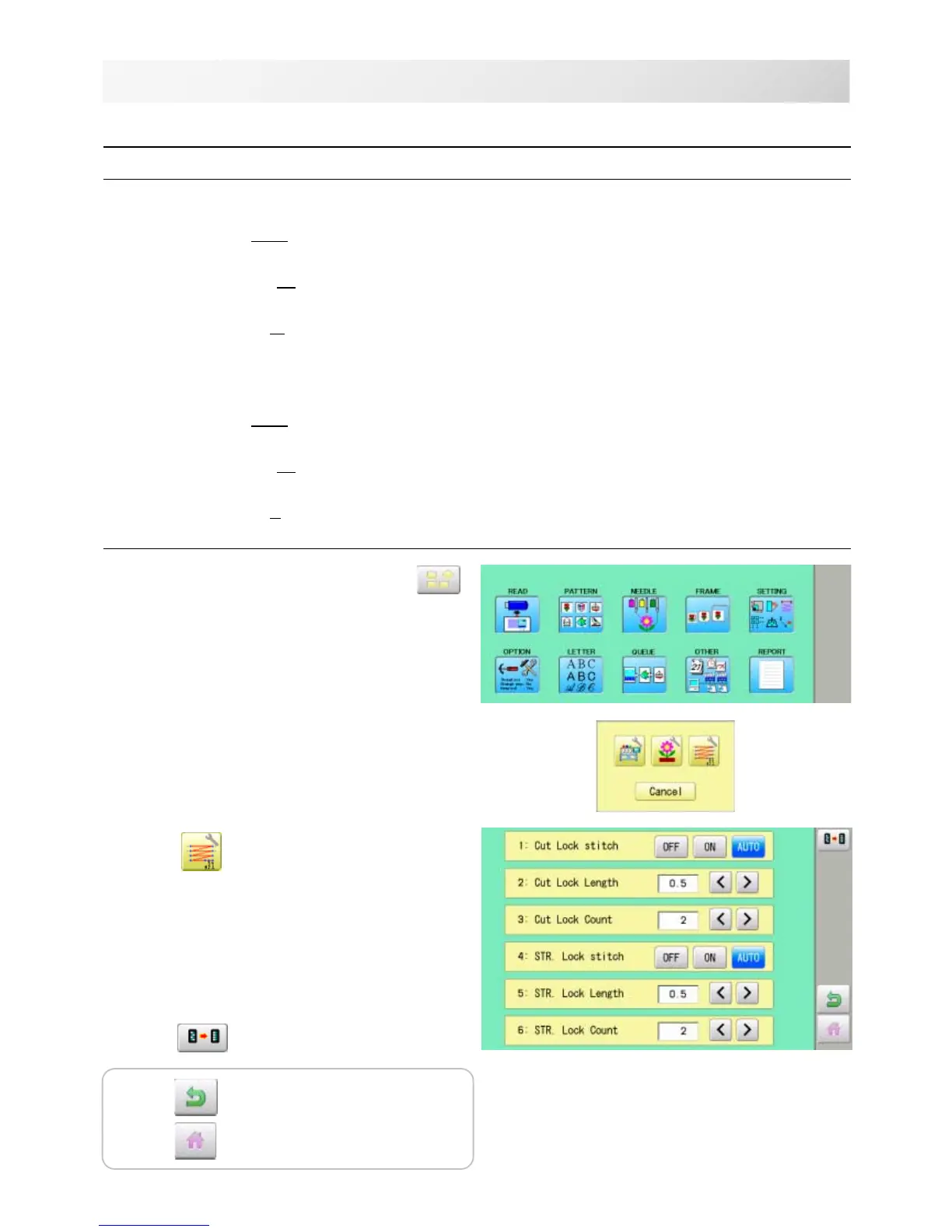
1. When the machine is stopped, press .
2. Select "OPTION".
3. Select
.
4. Select desired setting item and change the
setting.
Press when returning the setting on all the
needle numbers to default.
SETTING ITEM SETTING RANGE CONTENTS
1 Cut Lock stitch
OFF : Remove lock stitch when the machine cuts threads.
ON : Add lock stitch per SETTING ITEM 2 and 3 when the machine cuts threads.
AUTO : Add lock stitch when length of the stitch before thread cut is longer than length
set at SETTING ITEM 2.
2 Cut Lock Length 0.4~0.5~1.2mm : Set lock stitch length when "ON" or "AUTO" on SETTING ITEM 1 Cut Lock
stitch is selected.
3 Cut Lock Count 1 ~ 2 ~ 3 : Set number of lock stitch when "ON" or "AUTO" on SETTING ITEM 1 Cut Lock
stitch is selected.
4 STR. Lock stitch Add Lock stitch when the machine starts sewing.
OFF : Remove lock stitch when the machine stars.
ON : Add lock stitch per SETTING ITEM 5 and 6.
AUTO : Add lock stitch when length of the stitch before the machine starts sewing cut is
longer than length set at SETTING ITEM 5.
5 STR. Lock Length 0.4~0.5~1.6mm : Set length of lock stitch when "ON" or "AUTO" on SETTING ITEM 4 Cut Lock
stitch is selected.
6 STR. Lock Count 1 ~ 2 : Set number of lock stitch when "ON" or "AUTO" on SETTING ITEM 4 Cut Lock
stitch is selected.
Settings to lock stitches.
Press to return to Menu mode.
Press
to return to Drive mode.



 To Next Page