-SA -79
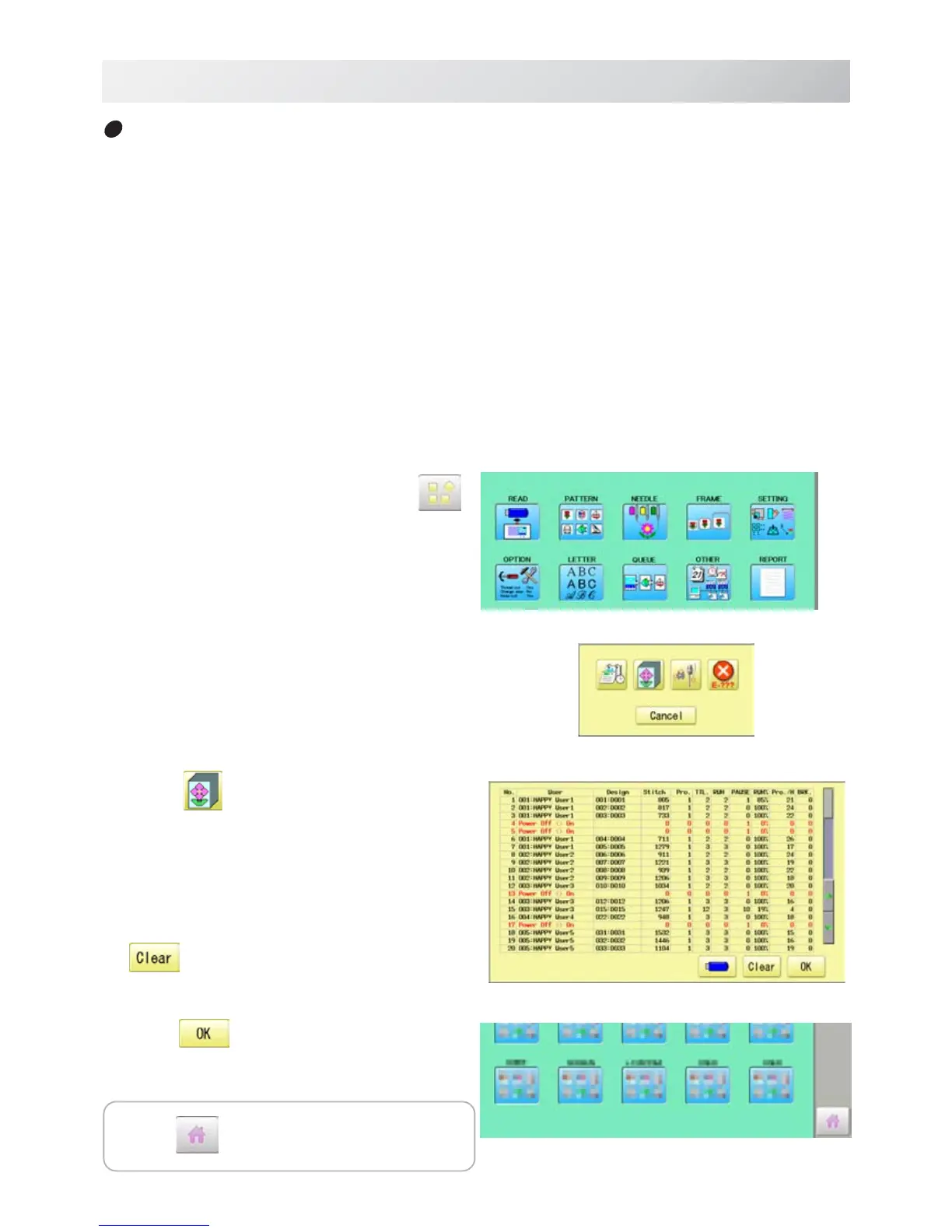
1. When the machine is stopped, press .
2. Select “REPORT”.
3. Select .
4. In order to exit the mode, proceed to the
step 5.
If you want to delete the record, press
.
4. Press
.
The display returns to MENU.
19-1b
REPORT
22_4b O901
Detailed production data
You can view following detailed production data for each user. (Max 4,096 data)
ITEMS
[No.] Number : Sequence number of the records
[User] *1 User ID : The ID number of embroidery machine operator
User Name : The name of embroidery machine operator
[Design] Design ID : The ID number of embroidery design
Design Name : The name of embroidery design
[Stitche] Stitches : The number of stitches of embroidery design
[Pro.] Output : Quantities of production
[TTL.] Total time (min.) : The total required time (minutes) to complete the embroidery design
[RUN] Running time (min.) : The machine running time to embroider the design
[PAUSE] Pause time (min.) : The pause time in the middle of embroidery
[Run %] Operating rate (%) : Running time / Total time
[Pro./H] Productivity : Quantity of the production per hour
[BRK.] Number of thread breakage : The number of thread breakage within one production cycle
*1 :When machine main switch is operated (On/Off), "Power off <> on" will be displayed in "User Name"
section.
Press to return to Drive mode.


 To Next Page