-SA -55
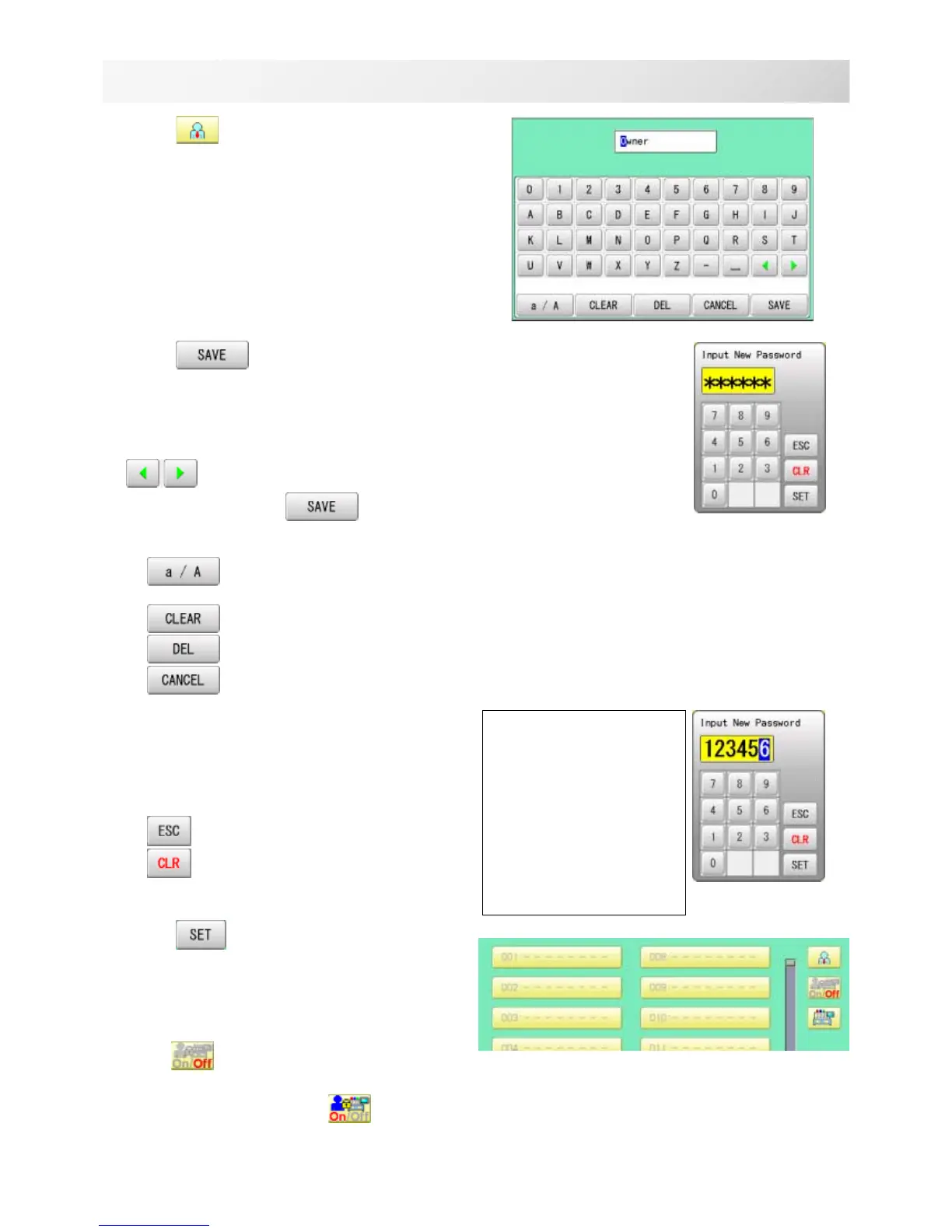
4. Press .
5. Press
, in case you do not need to
change the administratorÅfs name.
When you prefer to change the
administrator's name, move cursor with
then, enter new name from the
keyboard and press
.
The maximum number of characters is 16 letters.
Uppercase and lowercase letter are
switched.
All the letters are deleted.
Selected number is deleted.
Cancelled.
6. Enter arbitrary 6 digits number as pass-
word.
Enter “000000” if you do not want to use pass-
word.
Please keep your password safe.
Cancelled.
Numbers are deleted.
7. Press .
Password is fixed.
8. Push to activate the User manage-
ment function.
The icon will be changed to .
Proceed to step 9, if you do not want to use
the User management function.
USER MANAGEMENT
21_4 NB01
22-4
CAUTION
If you lost the pass-
word, you may not be
able to access the
User management
function.
Please contact your
dealer, if you have
forgotten or lost your
password.


 To Next Page