A
B
C
D
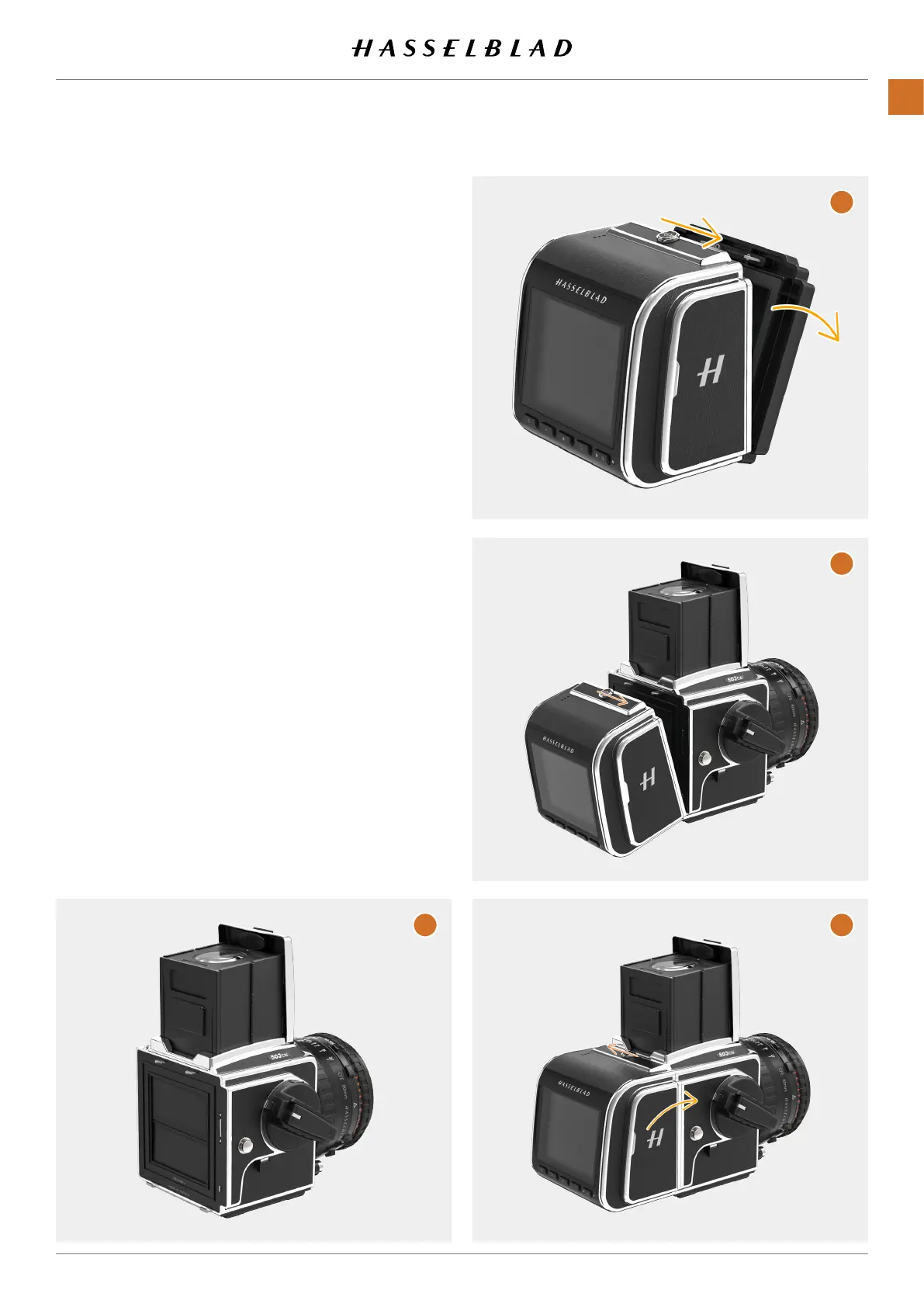
ATTACH THE CFV TO THE CAMERA
Preparethecamerabyrstremovingthelmmagazine.
(A)
ThisistoshortenthetimeneededtoattachtheCFVinorder
tocollectaslittledustaspossibleonthesensor.
Note!
IfthisisthersttimetheCFVisused,pleaseremovethe
protectivelmfromthesensorbeforeattachingtothe
camera.
RemovetheprotectivecoverfromtheCFVbyslidingtheLock
Buttontotheleft(theprotectivecoverisfacingyou).Swing
thecoverfreefromtheCFVandputitaside.
(B)
Tominimize
dustonthesensor,trytokeepthetimeuntilyouhave
attachedtheCFVtothecamera,asshortaspossible.Also
performthisprocedureinadustfreeenvironment.
AttachtheCFVtothecamerainthesamewayasanormallm
magazine.Holdthelockbuttonintheopenposition
(C)
until
theCFVisfullymountedonthecamera,thenreleasethelock
button(D).MakesuretheCFVissecurelyxedtothecamera.
CFV II 50C USER GUIDE www.hasselblad.com
18
QUICKSTART
CONTENTS



 To Next Page
 Loading...










