B
E
G
K
I
L
M
F
C
D
H
J
A
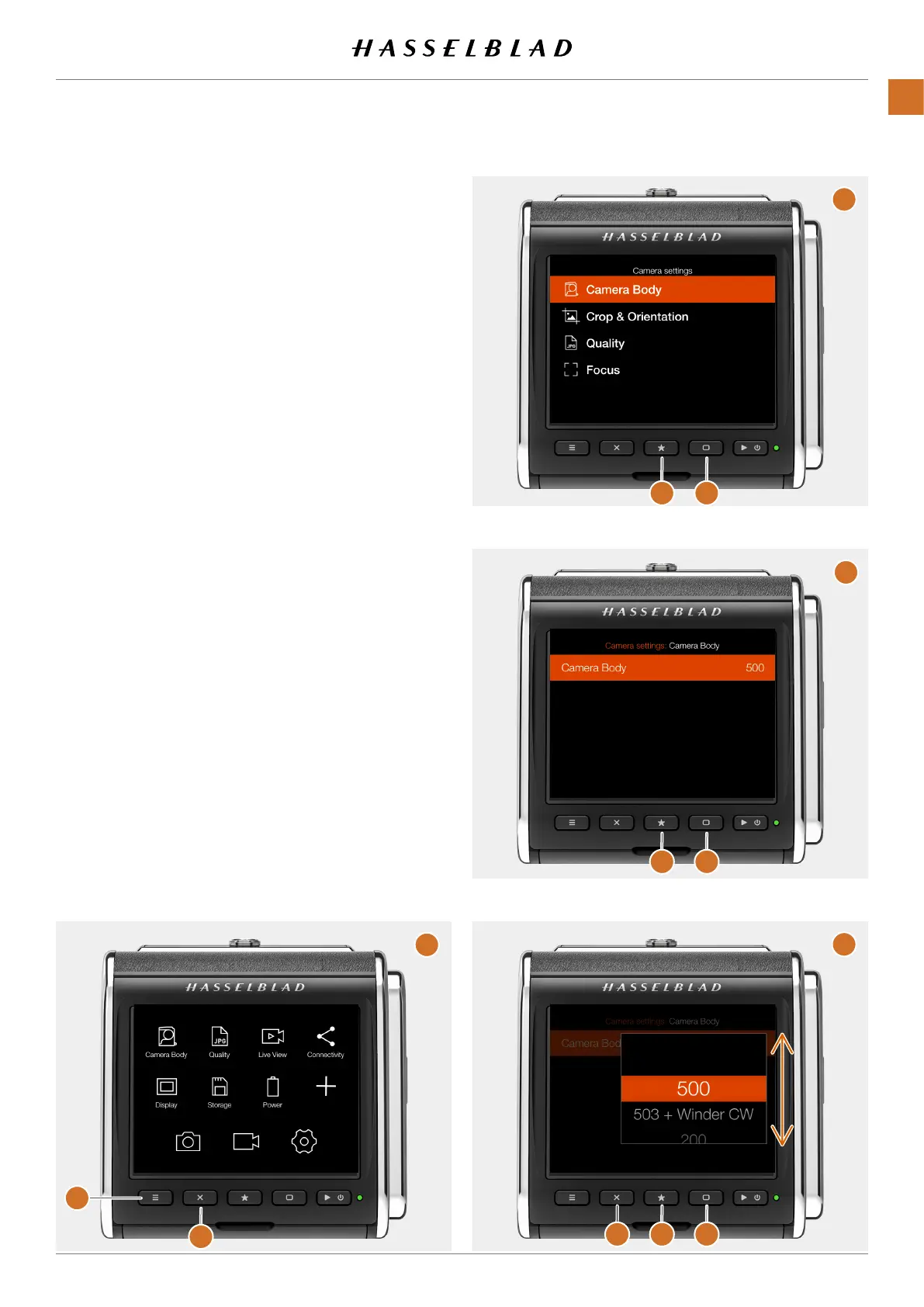
Using buttons
Threebuttonsareusedformenunavigation:Crossbutton
(B)
,Starbutton
(G)
andRectanglebutton
(E)
.TheRectangle
buttonmovestheselectiondownandtheCrossbuttonmoves
up.TheStarbuttonenterstheselection.
● PresstheMenubutton(A)toshowthemainmenu
(C)
● PresstheCrossbutton
(B)
toenterthecamerasettings
menu
(C)
.
● PresstheRectanglebutton(E)tohighlightthetopitem
(D)
.
● PresstheStarbutton
(F)
toentertheCameraBody
settings.
● PresstheRectanglebutton
(G)
tohighlightthetopitem
(H)
.PresstheStarbutton
(I)
toenterthesetting
(J)
.
● UsetheRectanglebutton
(K)
tomovetheselection
downandtheCrossbutton
(M)
tomoveup.Whenthe
correctcameratypeisselected,presstheStarbutton
(L)
tomaketheselection.
CFV II 50C USER GUIDE www.hasselblad.com
36
PARTS&CONTROLS
CONTENTS



 To Next Page
 Loading...










