A
B
C
D
E
2
3
4
1
CFV II 50C USER GUIDE www.hasselblad.com
62
USINGTHECFV
CONTENTS
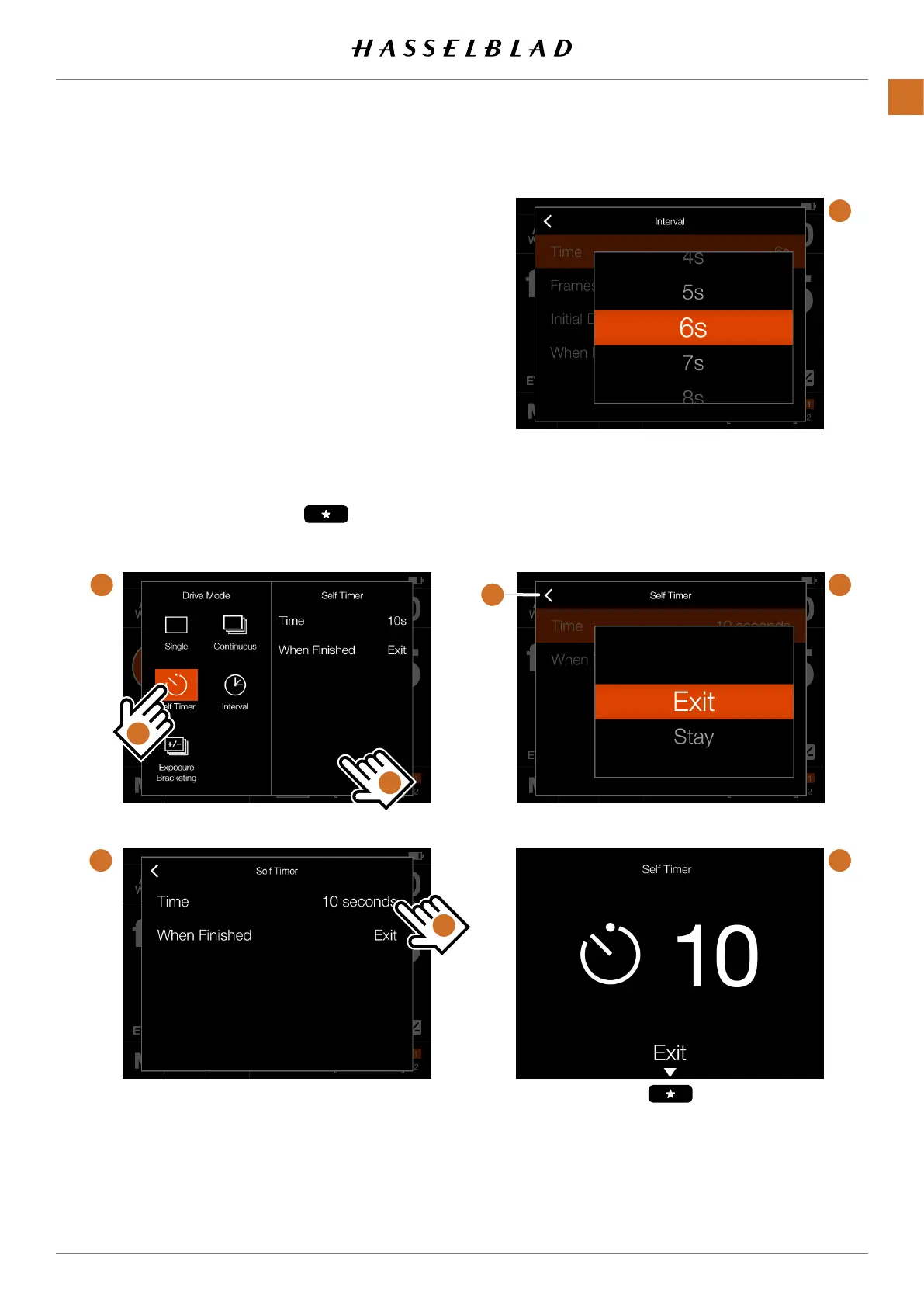
SELF TIMER SETTINGS
Onthecontrolscreentapthedrivemodeicontobringupthe
settingsscreen(A).
Taptheselftimericon(1).Tochangesettings,taptheright
panel (2)toshowthesettingsmenu(B).
Tochangeanyofthesettings,tapthevalue(3)tobringupany
ofthescreens(E)or (F).
Whenthesettingsaremade,taptheleftarrow(4)toreturnto
thedrivemodesettingsscreen.Finally,taptheselftimericon
againtomakeitactive.
Whentheshutterreleaseisfullypressed,therearscreen
willshowthecountdownscreen(E).Afterthepre-settimeis
elapsed,theexposurewillbemade.
Select ExitbypressingtheStarbutton ifyouwantto
canceltheselftimer.



 To Next Page
 Loading...










