B
D
F
A
E
G
C
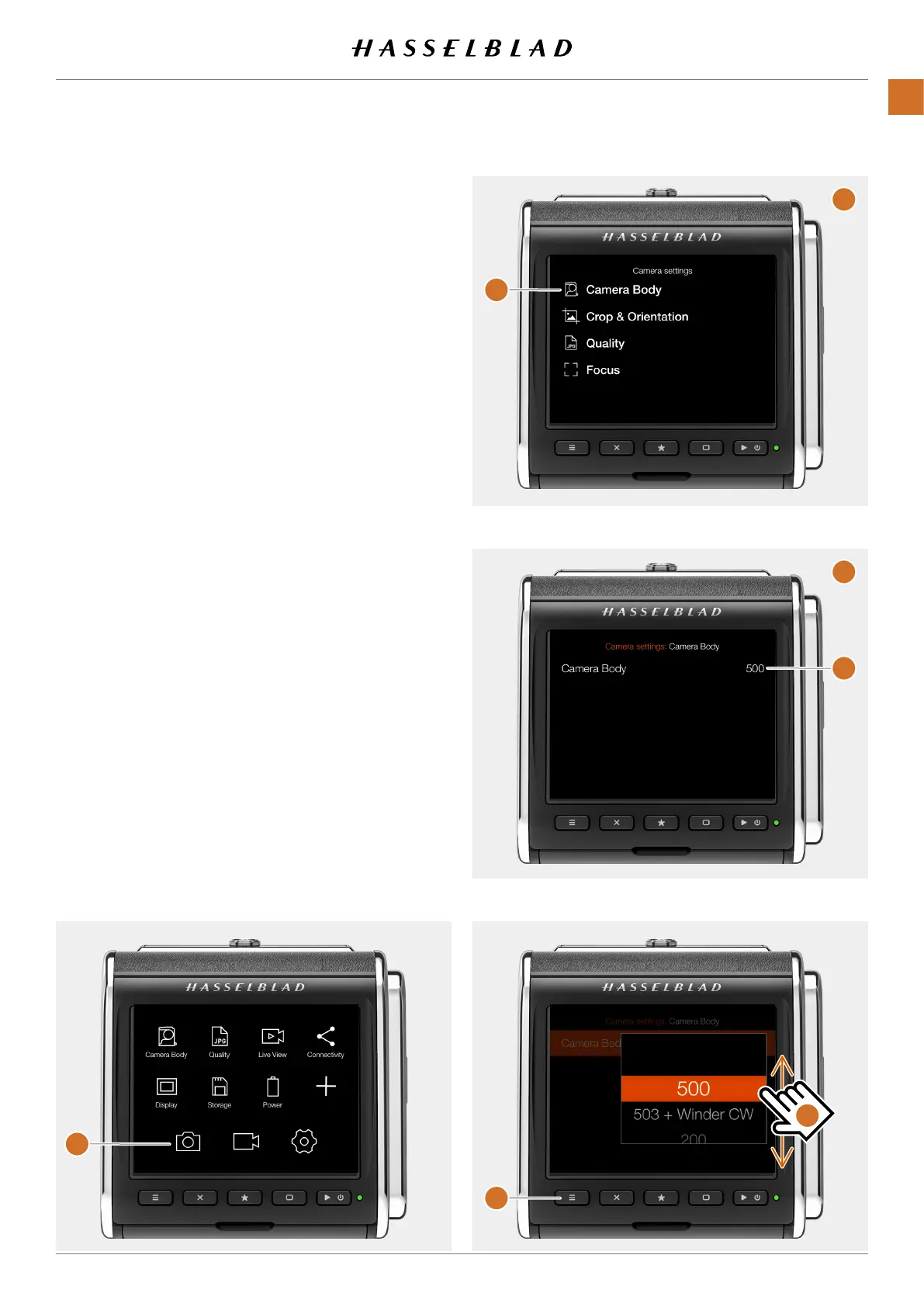
MENU SCREEN NAVIGATION
AllsettingsoftheCFVareavailableinthemenusystemwhich
isenteredbytappingoneoftheiconsatthebottomofthe
screensasdescribedonpage33.
Youcanusethemenusystemeitherbyusingtouchorby
usingthebuttonsasdescribedonthenextpage.
Using Touch
● Tapthecamerasettingsicon
(A)
● Themenuscreenforcamerasettingsappears
(B)
.
● TapCameraBody
(C)
.
● Thecamerabodysettingsscreenappears
(D)
● Tapthevaluetotheright
(500)
toshowthesettings
screen
(E)
● Selectthedesiredcamerabodybyswipingthelist
(F)
● Thedisplaywillreturntothemainmenuscreen
(A)
● Toexitwithoutsavingthesetting,pressthemenu
button
(G)
CFV II 50C USER GUIDE www.hasselblad.com
35
PARTS&CONTROLS
CONTENTS



 To Next Page
 Loading...










