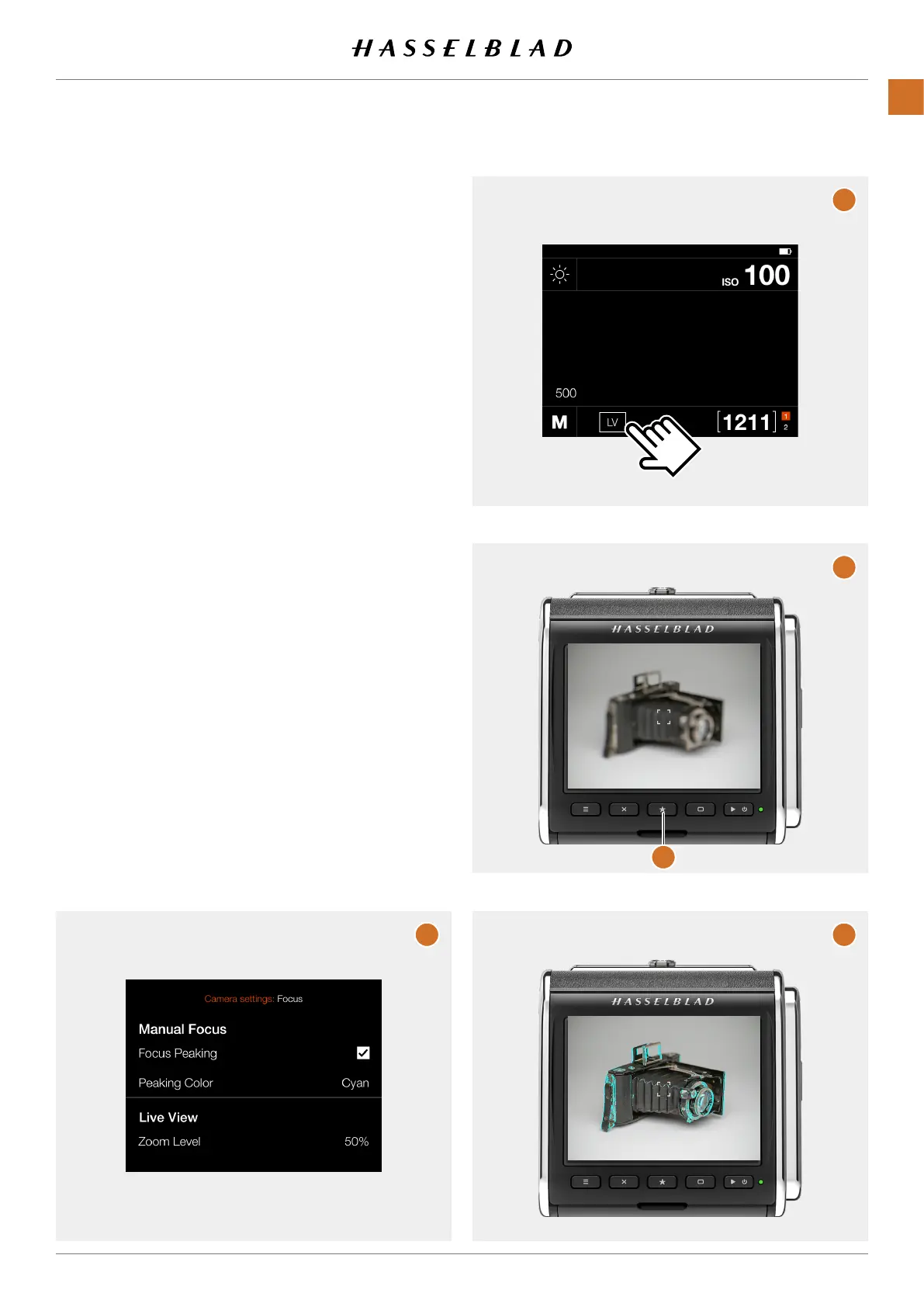
5.6 FOCUSING USING FOCUS PEAKING
In Camera Settings > Focus,thesettingFocus Peaking will
addanoverlayontopoftheliveviewimagewheresharp
areasofthesubjectarehighlightedusingaselectablecolor.
Thismethodmaynotbeaspreciseas100%zoom-in,butisin
manycasesbeafastwaytoachievegoodresults.
Setthecameraforliveview.Seesectionstartingonpage
50fordetailshowtosetthecamera.
Onthecontrolscreen,taptheLVicon(B).
Whenthesubjectisoutoffocus(C)nocoloroverlayisshown.
Turnthefocusingringuntilthemainpartsofthesubject
ishighlightedincolor.Thisindicatesthatthemainsubject
partsareinfocus.Tocheckdetails,presstheStarButton(1)
ordouble-tapthescreentozoominto50%or100%.Focus
peakingistemporarilydisabledin50%or100%zoom.
A
B
C
D
1
CFV II 50C USER GUIDE www.hasselblad.com
49
USINGTHECFV
CONTENTS



 To Next Page
 Loading...










