5.12 THE CFV ON A CAMERA USING
FLASH-SYNC
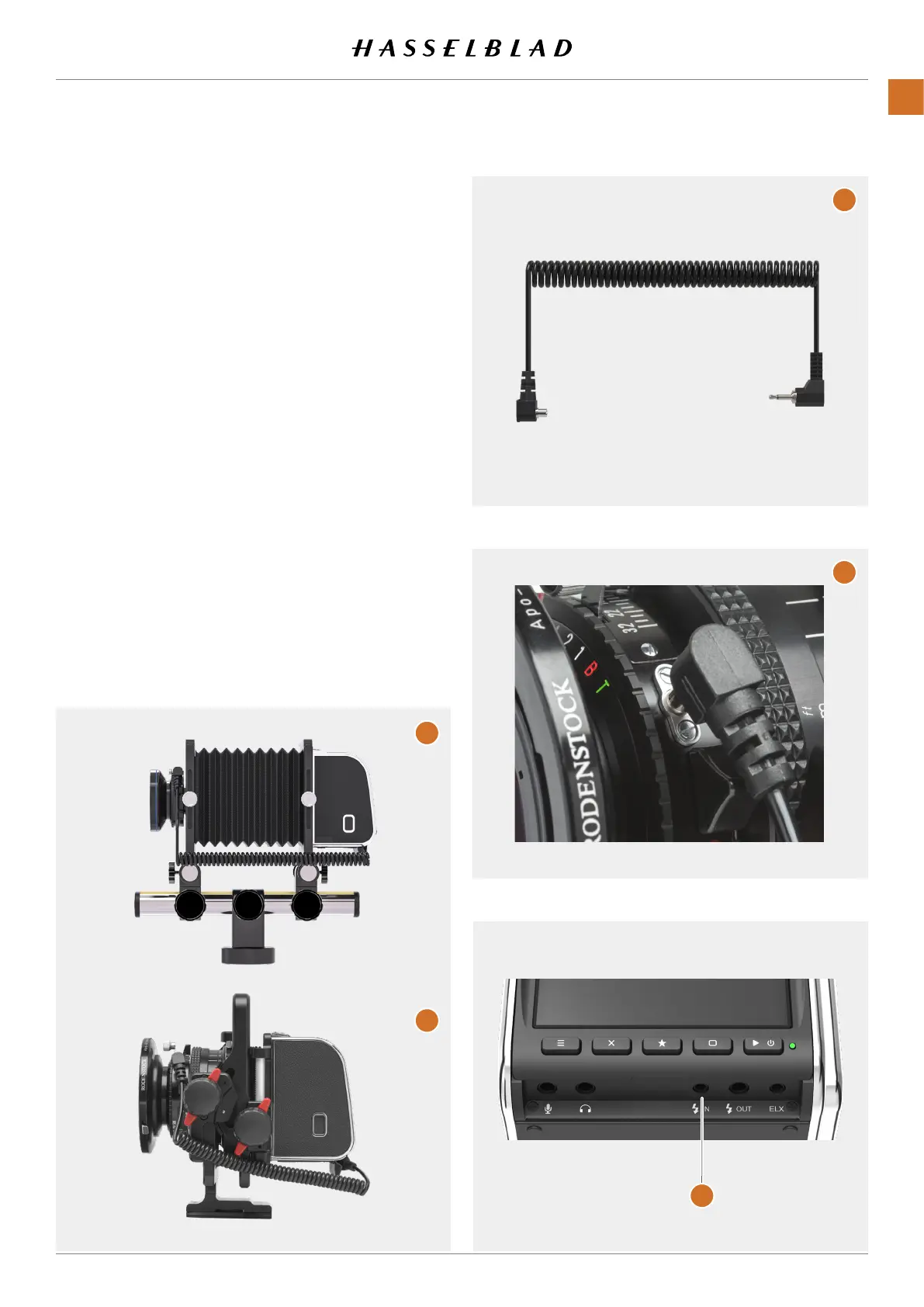
TheAny(FlashSync)settinginthecamerabodymenu(see
page69)isforcamerashavingaashsyncsocketandthat
arenotlistedinthecamerabodysettingmenu.Examplesof
suchcamerasaretechnicalcameras/Viewcameras(A) and
ArcBodycameras(B).
Thebasicoperationisdescribedinthequickstartchapteron
page16.
● SetcamerabodytypetoFlashSyncasdescribedon
page69.
● ConnecttheFlashSyncInputcable(C)fromthesync
socketofthelens(D)totheFlashSyncinputonthe
CFV (E).
START LIVE VIEW WITH A CAMERA USING ANY
(FLASH SYNC)
1 Makesurethelensisopen.Detailsonhowtodothis
dependsontheactuallens.
2 ActivateliveviewontheCFV.
3 PresstheMenubuttonorPlay/On-OffbuttontoendLive
View.
A
B
C
D
E
CFV II 50C USER GUIDE www.hasselblad.com
57
USINGTHECFV
CONTENTS



 To Next Page
 Loading...










