119
1
CHANGING TITLE OF PLAY LIST (TITLE)
The play lists have serial numbers in the order you have created them, along with the created dates/
times: You can change this title at any time.
1 Press the DISC NAVIGATION button.
2 Press the MENU button.
3 Use the f/e/d/c/A buttons to
choose “Title” on the “PlayList” menu screen,
and then press the A button.
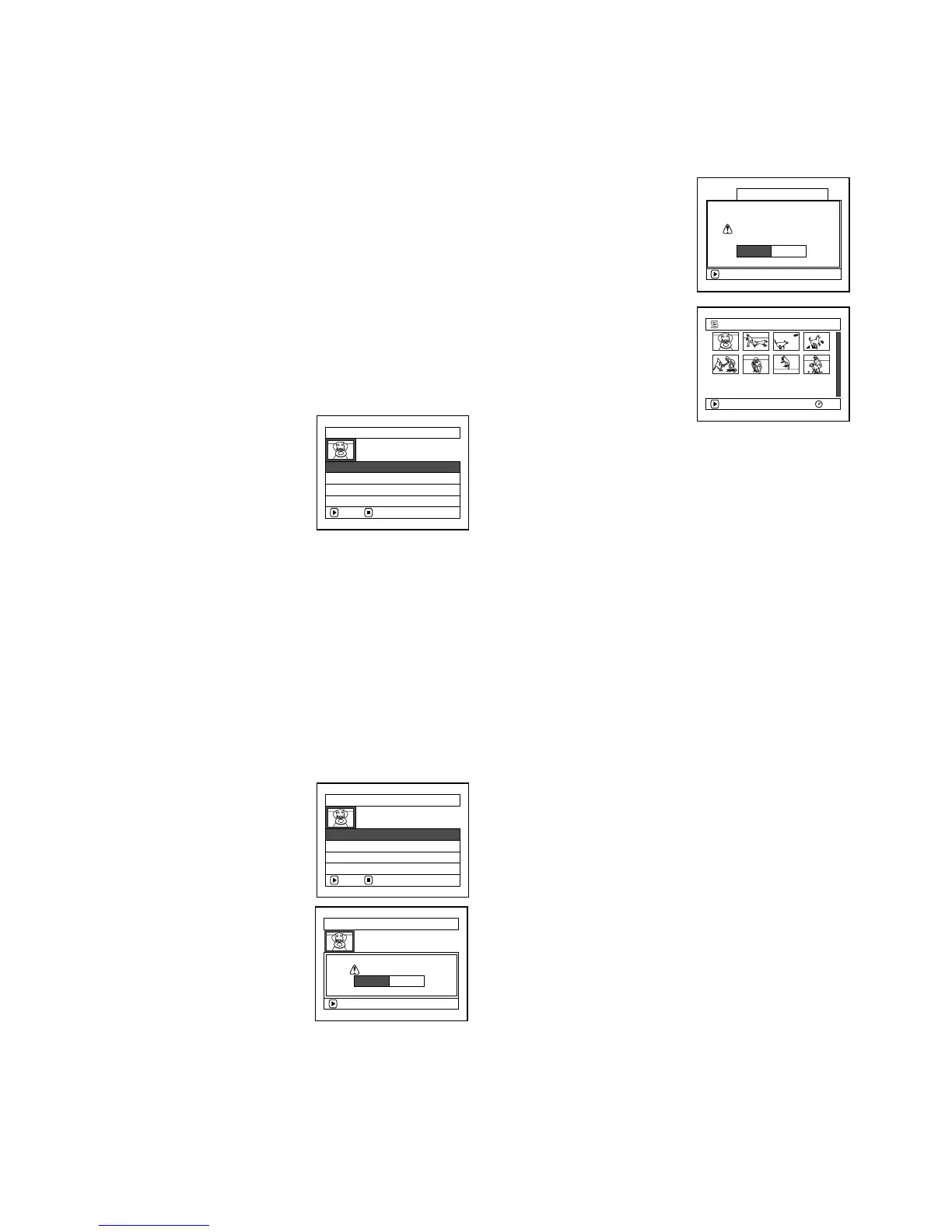
4 Use the “Playlist Title” screen to select the
play list whose title you wish to change, and
then press the A button.
See “CHANGING
TITLE OF
PROGRAMME
(TITLE)” on page 111
for how to enter a title.
5 The screen for verifying
exit will appear: Choose
“YES” and then press
the A button.
6 Press the C button to
quit.
After changing the title,
the Disc Navigation
screen on the play list
whose title has been
changed will appear.
Note:
The registered title can be changed at any time using
the same procedure.
1
DELETING PLAY LIST (DELETE)
1 Press the DISC NAVIGATION button.
2 Press the MENU button.
3 Use the f/e/d/c/A buttons to
choose “Delete” on the “PlayList” menu
screen, and then press the A button.
4 Use the “Delete
Playlist” screen to select
the play list you wish to
delete, and then press
the A button.
5 The screen for verifying deletion will appear:
Choose “YES”, and then press the A
button.
Choose “NO” to cancel deletion.
After Yes or No setting, the Disc Navigation
screen of all programmes will be restored.
Note:
• Even if you delete a play list, the original scenes
stored on disc will not be deleted.
• If any play list is deleted, the number of play lists will
automatically be revised. (For example, if the No. 2
play list is deleted, the No. 3 play list will become No.
2 play list.)
PlayList Ti t le
ENTER RETURN
01 30/ 8/2006 12:30
02 10/ 9/ 2006 8: 00
03 12/ 9/ 2006 9: 30
04 20/ 9/ 2006 15 :15
ENTER
Finish title setting?
TITLE at a Par k
YES NO
001/ 008
PLAY
RAM
01 at a Park
Delete PlayList
ENTER RETURN
01 30/ 8/2006 12:30
02 10/ 9/ 2006 8: 00
03 12/ 9/ 2006 9: 30
04 20/ 9/ 2006 15 :15
Delete PlayList
Delete PlayList?
PlayList No. 01
ENTER
30 / 8 /2006 12:30
YES NO










 To Next Page