128
Removing Disc from Its Package
No disc in package – such as in DVD Round Holder, square cartridge or caddy case – can be used on
this DVD video camera/recorder: Remove the disc from the holder, cartridge or caddy when using.
The way to remove a disc from its package may vary with the disc maker: See the disc instruction
sheet.
The following explains how to remove the discs made by Hitachi Maxell:
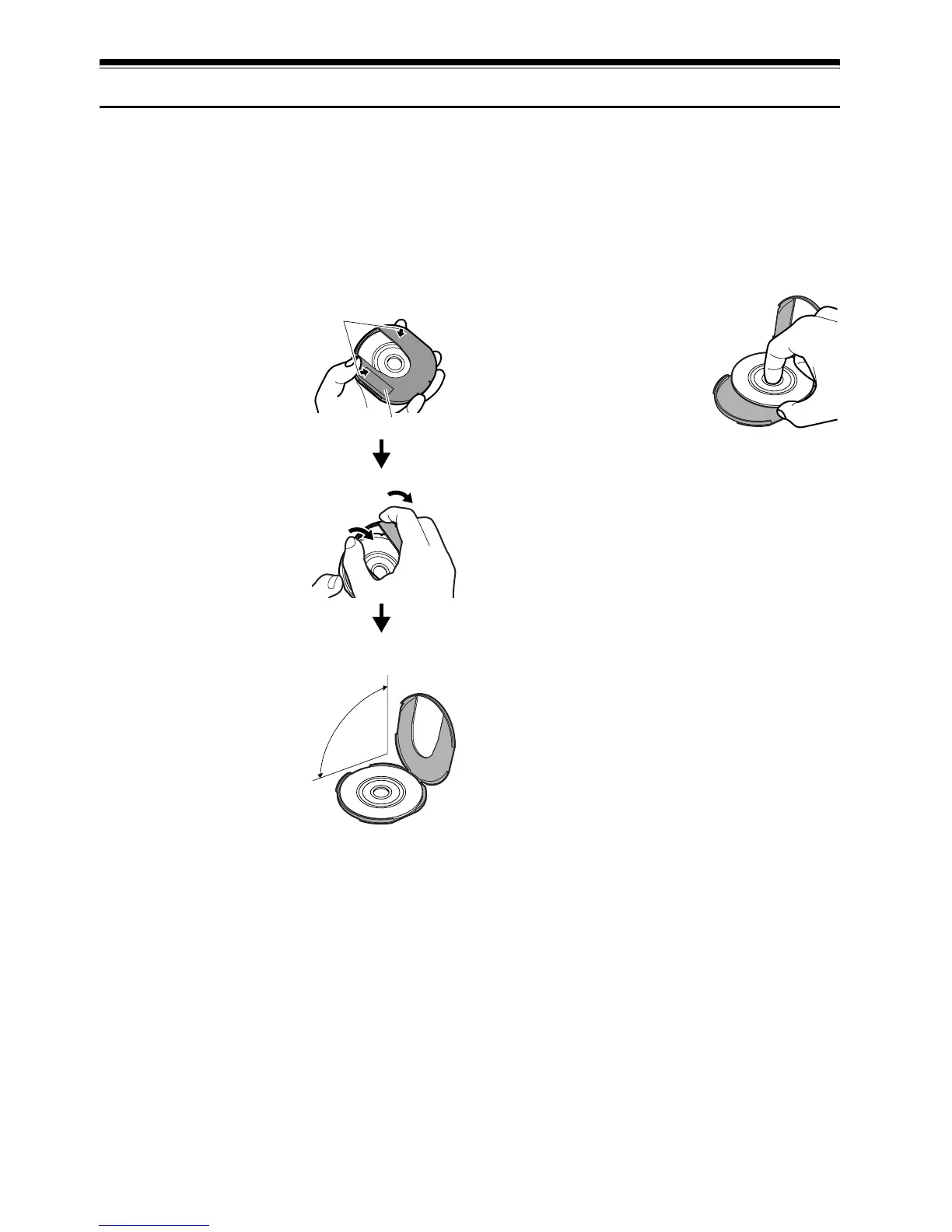
REMOVING AND REPLACING FROM/IN ROUND DVD HOLDER
1 Hold the Round DVD
Holder with SIDE A
facing up. While
pushing the two release
levers in the direction of
arrows (1) marked on
holder, slowly open
SIDE A of the holder in
the direction of arrows
(2), taking care not to
drop the disc.
2 Without touching the
recording surface, hold
the disc edge and centre
hole to remove it.
1
1
2
2
SIDE A mark
Release
levers
Do not open
more than 90º.













 To Next Page