43
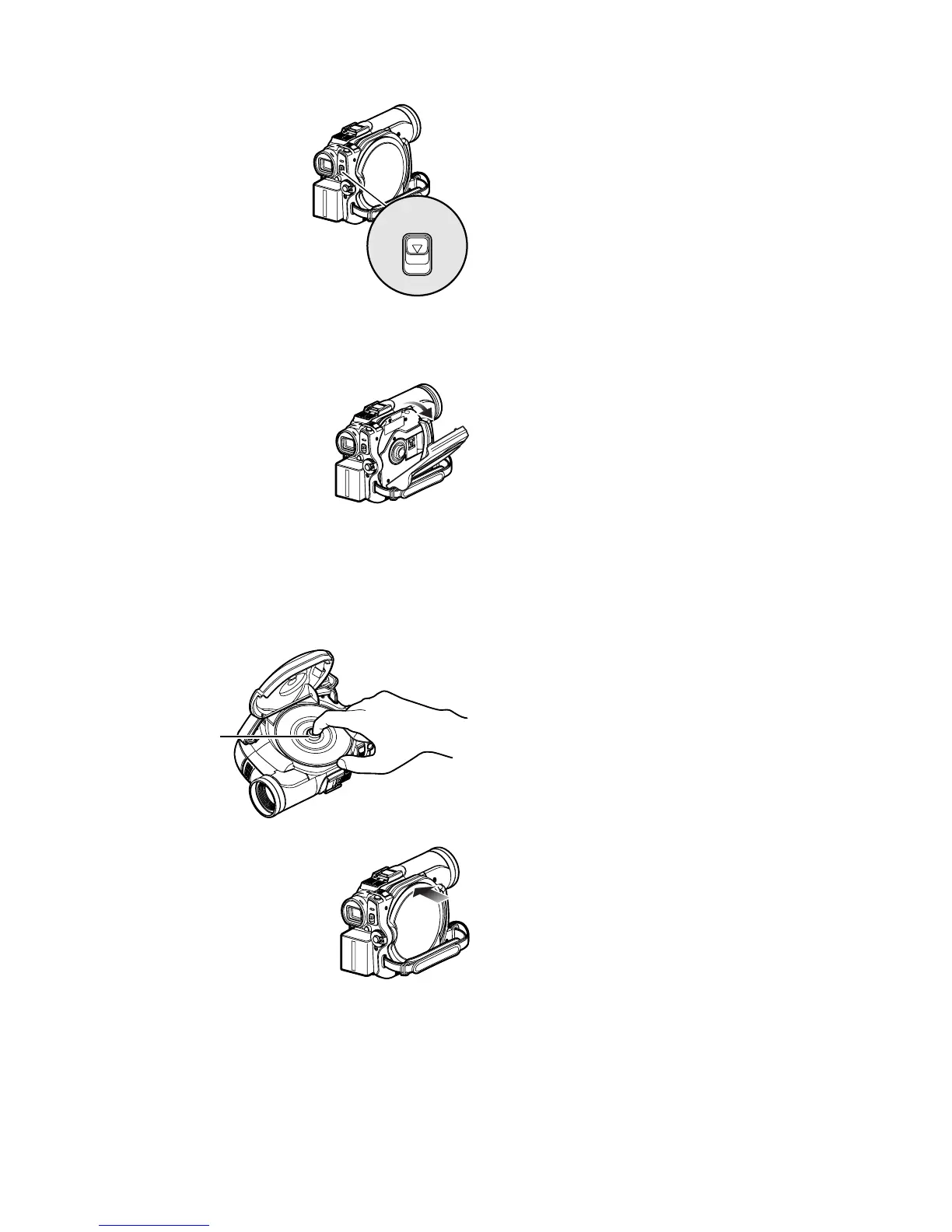
REMOVING DISC
1 Press down the DISC
EJECT button once and
release it.
In a moment, the cover
of disc insertion block
will open.
If the DVD video
camera/recorder is on
at this time, the
“EJECT” indicator will blink on the LCD
monitor or in the viewfinder.
2 Gently open the cover
fully until it stops.
3 Remove the disc.
While pushing down the centre portion of
turntable, pick up the disc, holding its edge,
to remove it.
4 Gently push the section
indicated “PUSH CLOSE”
on the cover of disc
insertion block, to close the
cover.
Note:
• Do not remove the battery or disconnect the AC
adapter/charger during removal of the disc or until
power is completely turned off: If you do, the disc
cover will not open. If this happens, reattach the
battery or AC adapter/charger, push down the DISC
EJECT button once, and then release it.
• Do not insert anything other than the 8 cm DVD-RAM
or DVD-R disc into the disc insertion block: Doing so
could cause malfunctions.
• When inserting or removing the disc, BE SURE NOT
to look into the lens in laser pickup: Doing so could
damage your eyesight.
DISC EJECT
Tur nta ble













 To Next Page