EasyManua.ls Logo

HITEC OPTIC 6 - Servo Directions

HITEC OPTIC 6
60 pages
Print Icon
To Next Page IconTo Next Page
To Previous Page IconTo Previous Page
Loading...
For more information - www.modelflight.com.au
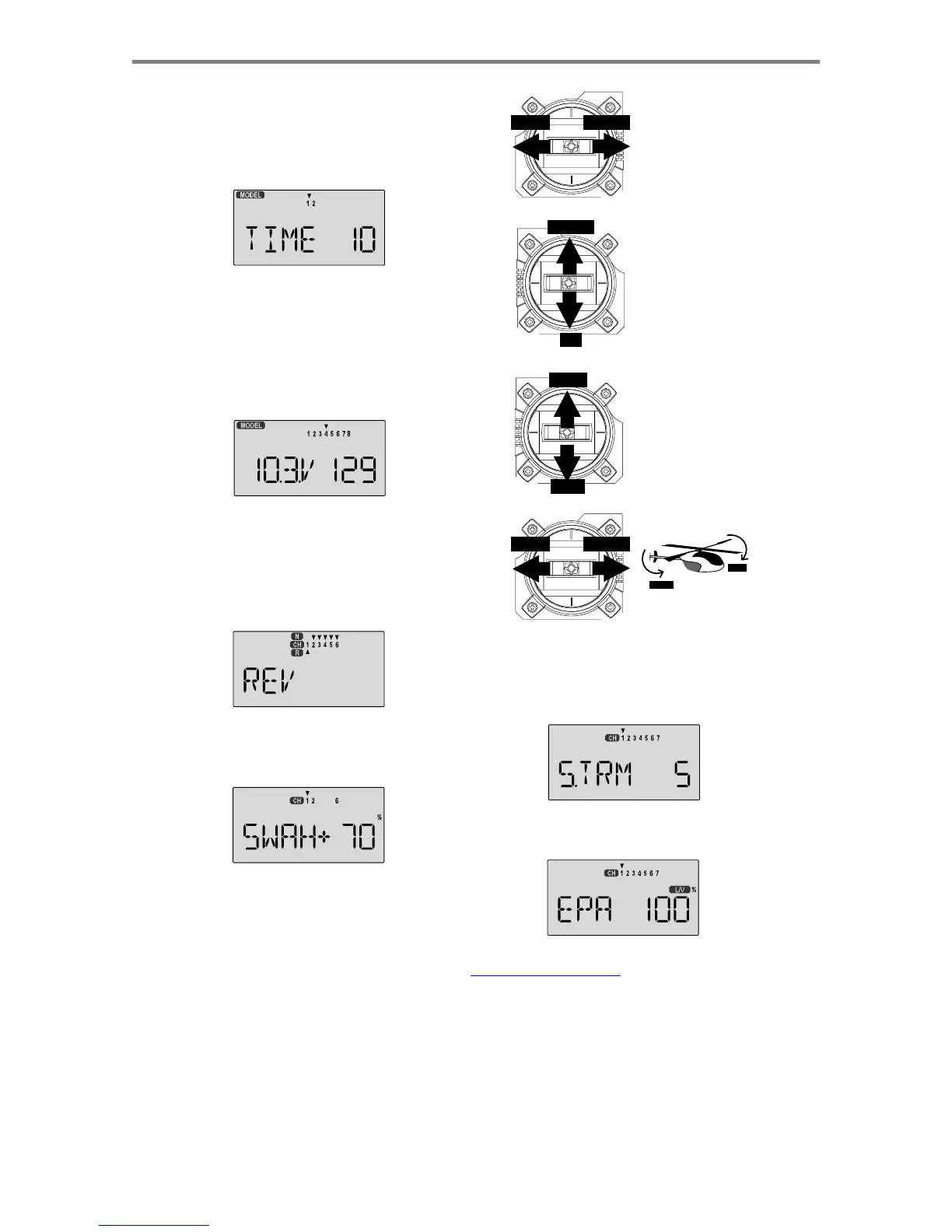
Helicopter
Setup
Instructions
9.
Set
the
stopwatch
.
Press
the
Down
arrow
four
times.
This
gets
you
into
the
Timer
menu
(
TIME
).
Use
the
Data
Increase
and
Decrease
keys
to
select
the
amount
of
time
you
want
the
stopwatch
to
count
down.
This
is
handy
to
keep
track
of
engine
running
time
so
you
don't
run
out
of
gas.
You
can
set
a
second
timer
for
a
different
amount
of
time.
Right
Aileron:
swashplate
tilted
LEFT RIGHT
towards
chopper's
right
side.
Left
Aileron:
swashplate
tilted
towards
the
left
side.
10.
This
completes
the
initial
part
of
the
setup.
Now,
we'll
go
ahead
and
customize
the
settings
for
your
model.
Switch
transmitter
power
OFF
.
11.
Switch
transmitter
power
back
on
and
transmitter
should
display
the
model
number
and
battery
voltage
as
shown.
The
number
on
the
right
is
the
elapsed
time,
which
will
vary
depending
on
how
long
the
transmitter
has
been
left
on.
DOWN
UP
HIGH
LO
W
Down
Elevator:
swashplate
tilted
towards
chopper's
front.
Up
Elevator:
swashplate
tilted
towards
the
rear.
HIGH
Position:
high
rotor
pitch
A
ND
carburetor
fully
opened.
LOW
Position:
low
rotor
pitch,
carburetor
at
idle
(use
trim
tab
to
full
y
close
)
12.
Servo
Directions
.
Check
the
proper
direction
of
throw
for
each
servo.
Use
the
reversing
function
[
REV
]
to
reverse
channels
as
necessary
to
get
proper
throw
directions.
If
you're
using
the
120
°
swashplate,
please
read
the
SWAH
menu
instructions
on
page
53
to
see
how
your
model
responds
to
the
different
commands.
LEFT RIGHT
RIGHT
LEFT
14.
Servo
Neutrals
.
First,
be
sure
the
hovering
pitch
and
hovering
throttle
levers
on
the
sides
of
the
radio
are
centered.
Set
up
all
linkages
so
that
all
servos
are
as
close
(
STRM
)
window
to
make
fine
adjustments
on
the
servo
neutrals.
13.
If
you're
using
120
°
swash
type,
please
use
the
swashplate
(
SWAH
)
menu,
page
53,
to
adjust
these
responses.
15.
Servo
Travel
.
Use
the
EPA
command
to
limit
servo
travels
to
prevent
binding.
Helico
p
ter
Set
u
p
Instructions
-
Pa
g
e
4
7

Table of Contents

Other manuals for HITEC OPTIC 6

Related product manuals