EasyManua.ls Logo

HP Portable PLUS - Page 76

HP Portable PLUS
177 pages
Print Icon
To Next Page IconTo Next Page
To Previous Page IconTo Previous Page
Loading...
8·10
Troubleshooting
Portable
PLUS
Computer
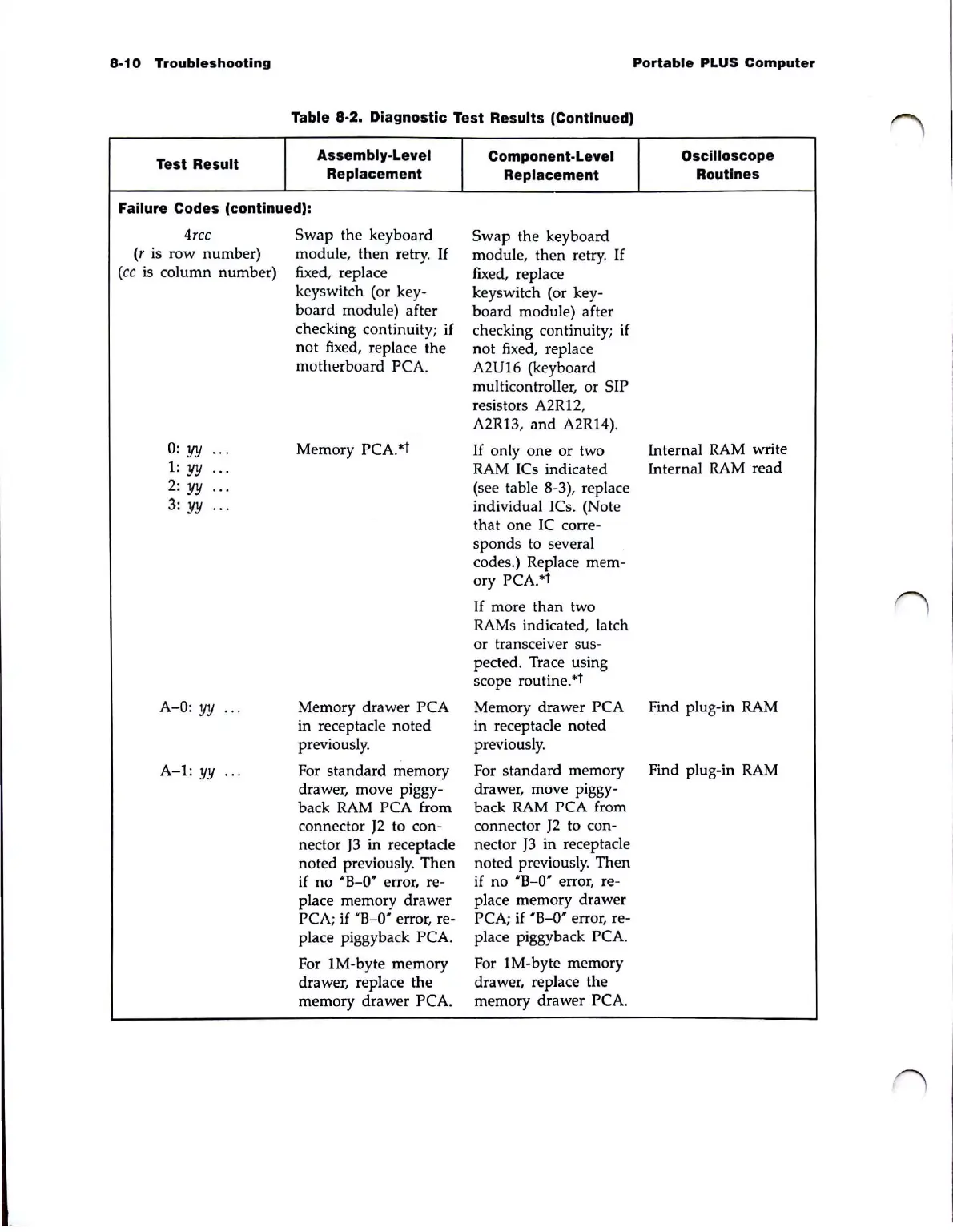
Table 8·2. Diagnostic Test Results (Continued)
Test
Result
Assembly·Level
Component·Level
Oscilloscope
Replacement
Replacement
Routines
Failure Codes (continued):
4rcc
Swap
the keyboard
Swap the keyboard
(r is row number)
module, then retry.
If
module, then retry.
If
(cc
is
column number)
fixed, replace
fixed, replace
keyswitch (or key·
keyswitch (or key-
board module) after
board
module) after
checking continuity; if
not fixed, replace the
not fixed, replace
motherboard PCA.
A2U16 (keyboard
multicontroller, or SIP
resistors A2R12,
A2R13, and A2RI4).
0:
yy ... Memory PCA.
ot
If
only one or two
Internal
RAM
write
1:
yy
...
RAM
ICs indicated
Internal RAM read
2:
yy
...
(see table 8-3), replace
3:
yy .. .
individual ICs. (Note
that one IC corre-
sponds to several
codes.) Replace mem-
ory PCA.°t
If
more than two
RAMs indicated, latch
or transceiver sus-
pected. Trace using
scope routine.
ot
A-O: yy
..
. Memory drawer PCA Memory drawer PCA
Find plug-in
RAM
in receptacle noted
in receptacle noted
previously. previously.
A-I:
yy
...
For standard memory For standard memory
Find plug-in RAM
drawer, move piggy-
drawer, move piggy-
back
RAM
PCA from
back
RAM
PCA from
connector
J2
to con-
connector
J2
to con-
nector
J3
in receptacle
nector
J3
in receptacle
noted previo
usly.
Then
noted previously. Then
if no 'B-O' error, re-
place memory drawer
place memory drawer
PCA; if 'B-O' error, re-
PCA;
if
' B-O' error, re-
place piggyback PCA.
For 1M-byte memory
For 1M-byte memory
drawer, replace the
drawer, replace the
memory drawer PCA.
memory drawer PCA.

Table of Contents

Related product manuals