Portable
PLUS
Computer
Troubleshooting
8·19
Table 8·5. Startup Problems (Continued)
Step
12.
Note
how
the unit has responded to key-
strokes during the previous steps.
I
Response
If
the unit has responded to some keys,
but
other keys
don't
get a response, check
the
key-
board function according to table 8-9,
"Repairing the
Keyboard:
If
the unit
hasn't
responded to
any
keys, check
the keyboard function according to table 8-9,
"Repairing the
Keyboard:
If
the unit has responded to all keys, repeat the
main diagnostic procedure (selecting the system
test from the test menu).
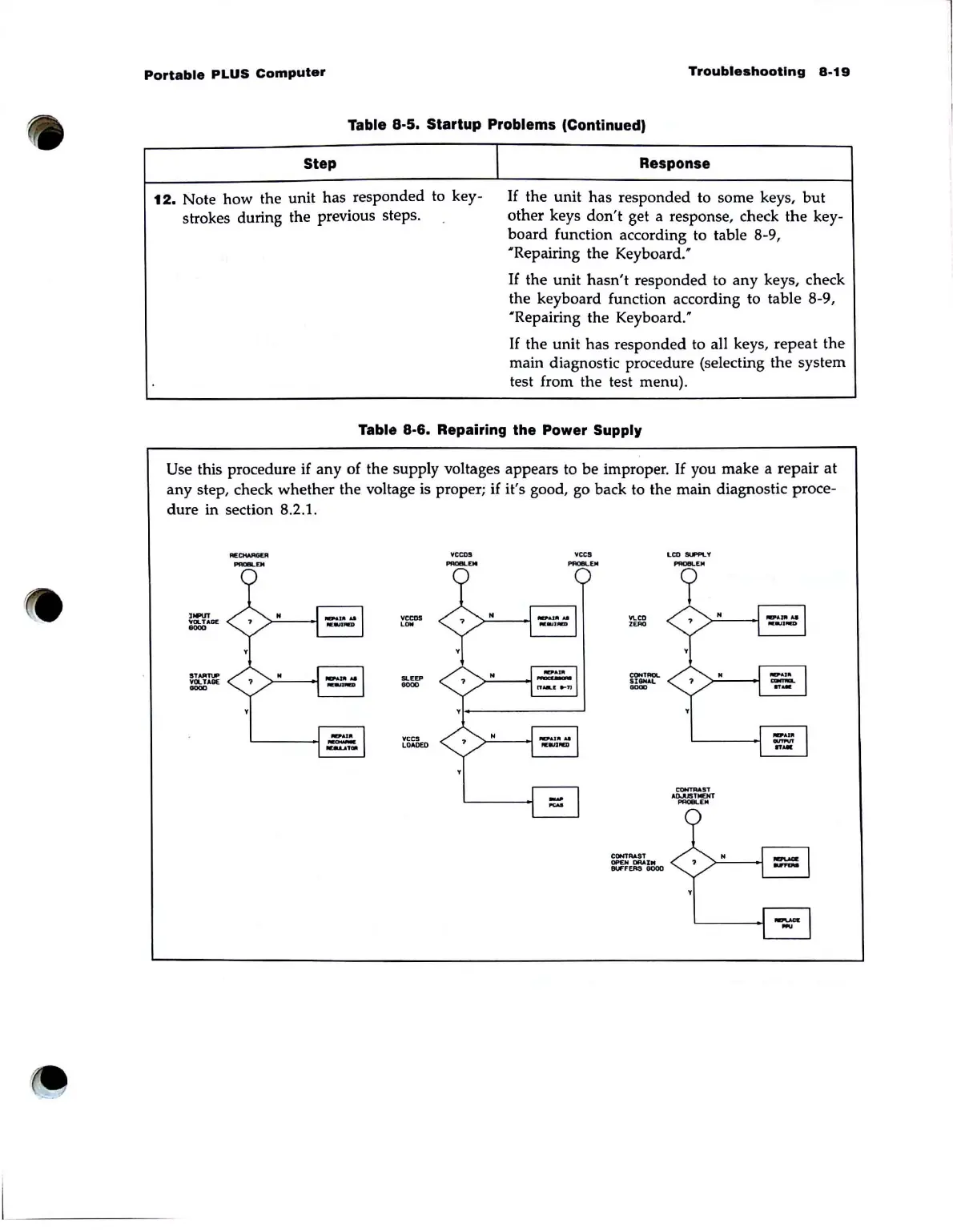
Table 8·6. Repairing the Power Supply
Use this procedure
if
any of the supply voltages appears to be improper.
If
you make a repair
at
any step, check whether the voltage is proper;
if
it's good, go back to the main diagnostic proce-
dure
in section 8.2.1.
.-.T
'1OLlABE
OOOD
.TAImIP
VOLTAGE
DODD
VCCDS
LON
ac
...
OODD
'ICC!
LDADEO
vceo!
_DO
'Ices
_EM
¥CCD
ZERO
CON'
....
........
DODD
CONTRAST
OP£H
DRAI
..
euFFEAS
GOOO
LCD
.......
V



 To Next Page