8-36
Troubleshooting
Portable
PLUS
Computer
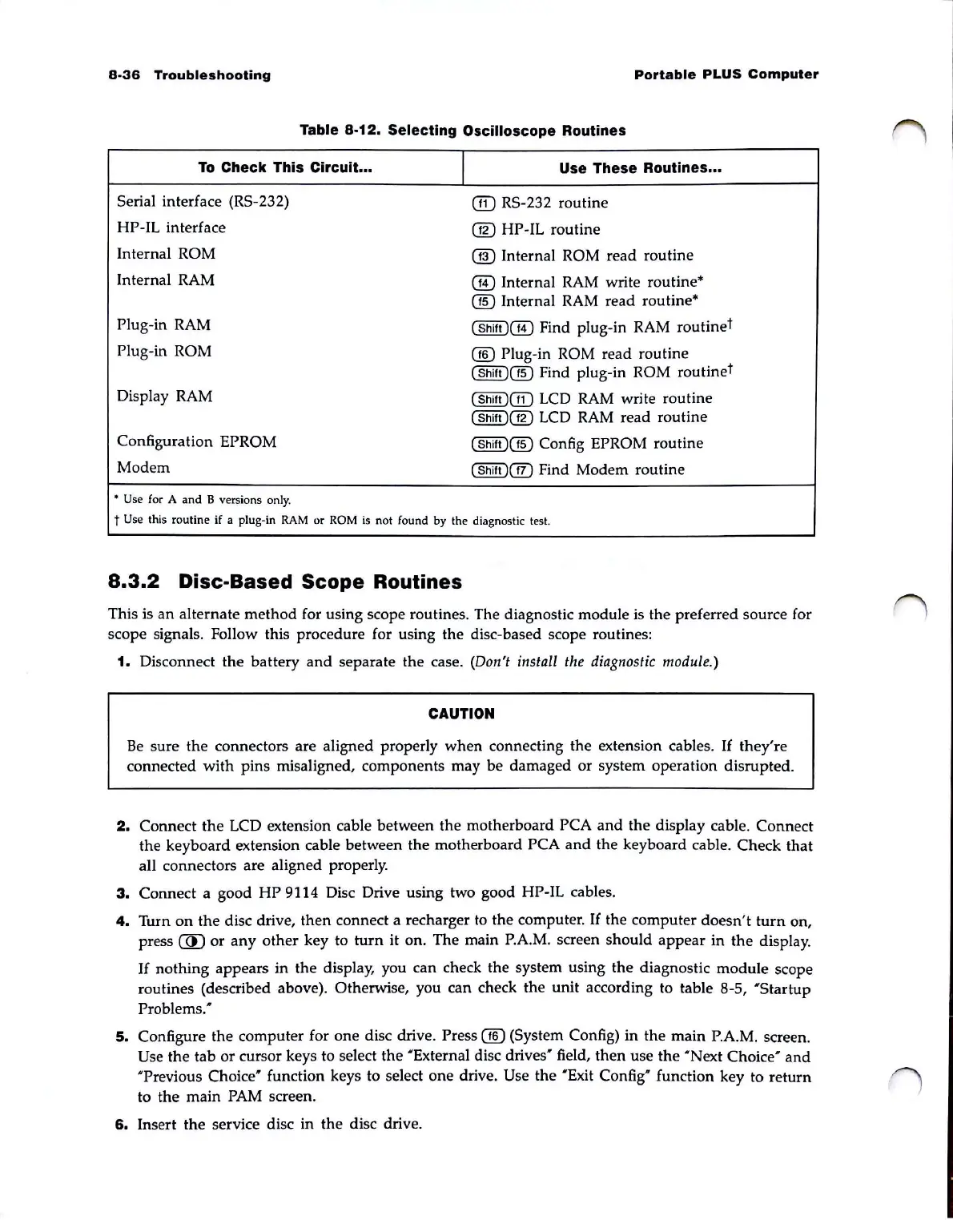
Table 8-12. Selecting Oscilloscope Routines
To
Check This Circuit ...
I
Use These Routines ...
Serial interface (RS-232)
@ RS-232 routine
HP-IL interface
@ HP-IL routine
Internal
ROM
@ Internal ROM
read
routine
Internal RAM
@ Internal RAM write routine*
@ Internal
RAM
read routine*
Plug-in RAM
(Shift
)@
Find plug-in RAM routine
t
Plug-in ROM
@ Plug-in ROM read routine
(Shift
)@
Find plug-in ROM routine
t
Display RAM
(Shift
)@
LCD RAM write routine
(Shift
)@
LCD
RAM
read
routine
Configuration EPROM
(Shift
)@
Con
fig
EPROM routine
Modem
(Shift
)@
Find Modem routine
• Use
for
A and B versions
only.
t Use this routine if a plug-in
RAM
or
ROM
is
not found by the diagnostic test.
8.3.2
Disc-Based Scope Routines
This is
an
alternate
method
for using scope routines. The diagnostic module is the preferred source for
scope signals. Follow this procedure for using the disc-based scope routines:
1. Disconnect
the
battery
and
separate
the
case. (DolI't
illstall
the diagllostic module.)
CAUTION
Be
sure
the
connectors are aligned properly
when
connecting the extension cables.
If
they're
connected
with
pins misaligned, components may
be
damaged
or
system operation disrupted.
2.
Connect
the
LCD extension cable between
the
motherboard PCA
and
the
display cable. Connect
the
keyboard extension cable between
the
motherboard PCA
and
the
keyboard cable. Check that
all connectors are aligned properly.
3.
Connect a good
HP
9114 Disc Drive using two good HP-IL cables.
4.
Turn
on
the
disc drive,
then
connect a recharger to
the
computer.
If
the computer
doesn't
turn
on,
press
@
or
any
other
key to
turn
it
on. The main P.A.M. screen
should
appear
in
the
display.
If
nothing
appears
in
the
display, you can check the system using
the
diagnostic
module
scope
routines (described above). Otherwise, you can check the
unit
according to table 8-5,
'Startup
Problems:
5.
Configure
the
computer for one disc drive. Press @ (System Config)
in
the
main P.A.M. screen.
Use
the tab
or
cursor keys to select
the
'External disc
drives'
field,
then
use
the
'Next
Choice'
and
'Previous
Choice'
function keys to select
one
drive. Use
the
'Exit
Con
fig' function key to
return
to the main PAM screen.
6.
Insert
the
service disc in
the
disc drive.



 To Next Page