8·20
Troubleshooting
Portable
PLUS Computer
Table
8·6.
Repairing
the
Power Supply (Continued)
Step
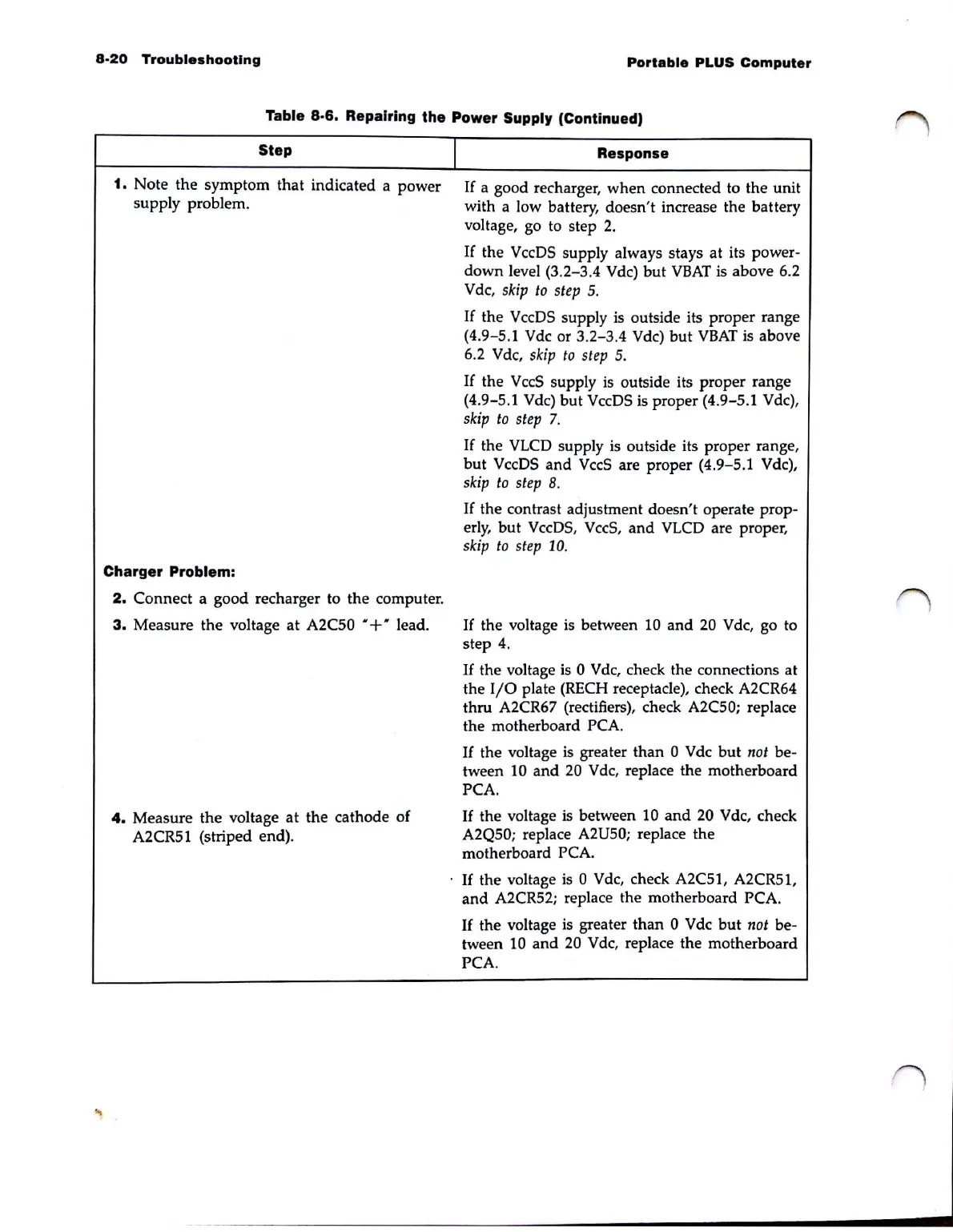
1. Note the symptom that indicated a power
supply problem.
Charger Problem:
2.
Connect a good recharger to the computer.
3.
Measure the voltage at A2C50
"+
" lead.
4.
Measure
the
voltage at the cathode of
A2CR51 (striped end).
I
Response
If a good recharger,
when
connected to the unit
with a low battery, doesn't increase the battery
voltage, go to step 2.
If
the VccDS supply always stays at its power-
down
level
(3
.2-3.4 Vdc)
but
VBAT
is above 6.2
Vdc,
skip
to
step
5.
If
the VccDS supply is outside its proper range
(4
.
9-5
.1 Vdc or 3.2-3.4 Vdc) but
VBAT
is above
6.2
Vdc,
skip
to
step
5.
If
the
VccS
supply
is
outside its proper range
(4
.9-5.1 Vdc) but VccDS is proper (4.9-5.1 Vdc),
skip
to
step
7.
If
the
VLCD
supply is outside its proper range,
but
VccDS and
VccS
are proper (4.9-5.1 Vdc),
skip
to
st
ep 8.
If
the contrast adjustment doesn't operate prop-
erly,
but
Vc
c
DS,
VccS
,
and
VLCD
are proper,
skip
to
step
10
.
If
the voltage is between
10
and
20
V dc, go to
step
4.
If
the voltage
is
0 Vdc, check the connections at
the
I/0
plate (RECH receptacle), check A2CR64
thru A2CR67 (rectifiers), check
A2C50; replace
the motherboard
PCA.
If
the voltage is greater than 0 Vdc
but
not
be-
tween
10
and
20
Vdc, replace the motherboard
PCA.
If
the voltage is between
10
and
20
Vdc, check
A2Q50; replace A2U50; replace the
motherboard
PCA.
If
the voltage is 0 Vdc, check A2C51, A2CR51,
and
A2CR52; replace the motherboard PCA.
If
the voltage is greater
than
0 Vdc
but
not
be-
tween
10
and
20 V dc, replace the motherboard
PCA.



 To Next Page