8·18
Troubleshooting
Portable
PLUS
Computer
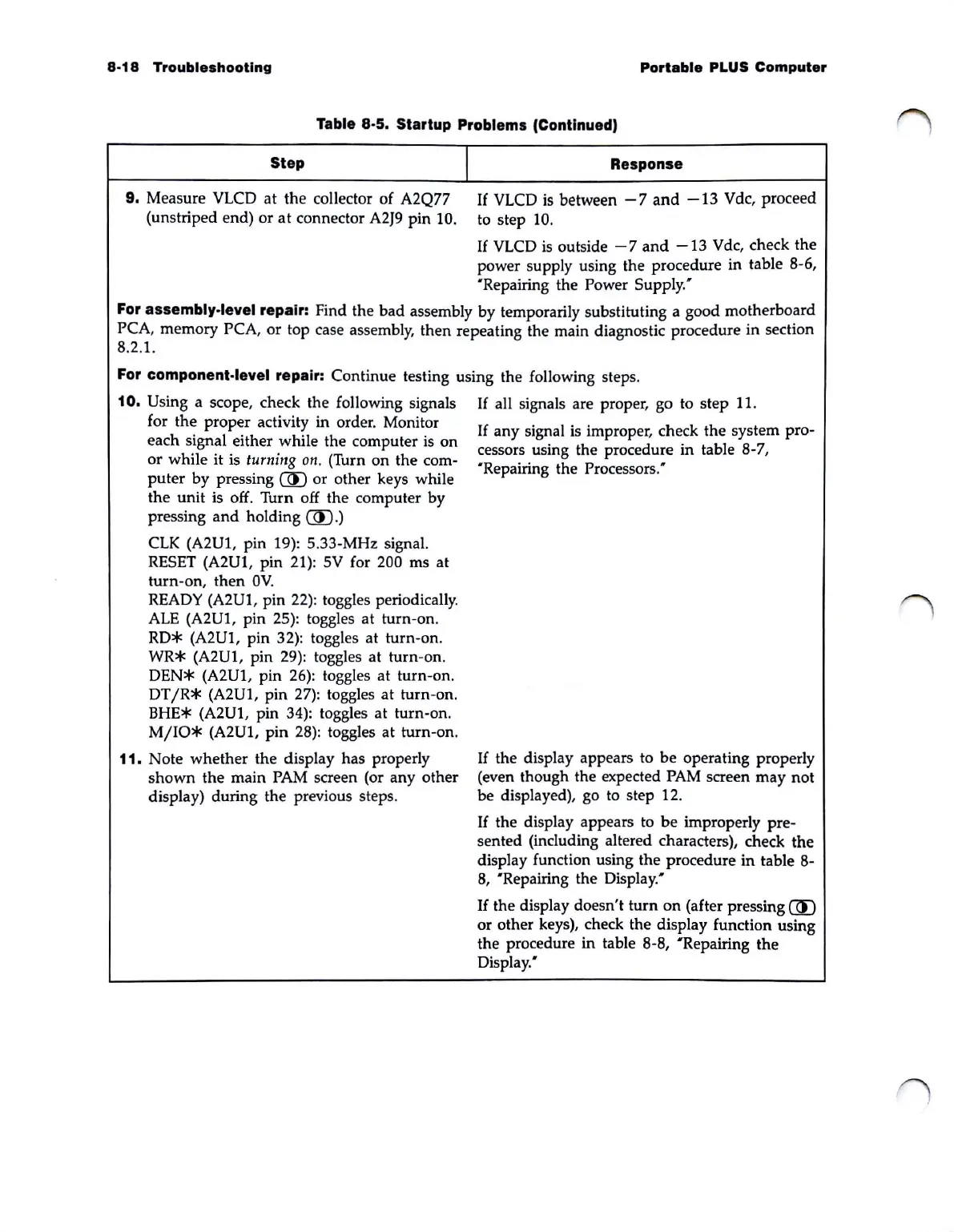
Table 8·5. Startup Problems (Continued)
Step
9. Measure VLCD
at
the collector of A2Q77
(unstriped end) or
at
connector
A2J9
pin 10.
I
Response
If
VLCD
is
between - 7
and
-13
V dc, proceed
to
step 10.
If
VLCD
is
outside
-7
and
-13
Vdc, check the
power supply using the procedure in table
8·6,
'Repairing
the Power Supply.'
For assembly·level repair: Find the bad assembly by temporarily substituting a good motherboard
PCA, memory PCA, or top case assembly, then repeating the main diagnostic procedure in section
8.2.1.
For component·level repair: Continue testing using the following steps.
10.
Using a scope, check the following signals
If
all signals are proper, go to step 11.
for the proper activity in order. Monitor
each signal either while the computer
is
on
or while it is turning
on.
(Turn
on
the com·
puter
by pressing
CID
or other keys while
the unit is off. Turn off the computer by
pressing
and
holding
CID.)
CLK
(A2Ul, pin 19): 5.33-MHz signal.
RESET
(A2Ul, pin 21): 5V for 200 ms
at
turn-on, then
OV
.
READY
(A2Ul, pin 22): toggles periodically.
ALE
(A2U1, pin 25): toggles at turn-on.
RD*
(A2Ul, pin 32): toggles at turn-on.
WR*
(A2Ul, pin 29): toggles at turn-on.
DEN*
(A2U1, pin
26):
toggles at turn-on.
DTjR*
(A2Ul, pin
27):
toggles
at
turn-on.
BHE* (A2Ul, pin 34): toggles at turn-on.
MjIO*
(A2Ul, pin 28): toggles at turn-on.
11.
Note whether the display has properly
shown
the main
PAM
screen (or any other
display) during the previous steps.
If
any
signal
is
improper, check the system pro-
cessors using the procedure in table 8-7,
'Repairing the Processors:
If
the display appears to be operating properly
(even though the expected
PAM
screen may not
be displayed), go
to
step 12.
If
the display appears to
be
improperly pre-
sented (including altered characters), check the
display function using the procedure in table 8-
8,
'Repairing the Display:
If
the display doesn't turn
on
(after pressing
CID
or
other keys), check the display function using
the procedure in table 8-8,
'Repairing the
Display:



 To Next Page